Choosing the right web design company in Nepal

Choosing the right web design company in Nepal is essential for the success of your website. Here are some valuable tips to help you make an informed decision: This blog post will provide essential tips to help you make an informed decision and find the perfect web design company for your needs.

In today’s digital age, having a well-designed website is crucial for any business or organization. A professionally designed website enhances your online presence and plays a vital role in attracting and engaging visitors. However, creating a website requires expertise and skills that may be beyond the capabilities of an average individual. That’s where web design companies come into play. Choosing the right web design company can be daunting, as countless options are available.

1. Define Your Requirements

Defining your requirements and objectives is essential before you search for a web design company. Take the time to identify the purpose of your website, your target audience, and the specific features and functionalities you need. This will help you communicate effectively with potential web design companies and ensure they understand your vision.

2. Review Their Portfolio

A reputable web design company should have a portfolio showcasing their previous work. Take the time to review their portfolio to get a sense of their design style, creativity, and the types of websites they have developed. Please pay attention to the user experience and functionality of the websites they have created. Look for diversity in their portfolio to see if they can handle various industries and design requirements.

3. Check Client Testimonials and Reviews

Client testimonials and reviews provide valuable insights into a web design company’s reliability, professionalism, and customer satisfaction. Search for reviews on independent websites, social media platforms, and business directories. Testimonials and reviews give you an idea of the company’s strengths and weaknesses and ability to meet deadlines and deliver quality work.

4. Assess their Expertise and Experience

It is important to consider the expertise and experience of a web design company before making a decision. Please find out how long they have been in the industry and the number of projects they have completed. Look for a company with experience working with businesses similar to yours or within your industry. This demonstrates their ability to understand your unique requirements and deliver effective solutions.

6. Inquire About the Team and Project Management:

Learn about the team working on your project. Inquire about their expertise, qualifications, and roles within the agency. Additionally, ask about the project management process. A well-organized agency with a clear project management approach is more likely to deliver your project on time and within budget.

5. Evaluate Communication and Support

Effective communication is crucial for a successful web design project. During your initial interactions with the company, assess their communication skills and responsiveness. Are they attentive to your needs and objectives? Do they respond promptly to your inquiries? Additionally, please inquire about the support they provide after the completion of the project. A reliable web design company will offer ongoing support and be available to address any issues or updates that may arise.

6. Consider Pricing and Value

While price shouldn’t be the sole determining factor, it is essential to consider your budget when choosing a web design company. Request quotes from multiple companies and compare their pricing structures and packages. However, be wary of highly low-cost options, which may compromise quality and functionality. Look for a company that offers a balance between affordability and value. Consider the long-term benefits and return on investment a well-designed website can provide for your business.

7. Inquire About the Development Process

Understanding the web design company’s development process is crucial for ensuring a smooth and successful project. Inquire about their design and development methodologies, their approach to project management, and the tools they use. A transparent and organized development process indicates professionalism and a commitment to delivering high-quality results.

8. Discuss Ownership and Future Scalability

Before finalizing your decision, discuss ownership rights and future scalability options with the web design company. Ensure that you will fully own your website once it is completed. Additionally, discuss the potential for future updates, enhancements, and scalability.

9. Consider Ongoing Support and Maintenance:

A website requires ongoing support, updates, and maintenance even after its initial development. Inquire about the agency’s post-launch support and maintenance services. Ensure they offer timely support and are available to address any issues or updates that may arise in the future.

10. Seek a Long-Term Partnership:

Building a website is not just a one-time project. Choosing a web design agency with whom you can establish a long-term partnership is beneficial. A trusted agency that understands your evolving needs can provide ongoing support, updates, and future enhancements as your business grows.

By following these tips and conducting thorough research, you can find the right web design agency that aligns with your goals, delivers high-quality results, and provides a seamless web design experience.

What is web design, and what do web designers do?

Web design refers to creating and arranging visual elements, content, and functionality to build aesthetically appealing, user-friendly, and effective websites to achieve their intended purpose. It involves the combination of various disciplines, such as graphic design, user experience (UX) design, user interface (UI) design, and coding.

Web designers are professionals who specialize in creating and designing websites. They possess a range of skills and knowledge to craft websites that align with the goals and requirements of their clients. Here are some key responsibilities and tasks of web designers:

1. Gathering Requirements: Web designers work closely with clients to understand their needs, objectives, and target audience. They gather information about the website’s purpose, desired functionalities, and branding or design preferences.

2. Planning and Wireframing: Web designers create a blueprint for the website, often through wireframes or prototypes. This stage involves structuring the website’s layout, determining the placement of key elements, and planning the user flow and navigation.

3. Visual Design: This is where web designers showcase their creativity. They select appropriate color schemes, typography, graphics, and images that align with the client’s brand identity and create a visually appealing website. They focus on creating a consistent, cohesive design that enhances user experience.

4. User Experience (UX) Design: Web designers prioritize the user’s experience by ensuring the website is intuitive, easy to navigate, and user-friendly. They consider information architecture, user interactions, and accessibility to create a seamless and enjoyable browsing experience.

5. User Interface (UI) Design: UI design involves designing the interface elements that users interact with, such as buttons, forms, menus, and icons. Web designers create visually engaging and functional UI components that enhance usability and guide users through the website.

6. Responsive Design: With the increasing use of mobile devices, web designers incorporate responsive design principles to ensure that websites adapt and display correctly on various screen sizes and devices. This involves optimizing layouts, images, and content for a consistent experience across different platforms.

7. Coding and Implementation: While web designers may only sometimes handle the coding aspects themselves, they should have a solid understanding of HTML, CSS, and other web technologies. They collaborate with web developers to ensure the design is implemented correctly and the website functions as intended.

8. Testing and Optimization: Web designers conduct testing to identify and fix any usability issues, browser compatibility issues, or performance problems. They continuously monitor and optimize the website’s design and functionality to improve its performance and user satisfaction.

Overall, web designers are crucial in creating visually appealing and functional websites that effectively communicate the client’s message, engage users, and drive desired actions. They combine their artistic and technical skills to bring ideas to life on the digital platform.

Differentiate between a Web designer and a web developer.

While web designers and web developers often work together to create websites, they have different roles and responsibilities. Here’s a breakdown of the key differences between web designers and web developers:

Web Designer roles and responsibilities:

1. Focus: Web designers primarily focus on the visual aspects of a website, including its aesthetics, user interface (UI), and user experience (UX). They aim to create visually appealing and engaging designs that align with the client’s brand identity and target audience.

2. Skills: Web designers have expertise in graphic design, layout design, typography, color theory, and design software tools like Adobe Photoshop, Illustrator, or Sketch. They possess a creative eye and understand the principles of design, including composition, balance, and visual hierarchy.

3. Responsibilities: Web designers are responsible for gathering client requirements, creating wireframes and mockups, designing the website’s visual elements, selecting colors and typography, and creating a cohesive and visually pleasing user interface. They often collaborate with web developers to ensure the design is implemented correctly.

4. Tools: Web designers use design software to create visual designs and prototypes, such as wireframing tools, graphic design software, and prototyping tools like Figma, InVision, Adobe XD, Marvel, UXPin., Moqups, Justinmind, Lucidchart, Balsamiq etc.

Web Developer roles and responsibilities:

1. Focus: Web developers focus on the technical aspects of website creation, including coding, functionality, and performance. They bring the web designer’s visual design to life by writing the necessary code and implementing the website’s features and functionalities.

2. Skills: Web developers have expertise in programming languages like HTML, CSS, JavaScript and may also be proficient in backend languages like Python, PHP, or Ruby. They understand web development frameworks and version control systems and know web server configuration and database management.

3. Responsibilities: Web developers are responsible for translating the web designer’s visual design into code, building the website’s structure, implementing functionality and interactivity, integrating databases and APIs, optimizing performance, and ensuring cross-browser compatibility and responsiveness.

4. Tools: Web developers use tools and technologies like text editors, integrated development environments (IDEs), code libraries, debugging tools, and browser developer tools to write, test, and debug their code.

In summary, web designers focus on a website’s visual design and user experience, while web developers focus on technical implementation and functionality. While there can be some overlap in skills and responsibilities, understanding these distinctions can help effectively collaborate and produce high-quality websites.


Best Cross-Platform Code Editors for Web Developers

Cross-platform code editors are software tools that allow developers to write, edit, and manage code across multiple operating systems and platforms. These editors are designed to work on different operating systems, such as Windows, macOS, and Linux, allowing developers to work on their code in the environment of their choice.

The advantage of using a cross-platform code editor is that it allows developers to work with a consistent user interface and set of features, regardless of their operating system or platform. This can be especially important for teams collaborating on code across different systems or for individual developers switching between other operating systems.

Cross-platform code editors often support a wide range of programming languages and come with various features such as syntax highlighting, code completion, debugging tools, and plugins. They provide a streamlined workflow for developers, enabling them to write and manage their code seamlessly across different platforms.

As a web developer, having a reliable code editor is crucial to your workflow. With so many different programming languages and operating systems, finding a code editor that works across multiple platforms is important. In this article, we’ll explore the ten best cross-platform code editors for web developers.

There are many different code editors available, both free and paid. Some are designed for specific programming languages, while others are more general-purpose. Some are lightweight and minimalist, while others are packed with features.

So, how do you choose the best code editor for you? Here are a few things to consider:

  • Your programming language(s): If you only work with one programming language, you can choose a code editor that is specifically designed for that language. For example, if you are a JavaScript developer, you should use a code editor like Sublime Text or Atom.
  • Your workflow: How do you like to work? Do you want to have a lot of features at your fingertips, or do you prefer a more minimalist approach? Some code editors are designed for power users, while others are more beginner-friendly.
  • Your budget: Some code editors are free, while others require a subscription. If you are on a tight budget, choose a free code editor.

Once you have considered these factors, you can start to narrow down your choices. Here are 10 of the best cross-platform code editors for web developers:

1. Visual Studio Code

opengraph home

Visual Studio Code is a popular open-source code editor developed by Microsoft. It’s available for Windows, macOS, and Linux and supports various programming languages, including C++, C#, CSS, Dart, Dockerfile, F#, Go, HTML, Java, JavaScript, JSON, Julia, Less, Markdown, PHP, PowerShell, Python, R, Ruby, Rust, SCSS, T-SQL, TypeScript, and more. With a sleek interface, powerful debugging tools, and an extensive library of extensions, Visual Studio Code is an excellent choice for web developers of all skill levels.

One of the key features of Visual Studio Code is its extension system, which allows developers to customize their development environment with a wide range of plugins and extensions. This includes tools for debugging, linting, testing, and integrating with external services and frameworks. VS Code also has built-in support for Git, allowing developers to manage their source code easily.

VS Code has a user-friendly interface and a range of productivity-enhancing features, such as IntelliSense (a code completion feature that provides context-aware suggestions), a powerful search and replace function and multiple cursor support. It also features a built-in terminal, allowing developers to run commands and scripts without leaving the editor.

Overall, Visual Studio Code is a powerful and versatile code editor that provides developers with a customizable and streamlined workflow for their coding projects.

2. Sublime Text

Sublime Text is a popular cross-platform code editor developers widely use to write, edit, and manage code. It is known for its powerful and flexible interface and support for many programming languages.

Sublime Text offers a variety of features that help developers to streamline their workflow and be more productive. These include syntax highlighting, code completion, multiple cursors, and a powerful search and replace function. Sublime Text also has an extensive library of plugins and extensions, allowing developers to customize their editor to suit their needs.

One of the key features of Sublime Text is its performance. It is known for its speed and responsiveness, even when working with large files or complex codebases. This makes it a popular choice for developers working with large-scale projects.

Sublime Text is available for free, but it also offers a paid version with additional features and support. Overall, Sublime Text is a powerful and versatile code editor that provides developers with a flexible and customizable environment for their coding projects.

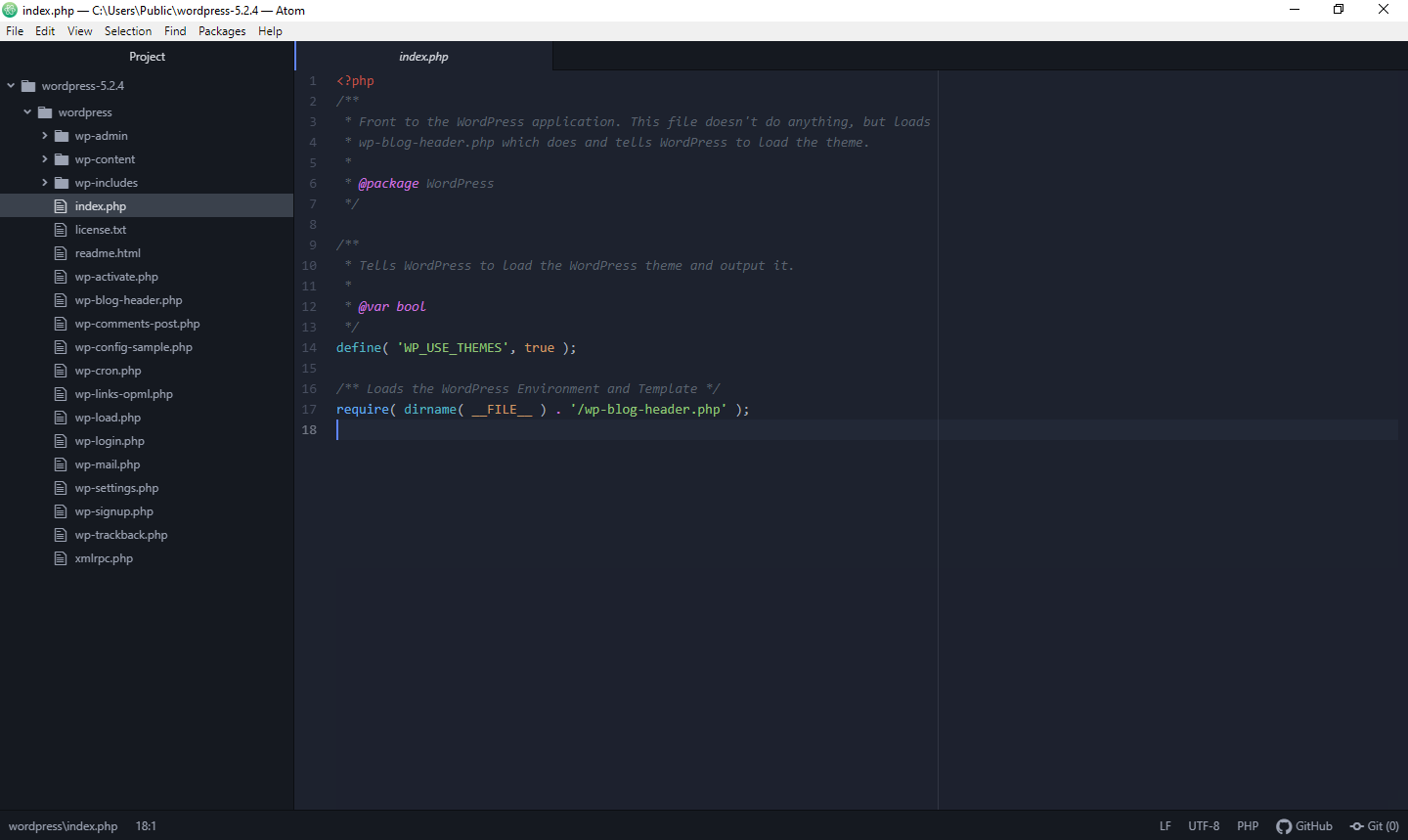
3. Atom

Atom screenshot v1.41.0

Atom is a free and open-source cross-platform code editor developed by GitHub. It is designed to be highly customizable and extensible, and it offers a range of features to help developers write and manage their code.

One of the key features of Atom is its modular design, which allows developers to customize their editor by installing packages and themes. These packages can provide functionality such as syntax highlighting, autocompletion, debugging, and integration with external tools and services.

Atom also includes a powerful search and replace function, multiple cursors, and a user-friendly interface that makes navigating and editing code easy. It also offers Git integration, allowing developers to manage their source code from within the editor.

Atom is built on web technologies, such as C, C++, C#, COBOL, CSS, CoffeeScript, Go, HTML, Java, JavaScript, JSON, Perl, PHP, Ruby, Scala, SQL, etc. which makes it highly flexible and customizable. It is also highly extensible, and developers can create their packages and themes to customize the editor to their liking.

Overall, Atom is a powerful and versatile code editor that provides developers with a flexible and customizable environment for their coding projects.

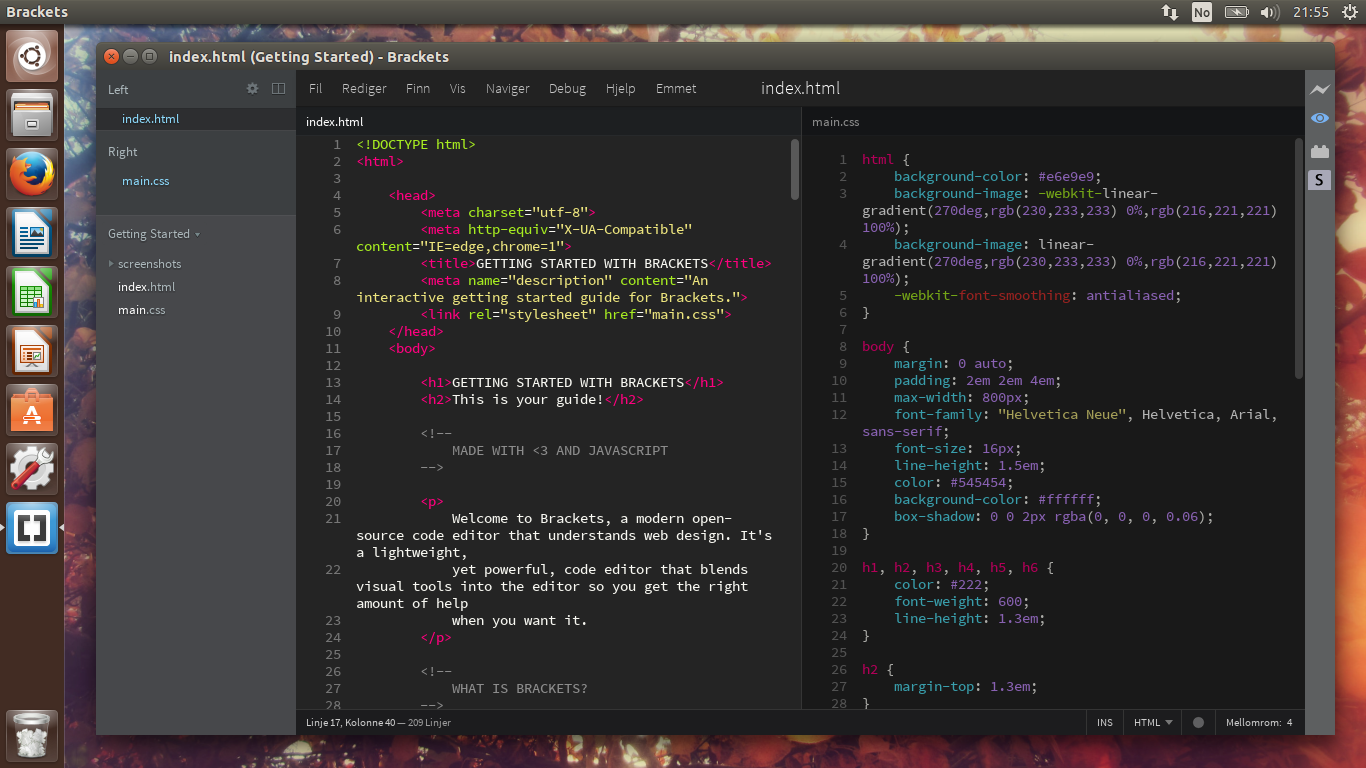
4. Brackets

Brackets 1.1

Brackets is a free and open-source code editor developed by Adobe Systems. It is designed specifically for web development and offers a range of features to help developers write, edit, and manage their code.

One of the key features of Brackets is its live preview function, which allows developers to see changes to their code in real time as they make them. This can be especially useful for front-end development, as it allows developers to see how their code will look in the browser without switching back and forth between their editor and their browser.

Brackets include various other features, such as syntax highlighting, code completion, and a user-friendly interface. It also supports multiple programming languages, including C++, C, VBScript, Java, JavaScript, HTML, Python, Perl, Ruby, etc.

Brackets is highly extensible, and developers can install plugins to add additional functionality to the editor. These plugins can provide functionality such as linting, autocompletion, and integration with external tools and services.

Brackets is a powerful and versatile code editor providing web developers with a streamlined and efficient environment for their coding projects.

5. Notepad++

Notepad plus plus 7 5 1

Notepad++ is a free and open-source text editor for Windows. It is designed to be a lightweight and fast alternative to traditional text editors, with various features to help developers write and edit code.

Notepad++ offers syntax highlighting for various programming languages, including C, C++, Java, JavaScript, HTML, CSS, and others. It also includes code folding, auto-completion, and a powerful search and replace function.

Notepad++ is highly customizable, and developers can install plugins to add additional functionality to the editor. These plugins can provide functionality like linting, debugging, and integration with external tools and services.

One of the key features of Notepad++ is its speed and efficiency. It is designed to be lightweight and fast, with a low memory footprint, which makes it a popular choice for developers who need a text editor that can handle large files or complex codebases.

6. Bluefish

Bluefish editor editng an html page

Bluefish is a free and open-source code editor designed for web developers. It offers a range of features to help developers write, edit, and manage their code, including syntax highlighting, autocompletion, and a user-friendly interface.

One of the key features of Bluefish is its support for a wide range of programming languages, including HTML, XHTML, CSS, XML, PHP, C, C++, JavaScript, Java, Go, Vala, Ada, D, SQL, Perl, ColdFusion, JSP, Python, Ruby, and shell and many others. This makes it a popular choice for developers who work with a variety of programming languages and need a single editor that can handle them all.

Bluefish also includes various other features, such as code folding, multiple cursors, and a powerful search and replace function. It also integrates with external tools and services, such as version control systems and web browsers.

Bluefish is highly customizable, and developers can install plugins to add additional functionality to the editor. These plugins can provide functionality such as debugging, linting, and integration with external tools and services.

Overall, Bluefish is a powerful and versatile code editor that provides web developers with various features to help them write and edit code efficiently and effectively.

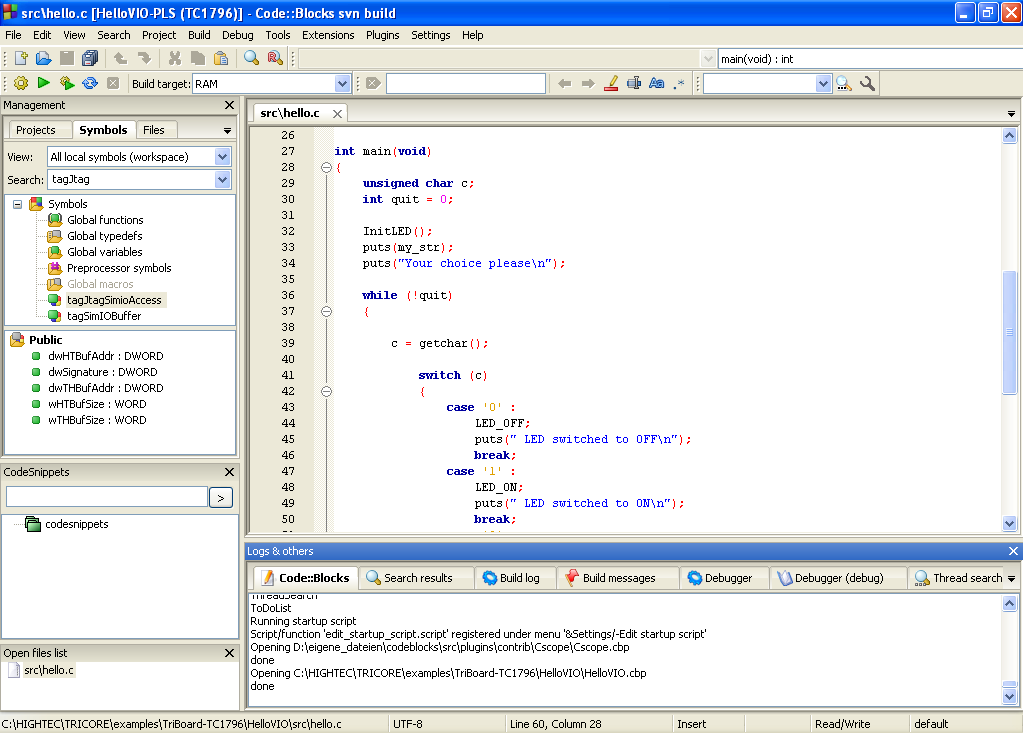
7. Code::Blocks

codeblocks

Code::Blocks is a free, open-source, cross-platform integrated development environment (IDE) designed for C, C++, and Fortran development. It provides a range of features to help developers write, debug, and manage their code.

Code::Blocks offers a user-friendly interface with various features, including syntax highlighting, code folding, and a powerful search and replace function. It also includes a debugger to help developers find and fix errors in their code.

One of the key features of Code::Blocks is its support for a wide range of compilers, including GCC, Clang, and Visual C++. This allows developers to choose the compiler that best suits their needs and ensures that their code is compatible with multiple platforms.

Code::Blocks is highly customizable, and developers can install plugins to add additional functionality to the IDE. These plugins can provide functionality such as linting, autocompletion, and integration with external tools and services.

Overall, Code::Blocks is a powerful and versatile IDE that provides developers with various features to help them write and manage their code efficiently and effectively. It is especially popular among C and C++ developers who require a flexible and customizable development environment.

8. Eclipse

1200px Eclipse33 Ubuntu

Eclipse is a free and open-source integrated development environment (IDE) designed for Java development, although it also supports many other programming languages. It provides a range of features to help developers write, debug, and manage their code.

Eclipse offers a user-friendly interface with various features, including syntax highlighting, code completion, and a powerful search and replace function. It also includes a debugger to help developers find and fix errors in their code.

One of the key features of Eclipse is its support for a wide range of plugins, which can add additional functionality to the IDE. These plugins can provide functionality such as linting, autocompletion, and integration with external tools and services.

Eclipse is highly customizable, and developers can create plugins or modify existing ones to suit their needs. This flexibility makes Eclipse popular among Java developers requiring a highly customizable and extensible development environment.

Overall, Eclipse is a powerful and versatile IDE with various features to help developers write and manage their code efficiently and effectively. Its support for a wide range of programming languages and its extensive plugin system makes it a popular choice for developers of all experience levels.

9. Aptana Studio

Aptana Studio Screenshot

Aptana Studio is a free and open-source integrated development environment (IDE) designed for web application development. It provides a range of features to help developers write, debug, and manage their code.

Aptana Studio offers a user-friendly interface with various features, including syntax highlighting, code completion, and a powerful search and replace function. It also includes a debugger to help developers find and fix errors in their code.

One of the key features of Aptana Studio is its support for a wide range of web technologies, including HTML, CSS, JavaScript, Ruby, and Python. This makes it a popular choice for web developers who work with multiple technologies and need a single IDE to handle them all.

Aptana Studio is highly customizable, and developers can install plugins to add additional functionality to the IDE. These plugins can provide functionality such as linting, autocompletion, and integration with external tools and services.

Overall, Aptana Studio is a powerful and versatile IDE that provides web developers with various features to help them write and manage their code efficiently and effectively. Its support for a wide range of web technologies and its extensive plugin system makes it a popular choice for developers of all experience levels.

10. CodeLite

CodeLite 5.1

CodeLite is a free, open-source, cross-platform integrated development environment (IDE) designed for C, C++, PHP, and JavaScript (Node. js) development. It provides a range of features to help developers write, debug, and manage their code.

CodeLite offers a user-friendly interface with various features, including syntax highlighting, code completion, and a powerful search and replace function. It also includes a debugger to help developers find and fix errors in their code.

One of the key features of CodeLite is its support for a wide range of compilers, including GCC, Clang, and Visual C++. This allows developers to choose the compiler that best suits their needs and ensures that their code is compatible with multiple platforms.

CodeLite is highly customizable, and developers can install plugins to add additional functionality to the IDE. These plugins can provide functionality such as linting, autocompletion, and integration with external tools and services.

Overall, CodeLite is a powerful and versatile IDE that provides developers with various features to help them write and manage their code efficiently and effectively. It is especially popular among C and C++ developers who require a flexible and customizable development environment.

Conclusion

In conclusion, plenty of great cross-platform code editors are available for web developers. Whether you’re looking for a lightweight editor or a powerful IDE, there’s a code editor out there that will suit your needs. Your best code editor will depend on your needs and preferences.

Himalayan Bank Payment Gateway Integration Service

Webtech Nepal provides Himalayan Bank Payment Gateway Integration Service in Nepal. To start HBL payment gateway integration on your website, you must understand what a payment gateway is. A payment gateway is a technology that enables online payments to be made through a website or mobile app. It acts as a secure intermediary between the customer’s bank and merchant accounts, ensuring the transaction is safe and secure. The Himalayan Bank Payment Gateway integration service allows businesses to integrate their websites or mobile apps with the bank’s payment gateway, enabling them to accept online customer payments.

What is Himalayan Bank?

Himalayan Bank, one of Nepal’s leading commercial banks, offers its customers a range of innovative banking solutions. One of the bank’s most notable offerings is its payment gateway integration service, which enables businesses to accept payments online securely and efficiently. In this article, we will look closer at the Himalayan Bank payment gateway integration service, its features, benefits, and how it can help businesses in Nepal.

Features & Benefits of HBL Merchant Payment Gateway Integration

The bank uses industry-standard encryption technologies and security protocols to ensure that all transactions are safe and secure. Businesses and customers can be assured that their financial data is protected from unauthorized access and fraud.

Another benefit of the HBL Merchant Payment Gateway Integration service is its ease of use. The service is designed to be simple and user-friendly, making it easy for businesses to integrate it with their websites or mobile apps. The bank provides detailed documentation and support to ensure companies can set up and use the service without the hassle.

In addition to its security and ease of use, the Himalayan Bank payment gateway integration service also offers a range of features that can help businesses to manage their online payments more efficiently. Some of these features include:

1. Multiple payment options: The payment gateway integration service supports multiple payment options, including credit cards, debit cards, and net banking. This means that businesses can offer their customers various payment options, making it more convenient for them to pay.

2. Real-time transaction updates: The service provides real-time transaction updates, enabling businesses to track the status of their transactions and receive instant notifications when a payment is made.

3. Automatic settlement: The payment gateway integration service automatically settles payments into the business’s account, reducing the need for manual intervention and making the payment process more efficient.

4. Customizable payment pages: Businesses can customize their payment pages to match their branding and design, providing a seamless and consistent user experience.

5. Multi-currency support: The service supports multiple currencies, enabling businesses to accept customer payments worldwide.

6. Fraud detection and prevention: The payment gateway integration service includes advanced fraud detection and prevention features, such as transaction monitoring and velocity checks, to protect businesses from fraudulent transactions.

Many businesses, including e-commerce websites, educational institutions, government agencies, and utility companies, can use the Himalayan Bank payment gateway integration service. It is beneficial for businesses that operate online or have many remote customers.

To use the payment gateway integration service, businesses must sign up for a merchant account with Himalayan Bank. The bank provides detailed instructions and support to help companies to set up their accounts and integrate the payment gateway with their websites or mobile apps. Once the integration is complete, businesses can start accepting online payments from their customers.

Security & Fraud Prevention Measures

The Himalayan Bank Payment Gateway Integration Service is designed to be a safe and secure platform for businesses to accept online payments. The bank has implemented security and fraud prevention measures to protect businesses and customers from fraudulent transactions. Here are some of the key security and fraud prevention measures implemented by Himalayan Bank for its payment gateway integration service:

1. Encryption: Himalayan Bank uses industry-standard encryption technologies to ensure that all transactions through its payment gateway are secure. The bank uses 256-bit SSL encryption, the same level of encryption banks use for online banking.

2. PCI DSS Compliance: Himalayan Bank is compliant with the Payment Card Industry Data Security Standard (PCI DSS), which is a set of security standards designed to ensure that all companies that accept, process, store, or transmit credit card information maintain a secure environment. This compliance ensures that the bank meets the highest security standards when processing credit card transactions.

3. Fraud Detection and Prevention: The payment gateway integration service has advanced fraud detection and prevention features to protect businesses from fraudulent transactions. The system includes transaction monitoring and velocity checks to detect unusual transaction patterns and flag them for review.

4. CVV Verification: The payment gateway integration service requires customers to enter the Card Verification Value (CVV) number when making a payment. This helps to prevent fraudulent transactions as the CVV number is only available on the physical credit card and not stored in the merchant’s database.

Overall, the Himalayan Bank Payment Gateway Integration Service has implemented several security and fraud prevention measures to protect businesses and their customers from fraudulent activities. The bank has taken all necessary steps to ensure that the payment gateway is secure and meets the highest standards of security in the industry.

Customer Support

The cost and pricing model for the Himalayan Bank Payment Gateway Integration Service may vary depending on the business’s specific requirements. Here are some factors that may affect the cost and pricing of the service:

1. Transaction Volume: The cost of the payment gateway integration service may depend on the number of transactions processed through the platform. Generally, businesses with a high transaction volume may be eligible for volume-based discounts.

2. Customization: The service cost may increase if a business requires customized features or integration with specific software or platforms.

3. Setup and Integration: The cost of configuration and integration may also vary depending on the complexity of the business requirements. The bank may charge a one-time setup fee to cover the costs of integrating the payment gateway with the business’s website or mobile app.

4. Monthly Fees: The bank may charge a monthly fee to cover the maintenance and support costs of the payment gateway integration service.

5. Transaction Fees: The bank may charge a fee for each transaction processed through the payment gateway. The price may be a fixed percentage of the transaction amount or a fixed fee per transaction.

6. Cross-Border Transactions: If a business processes cross-border transactions, additional fees may be associated with currency conversion and international transaction fees.

Businesses interested in the Himalayan Bank Payment Gateway Integration Service are recommended to contact the bank directly to discuss their specific requirements and obtain a customized pricing quote. The bank’s team will be able to provide a detailed breakdown of the costs and fees associated with the service based on the business’s needs.

Conclusion

In conclusion, the Himalayan Bank payment gateway integration service is an excellent solution for businesses that want to accept online payments securely and efficiently. Its advanced security features, ease of use, and range of features make it a popular choice among businesses in Nepal. This service allows companies to streamline payment processes, reduce manual intervention, and improve the overall customer experience.

Why you need your website redesign?

If you read this post, consider redesigning your website in 2023. Congratulations, you’re on the right track! Redesigning your website is crucial to staying relevant and competitive in today’s fast-paced digital world. This blog post will explore why you need a website redesign in 2023 and how it can benefit your business.

The digital world is constantly evolving, and keeping up with these changes is vital to the success of your online presence. If your website was updated a while ago, it’s time to consider a redesign. A website redesign is not just about making your site look better; it’s about improving the user experience, increasing conversions, and keeping up with the latest design trends and technologies.

Here are some reasons why you need to redesign your website in 2023:

1. Your website looks outdated

In today’s digital age, a website that needs to be updated can harm your business. Your website is often the first point of contact between your company and potential customers. If your website needs to be updated or more professional, it can create a negative first impression and turn potential customers away. A website redesign can help modernize your website and make it more visually appealing to your target audience.

2. Your website is not mobile-friendly

With more people accessing the internet from mobile devices, having a mobile-friendly website is no longer an option – it’s necessary. If your website is not optimized for mobile devices, you’re missing out on a large audience that could be accessing your website from their smartphones or tablets. A website redesign can help you create a responsive design that adapts to different screen sizes and provides an optimal user experience on all devices.

3. Your website is slow

Website speed is a critical factor in user experience and search engine optimization. If your website loads quickly, users will likely leave and look for alternatives. Moreover, search engines such as Google prioritize fast-loading websites in their search results, meaning that a slow website can also impact your search engine rankings. A website redesign can help you optimize your website’s speed and improve its performance.

4. Your website is not optimized for search engines

Search engine optimization (SEO) is a crucial aspect of digital marketing. You miss potential traffic and leads if your website is not optimized for search engines. A website redesign can help you create an SEO-friendly website that is optimized for relevant keywords, has a clear structure, and provides a positive user experience. Optimizing your website for search engines can increase your visibility and attract more organic traffic to your website.

5. Your website does not reflect your brand

Your website reflects your brand and should accurately represent your values, mission, and vision. If your website does not reflect your brand, it can create confusion and send mixed messages to your audience. A website redesign can help you create a website aligned with your brand identity and provide a cohesive experience across all touch points.

6. Your website is not user-friendly

If your website could be more challenging or confusing, it’s time for a redesign. A user-friendly website with clear calls to action and intuitive design is easy to navigate. A redesign can simplify your website, making it easier for users to find what they’re looking for and take the actions you want them to take.

7. Your website is not secure

If your website is insecure, it’s vulnerable to hacking and other cyber threats. In 2023, website security will be more critical than ever, mainly if you collect personal information from your users. A redesign can help improve your website’s security by ensuring it’s updated with the latest security standards and implementing secure protocols like SSL.

8. Your website is not converting visitors into customers

If your website needs to convert visitors into customers, it’s time to redesign. A website redesign can help improve the user experience, making finding what they’re looking for and taking the actions they want easier. This can lead to an increase in conversions and, ultimately, more business for you.

In conclusion, a website redesign is not just about improving your site; it’s about improving the user experience, increasing conversions, and keeping up with the latest design trends and technologies. Suppose your website looks outdated, needs to be more responsive, is slow, is not user-friendly, is not optimized for search engines, is not secure, or is not converting visitors into customers. In that case, it’s time for a redesign. In 2023, website design is going to continue to evolve.

Why every business needs a website?

In today’s world, where everything is becoming digital, people are more likely to search for products and services online rather than physically visiting a store. Therefore, having an online presence is essential for any business to reach its potential customers. No matter the size or nature of your business, having a website is necessary. It not only provides an online presence for your brand, but it also serves as a platform for communication, marketing, and sales. A website is a digital storefront accessible 24/7 from anywhere in the world. It provides a platform to showcase your products and services, share your brand story and engage with your audience.

Moreover, having a website is cost-effective compared to traditional advertising methods such as print or TV ads. With the right SEO strategy, you can rank higher on search engines and drive traffic to your website without spending much money. You can also track user behavior using analytics tools and modify your website to improve user experience.

Here are some reasons why every business needs a website:

Establishes an Online Presence

A website is necessary if you want your business to be visible online. Nowadays, people search for products and services online, and if your business doesn’t have a website, you’re losing out on potential customers. By having a website, you can establish an online presence and reach a wider audience.

Builds Credibility

A website is the best way to build credibility and establish trust with potential customers. When people search for a product or service, they expect to find a website that provides information about the company, its products, and its services. A well-designed, informative website and easy to navigate can give potential customers the confidence to do business with you.

Provides a Platform for Communication

A website provides a platform for communication between your business and your customers. It lets you provide information about your products and services, answer customer queries, and receive feedback. You can also use your website to provide customer support, which can help build trust and loyalty with your customers.

Increases Sales

A website is an effective way to increase sales for your business. By providing a platform for online transactions, you can reach customers who are unable or unwilling to visit your physical store. Additionally, a website allows you to showcase your products and services, which can lead to increased sales.

Allows for Targeted Marketing

A website allows you to engage in targeted marketing. You can use tools like search engine optimization (SEO) and pay-per-click (PPC) advertising to reach your target audience. By targeting your marketing efforts, you can reach potential customers more likely to be interested in your products and services.

Provides Valuable Data

A website provides valuable data that can be used to improve your business. You can use analytics tools to track website traffic, customer behavior, and sales. This data can help you identify areas for improvement and make informed decisions about your business.

Keeps Your Business Competitive

In today’s digital age, having a website is essential to staying competitive. Your competitors are likely to have websites; if you don’t, you’re at a disadvantage. A website allows you to compete on a level playing field and reach potential customers who might otherwise choose your competitors.

Conclusion

In conclusion, every business needs a website. A website provides an online presence, builds credibility, provides a platform for communication, increases sales, allows for targeted marketing, provides valuable data, and keeps your business competitive. It allows you to establish credibility and build trust with your customers while enabling you to reach out beyond local markets. Creating an effective website design showcasing your brand values, products, or services can set you apart from competitors while increasing leads and sales opportunities.

Beginners guide to Git and Github

As a beginner, Git and GitHub might seem daunting, but they are essential tools for any developer or anyone who wants to collaborate on a project. Git is a version control system, while GitHub is a web-based hosting service for Git repositories. In this blog post, we’ll discuss the basics of Git and GitHub and how to use them.

What is Git?

Git is a distributed version control system that helps track changes to files and directories. With Git, you can keep track of changes to your code, collaborate with others on a project, and revert to previous versions of your code if necessary.
Git is a command-line tool that works on Windows, Mac, and Linux. You can also use Git with a graphical user interface (GUI).

What is GitHub?

GitHub is a web-based hosting service for Git repositories. It provides tools for collaboration, code review, and project management. GitHub lets you store your Git repositories online and collaborate with others on a project.

GitHub offers free and paid plans. The free plan includes unlimited public repositories, while the paid plans provide additional features such as private repositories and advanced collaboration tools.

How to use Git and GitHub?

To get started with Git and GitHub, you need to follow these basic steps:

Step 1: Install Git

First, you need to install Git on your computer. You can download Git from the official website and follow the installation instructions for your operating system.

Step 2: Create a GitHub account

Next, you need to create a GitHub account. Go to the GitHub website and sign up for an account.

Step 3: Create a Git repository

After installing Git and creating a GitHub account, you need to create a Git repository. A Git repository is a folder that contains your code and version history.

To create a Git repository, follow these steps:

  1. Create a new folder on your computer.
  2. Open the command prompt or terminal and navigate to the folder.
  3. Run the command git init to initialize the repository.

Step 4: Add files to the repository

After creating a Git repository, you need to add files to the repository. To add files to the repository, follow these steps:

  1. Copy the files you want to add to the repository into the repository folder.
  2. Run the command git add . to stage the files for the next commit.

Step 5: Commit changes

After adding files to the repository, you need to commit the changes. A commit is a snapshot of the repository at a specific point in time.

To commit changes, follow these steps:

  1. Run the command git commit -m "commit message" to create a new commit.
  2. Write a descriptive commit message that explains the changes you made.

Step 6: Push changes to GitHub

After committing changes, you need to push the changes to GitHub. To push changes to GitHub, follow these steps:

  1. Create a new repository on GitHub.
  2. Run the command git remote add origin [GitHub repository URL] to add the GitHub repository as the remote origin.
  3. Run the command git push -u origin main to push the changes to GitHub.

Conclusion

Git and GitHub are essential tools for any developer or anyone who wants to collaborate on a project. In this blog post, we discussed the basics of Git and GitHub and how to use them. With Git and GitHub, you can keep track of changes to your code, collaborate with others on a project, and revert to previous versions of your code if necessary.

How much does website development cost in Nepal?

Website development cost in Nepal is an essential factor to consider when planning the launch of a new website. It is important to understand the factors that affect the cost of website development to make a well-informed decision. The primary factors affecting website development costs in Nepal are the type and complexity of the project, labor costs, and quality assurance procedures.

The type of website being developed plays a vital role in determining its overall cost. If a simple static one-page website is sufficient for your needs, it can be done at a much lower price than if you are building a complex eCommerce store with multiple pages, functionality, and features. Additionally, labor costs also need to be considered when budgeting for your project – if you choose to hire professionals from outside Nepal, their fees will add additional overhead costs to your total budget.

Overview: What is Website Development?

Website development is a term used to describe creating and maintaining a website. It involves web design, programming, content creation, search engine optimization (SEO), and other aspects of website management. Website development can be expensive for businesses, but it is also essential to reach potential customers and increase brand awareness.

To understand how much it will cost to develop a website in Nepal, one must consider the project’s complexity. A simple static website with basic features such as a contact us page or blog may require fewer resources than a complex e-commerce site that needs payment gateways integrated into it. Once all aspects have been considered and the budget established, web developers can then estimate how much time and money will be required for the project.

Factors Affecting Cost

When it comes to website development costs in Nepal, many factors need to be taken into consideration. Understanding these factors can help you determine what kind of budget you should allocate for your project and how much you should expect the total costs to be. These factors include the project’s complexity, the website’s size and scope, additional tasks or customizations needed, and more.

The complexity of a website is one major factor that affects its overall development cost. A basic site with minimal functionality will be less expensive than an advanced e-commerce store or web application with integrated features like user registration and login forms, payment processing capabilities, search functions, etc. Additionally, any customization requests may also increase costs if they require additional coding or programming work.

What is the price of a one-page website?

Price range: between NPR 15,000 and NPR 30,000

This website has one page, sometimes known as a “landing page,” where users are directed after clicking an advertisement or email link.

These “one-page” websites can have extensive and intricate pages, although they typically have little substance.

This kind of website has a straightforward objective: to persuade the user to make a purchase, sign up for an offer, complete a form, dial a number, or download a file. Every content on the website is meant to encourage the user to finish this job.

These sites typically require the slightest effort to construct because they provide a clear and distinct purpose.

This kind of website is also appropriate if you want to establish a professional internet presence to reassure your clients. Then, a business card, flyer, document header, or any offline source is used by your consumers to reach your website.

How much does a dynamic website cost?

Price range: between NPR 45,000 and NPR 80,000+

The most typical website for small enterprises is of this type.
Usually, there are no page limits. You’ll find the following page kinds on these websites:

  • Homepage
  • About
  • Team
  • Mission/Vision
  • Services/Products
  • Appointment
  • Publications
  • Testimonials
  • Blog
  • Photo Gallery
  • Video Gallery
  • Contact

The website focuses on building the company’s identity, marketing its services and goods, and providing details like directions or business hours.

Similar to the one-page website mentioned above, the goal is always to persuade the user to follow an income-generating lead.

How much does an E-commerce site cost?

Price range: between NPR 1,00,000 and NPR 5,00,000+

The cost of setting up an online store can be a significant barrier for entrepreneurs who are considering launching their own e-commerce business. With the range of services and software available, it can be challenging to know exactly how much you need to budget to get your store off the ground.

It could be a straightforward marketing website with an e-commerce feature to offer a few direct goods or services, as in Click and Collect. Using a program like WordPress WooCommerce to build an online store is more superficial.

These solutions work well when you have standard e-commerce requirements without a need for specialized features.

Average Costs in Nepal

When businesses in Nepal consider website development, they often want to know the cost. Building a successful website requires a combination of services and technology that can vary widely, making it difficult to provide an exact answer. However, understanding the average costs associated with website development in Nepal can help organizations make more informed decisions while building their online presence.

Most websites require web hosting services, a content management system (CMS), and design work to create the site’s overall structure. The cost for these services can range from about NPR 45,000 for basic entry-level projects up to NPR 500000+ for more custom or complex initiatives. Additionally, ongoing maintenance and support fees typically add 10-15% of the total project costs each year after launch. Understanding these average costs is essential for any business planning to develop a website in Nepal.

Factors to Consider Before Developing a Website

Creating a website is essential for businesses looking to expand their reach and grow. However, before getting started, some factors need to be taken into account to ensure the website’s success. In Nepal, several cost considerations must be weighed when developing a website. This article will discuss how much it costs to create a website in Nepal and what key factors should be considered before taking this significant step.

Cost is essential when considering any web development project, which is no different in Nepal. Depending on the complexity of the site, web development can range from as little as NPR 15,000 up to thousands of bucks for more complex websites with extra features. Businesses need to determine their budget constraints before starting any project so they can plan accordingly and work within their financial parameters.

Popular Platforms for Website Development

When it comes to website development, there are a variety of popular platforms to choose from. Knowing which is best suited for your project can take time and effort, especially if you’re new to web development. The most popular platforms include WordPress, Joomla!, and Drupal – each with its strengths and weaknesses.

WordPress is the most popular platform of the three and has an easy-to-use interface that makes it ideal for those just starting out. It also has a massive library of plugins and themes, making customization relatively easy. However, while WordPress is user-friendly on the surface, it can be challenging to customize more complex features.

Joomla! is also popular among web developers due to its advanced content management system (CMS).

Conclusion

The bottom line is that website development costs in Nepal can vary greatly depending on the size and scope of the project. The complexity of the website, the number of pages, and the features required. Any additional services, such as SEO or digital marketing, will contribute to the overall cost. Even with a simple website, prices can range from a few hundred bucks to several thousand for full custom-built sites.

By understanding your needs and requirements before you start looking for quotes from a web development company, you’ll be in a better position to find an experienced company that can help you build an effective website at an affordable price. Researching what’s available in Nepal is also essential so that you know exactly what kind of services are available at each price point.

Design Thinking in Application Development

What do you think makes or breaks an app? Is it the features or the services provided by the app, or is it something else entirely? It’s the app design that holds the key to the success of your app amongst users. While the service for which your app is created will essentially draw the users to download and use it, the mobile app design will make the users keep using it.

Simply put, mobile app design focuses on the way your users will interact with your app. Everything they see, hear, and touch within your app contributes to its design. No wonder companies and clients often spend the longest time and effort perfecting the app design and hiring the most competent mobile app developers to turn their vision into reality.

So how does one perfect mobile app design?

The answer is simple- Design Thinking. Design thinking in application development involves using the mainframe of design thinking and using those principles to create the most interactive and supportive app design for your users.

Top mobile app developers focus on designing and developing user-centric apps, and the principles of design thinking allow them to follow a process that is completely inclusive of the needs and motivations of the app users. Imagine using a fast-loading app that displays a simple welcome logo and a fundamental homepage that requires you to navigate quite a bit to get to the features that are important to your interest. You will be turned off by the monotonous look and feel of the app very quickly.

Imagine a fast-loading app with colorful and welcoming graphics and an easy-to-follow user guide. Which app will hold your interest for longer? The answer is quite clear. Hence, mobile app designers turn to the following principles of design thinking that help them make their apps more appealing and give them insights into the user experience.

The Process of Design Thinking

Design thinking is all about putting the needs of the consumer above all. It heavily focuses on user-centric features and outcomes. It relies on empathizing with your users to define their needs, generate insights about their problems, and create innovative solutions for the same.

There are 5 main stages in the design thinking process that app designers can follow to create the most surprising and popular mobile app designs for their users.

1. Empathize

As mentioned earlier, successful mobile app design will emerge from a proper understanding of the psyche of the people using it. Empathizing with the needs and motivations of your users is a tactic that will lead app designers to understand better what the users will be looking for in their app when they download it. Design thinking requires critical thinking to a certain extent, where you must compromise between your vision and what the users will actually need and react positively to.

Due to this, the process of design thinking is not linear but iterative. It requires constant updates and modifications as new information comes in.

2. Define

Once you are in the shoes of your users, it will be relatively easy to define their problems and create respective solutions. You need to organize the information you have gathered from your observations during the empathizing stage and then discuss them with your team to figure out the core problems.

Your problem statement should focus on your perception of the user’s problem so that you can pitch solution-oriented ideas to incorporate into your app design. The more questions are asked, the better you will be able to define the problems.

3. Ideate

At this stage, you let your imagination run free. You can take ideas and feedback from cross-functional teams to improve your design ideas for the app or other features. How to create a solution through your app for the problem that your target audience already struggles with.

In this ideation stage, you can use many brainstorming techniques to help you expand your problem-solving space, like Worst Possible Idea, or SCAMPER, to help you stimulate thinking outside the box. Doing this will help you come up with a variety of ideas, some of which could actually be doable, and from some, you can borrow certain elements that will make the design of your app more appealing to users.

4. Prototype

Prototyping is the fourth stage of design thinking, where app designers can try out their different design ideas for the app and identify the ones that best fit the outcome desired by the clients or the needs and convenience of the users.

Remember, since design thinking is an iterative process, designers always have space to modify certain elements or eliminate them if they don’t do justice to the user experience when brought to life. The design team can prepare watered-down versions of the ideas they came up with a system to experiment with the team to identify the ones that best fit the features and requirements of the app and give an engaging user experience.

By the end of the prototyping stage, designers will have a much clearer understanding of what works for the app and the users and what doesn’t.

5. Test

Once you have ruled out other design alternatives, you can go ahead and produce a full-fledged final prototype that will be released to the beta testers or shown to the client. The iterative nature of the design thinking process will resurface here as the feedback from beta testers or the client will have to be adjusted in the final design before releasing it to the public.

Throughout this entire process, you will develop a deep understanding of what the clients and users expect from the app and deliver on it. The additional feedback will only help improve your app and make it so that it really hits off with the target market.

Concluding Thoughts

The process of design thinking is not limited to designers only. The concept addresses biases and views that hamper innovative solutions to help people solve core problems. Design thinking gives any problem a human-centric approach so that it becomes easier for designers in any field to grasp a closer and deeper understanding of users’ needs, motivations, and preferences. Overall, design thinking in app development allows developers and designers to create a compelling design for end-users that dramatically impacts any app’s success.

The benefits of using an Inventory Management System

Streamlining business processes and improving overall efficiency are essential for business. Implementing an inventory management system can help achieve these goals by providing accurate, real-time tracking of inventory levels and enhancing forecasting and planning capabilities.

“Proper inventory management is crucial for businesses, as it helps ensure that the right level of goods is available to meet customer demand while avoiding overstocking or stock shortages. In addition, an efficient inventory management system can improve relationships with vendors and enhance loss prevention efforts. Overall, proper inventory management can lead to increased productivity and financial success for a business,” says business analyst and loan provider Mason Burt of Ask Funding.

What is an inventory management system?

An inventory management system is a software program that tracks and manages a business’s inventory, including the receipt, storage, and distribution of goods. It allows companies to track their inventory levels efficiently, analyze purchasing patterns, and accurately fulfill customer orders. This can lead to cost savings and improved overall efficiency within the business.

What are the benefits of using an inventory management system?

A good inventory control integrates physical inventory with online ordering systems, ensuring that when customers add an item to their cart, it is available in the warehouse. This decreases wait times and eliminate the company’s need to reject orders due to a lack of inventory.

1. Improved Organization And Accuracy Of Inventory Records

By using an inventory management system, businesses can easily track and update their inventory records in real time, leading to improved organization and accuracy.

2. Enhanced Ability To Forecast And Plan For Future Inventory Needs

With accurate and up-to-date inventory records, businesses can more effectively forecast and plan for future inventory needs. This can lead to cost savings by reducing overstocking or stock shortages.

3. Improved Customer Satisfaction

An efficient system for tracking and managing inventory allows businesses to fulfill customer orders quickly and accurately, resulting in improved customer satisfaction.

4. Reduced Human Error

Inventory management systems reduce the chance of human error in record keeping and order fulfillment, leading to improved efficiency and cost savings. The automation provided by an inventory management system reduces the chance of mistakes in record keeping and order fulfillment, leading to improved efficiency and cost savings.

5. Improved Supplier Relationships

An efficient inventory management system allows for improved communication and collaboration, leading to better supplier relationships.

6. Reduced Inventory Costs

By better understanding current inventory levels and future needs, businesses can more effectively manage their inventory and reduce excess costs.

7. Enhanced Ability To Track And Monitor Inventory Levels

Inventory management systems allow businesses to easily track and monitor their current inventory levels, leading to improved decision-making and cost control.

8. Improved Ability To Adapt To Changes In Demand Or Supply

Accurate and up-to-date records allow businesses to effectively forecast and plan for their future inventory needs, leading to cost savings by reducing the risk of stock-outs or overstocking. This will enable companies to adapt to demand or supply changes quickly.

9. Enhanced Loss Prevention Efforts

Inventory management systems allow businesses to quickly identify discrepancies in inventory records, leading to improved loss prevention efforts.

10. Improved Overall Efficiency And Productivity

Overall, an inventory management system improves organization, accuracy, and efficiency in managing a business’s inventory, resulting in increased productivity.

Reach The Peak Of Your Success

An inventory management system can benefit your business and lead to financial success.

Webtech Nepal is a company dedicated to helping businesses achieve business success in the virtual sphere. We provide numerous services for your business, from inventory management to customizing CMS websites, Facebook advertising, domain registration, SEO optimization, and many more.

Contact us to reach the peak of your business’ success!

How Businesses can Leverage using Laravel CMS?

The main reason developers choose Laravel is that it simplifies adding MVC templates and creating websites. As a result of its open-source nature, this framework is packed with a wide range of features, including verification, routing processes, handling sessions, caching, and much more.

Why Businesses Prefer Laravel Framework?

Wide varieties of frameworks are available to create mobile or web applications. Laravel is preferred over other frameworks because it includes a dedicated dependency manager, routing services, code separation, unit testing, modular packaging, and other valuable features. Laravel is considered one of the best CMS solutions since it only requires a text editor and PHP installation.

Thousands of experts around the world are building client-centric solutions using this framework. Many businesses have now started opting for potential development companies that assist them in building custom web apps that cater to vivid business requirements.

Companies like Pfizer, Crowdcube, TourRadar, and BBC use Laravel. Another noteworthy example is the BBC, the oldest broadcaster in the world and the largest by employee numbers.

Here are some of the stats that show how popular Laravel is:

  • There are over 761,321 websites that are currently live and using Laravel.
  • Laravel has approximately 100,173 unique domains that are used globally. Some top countries using Laravel are the United States, Brazil, Russia, China, Japan, and India.
  • Many industry verticals choose Laravel for building their websites. The top industries where Laravel is used include computers, Electronics & Technology at approximately 5.91%, science and education at approximately 2.92%, and arts & entertainment at approx. 2.60% and others.
  • In the USA alone, more than 10 lacs of Laravel-based websites exist. Of these 4,86, 424 websites are live, and 601,221 sites have previously used this technology.

With Laravel, you can create stunning web apps that make your business stand out.

How Can Companies Use Laravel Development Optimally?

Laravel development is significant for business growth for the following reasons:

1. Powerful Security That Minimizes Cyber Threat

By using Laravel, companies can run their websites smoothly with minimal or negligible risk of cyber-attacks.

eCommerce portal users place great importance on privacy and their client’s data resources. The Laravel framework offers the best level of security for both of these business aspects.

Laravel offers the best security practices for developers that help them to build robust solutions, which ultimately helps businesses achieve secure Software Solutions in which they can safely manage their confidential data without getting prey to any online threats.

Your digital assets are protected by Laravel from a variety of internet threats. In addition, the Laravel framework protects your code base from threats such as cross-site forgery requests, SQL injection, etc.

2. Streamlined Authentication

Laravel business solutions framework permits developers to create web applications that grant resource access to authorized users.

3. High-Level Performance

Online businesses, especially start-ups, rely heavily on website speed and performance. Low conversion rates may be caused by the slow loading speed of the page.

Laravel is here to help with website page speed. This architecture controls how quickly a website loads and enhances how quickly it responds.

With the Laravel framework at your side, you can put an end to the stress caused by a slow website’s loading time. The framework’s numerous extraordinary capabilities and out-of-the-box functionalities enable businesses to grow to new heights despite its small size.

The Laravel framework’s tools, Redis and Memcached, will increase the efficiency and performance of your website.

3. High Level Capabilities

The Laravel organization currently provides comprehensive solutions to its international audience. The versatility of Laravel web development is just one of its many benefits. Building engaging multilingual applications is doable and attainable for Laravel app developers.

Businesses will be able to expand their reach and enter uncharted territory thanks to this.

In addition to increasing their online presence, businesses can improve sales and revenue.

4. Multi-Level Capabilities

The Laravel organization currently provides comprehensive solutions to its international audience. The versatility of Laravel web development is just one of its many benefits. Building engaging multilingual applications is doable and attainable for Laravel app developers.

Businesses will be able to expand their reach and enter uncharted territory thanks to this.

In addition to increasing their online presence, businesses can improve sales and revenue.

5. Tool Integration Capability

Laravel web development framework facilitates the integration of different tools that proves helpful in enhancing web apps’ performance.

6. Strong Software Architecture

Laravel implements a templating engine called Blade, which is used for website development. Developers can use plain PHP code with the Blade engine, its most appealing feature. Additionally, template boilerplates are automated.

Any large project requires excellent scalability and simpler code management, and Laravel delivers both advantages by adhering to the MVC architecture conventions.

The Laravel framework comes with several utilities. These tools guarantee that your system consistently follows the intended architecture. Artisan CLI is one of the most well-known instruments.

The MVC architectural feature of Laravel enables developers to resolve all technical problems with the application efficiently.

7. Appealing and Customized Themes

Laravel offers enticing themes that are simple to customize for an exquisite look of the app according to individual requirements. You can now create high-performance web applications for your business with an appealing interface.

8. Amazing Traffic Handling

There will come a time when your web application receives more traffic. A web application must deal with more requests per second as soon as it gets more traffic. It also illustrates how users face problems like website server malfunctions and data loss due to higher web traffic.

However, with Laravel, such situations wouldn’t arise.

Every project developed with Laravel includes a message queue system that helps balance the load. It will strengthen, ensure reliability, and keep the web server healthy by improving speed and data integrity.

Ending Note

You can see that many well-known companies throughout the world have adopted and used the Laravel framework. Over the past few years, Laravel has become increasingly popular for creating unique web apps in this quickly developing technology sector. The framework has assisted organizations in expanding financially while also enhancing consumer engagement and satisfaction.

You can be confident that the outcome will always be fantastic whether you hire a Laravel development service provider or a freelance Laravel developer.