WordPress Web Development: Complete Guide, Frameworks, Programming Languages

Building a website is one thing. Managing it after launch is another.

Think about a hotel that regularly updates its room packages, a school that publishes notices, or a company that needs to add new services to its website. Making these changes should not require a developer every time.

This is one reason WordPress has become a popular choice for business websites. It allows owners and content teams to manage everyday updates while giving developers the flexibility to build custom designs and features.

But installing WordPress is only the beginning. The quality of a website depends on how it is planned, designed, developed, secured, and maintained.

In this guide, we explain what WordPress web development involves, the technologies developers use, the steps required to build a professional website, and the costs businesses should consider. We will also discuss how to decide whether WordPress is the right platform for your business.

What Is WordPress Web Development?

WordPress web development is the process of creating, customizing, and maintaining websites using the WordPress content management system (CMS). It covers website design, theme development, plugin integration, content management, security, and performance optimization.

WordPress is an open source platform that allows businesses to publish and manage website content without writing code for every change.

For example, an organization can use WordPress to publish news, update staff information, upload annual reports, and manage service pages through a central dashboard.

Developers can go further by creating custom themes, building new functionality, and connecting WordPress to other business systems.

WordPress development generally involves two areas.

Frontend development focuses on everything visitors see and interact with. This includes the website layout, navigation, typography, images, contact forms, and mobile responsiveness.

Backend development handles how the website works behind the scenes. It includes content management, databases, user permissions, plugins, integrations, and administrative functionality.

A professional WordPress website brings both areas together so visitors can find information easily and the business can manage its website efficiently.

WordPress.org vs WordPress.com: What Is the Difference?

These two names often confuse business owners.

WordPress.org provides the open source software that can be installed on a hosting server of your choice. WordPress.com is a managed hosting service built using WordPress software.

With self hosted WordPress, businesses can choose their hosting provider, develop custom themes, install plugins, and manage their technical environment.

WordPress.com includes hosting and manages many technical tasks, although the level of customization and available developer tools can depend on the selected plan.

For businesses that need full control over their hosting, custom code, and integrations, self hosted WordPress is often a practical option.

Why Do Businesses Choose WordPress for Website Development?

WordPress is popular because it can support straightforward business websites as well as more demanding projects.

However, its real value depends on choosing the right development approach.

1. Easy Website Content Management

One of the biggest advantages of WordPress is the ability to manage content through an administrative dashboard.

A business owner can publish a blog post, replace an image, or edit service information without opening a code editor.

Suppose a travel agency in Kathmandu introduces a new trekking package. Its team can update the package description, itinerary, photographs, and contact information from the WordPress dashboard.

With an appropriately designed content system, the website can remain consistent even when several employees are responsible for updates.

2. Flexible Website Design

WordPress does not restrict a business to one type of website design.

Developers can create custom layouts, navigation menus, page templates, and content sections that reflect the company’s visual identity.

A professional services firm may prefer a clean corporate website, while a restaurant may need prominent food photography, menus, and booking options.

The same platform can support both.

Businesses looking for a distinctive visual identity can combine WordPress development with professional website design services to ensure the website looks appropriate for their audience.

3. Suitable for Different Business Requirements

WordPress can be used for corporate websites, online stores, educational websites, portfolios, news portals, membership platforms, and nonprofit websites.

Its functionality can also be expanded as requirements change.

A company might launch with five service pages and a contact form. Later, it may add a resource library, recruitment section, multilingual content, or customer portal.

Not every feature can be implemented through an existing plugin. Complex requirements may need custom development, but WordPress provides a flexible starting point.

4. Search Engine Optimization Support

WordPress gives developers and content managers control over many important SEO elements.

These include page titles, descriptions, URL structures, heading tags, image descriptions, internal links, and XML sitemaps.

Plugins such as Yoast SEO and Rank Math can help manage some of these settings.

However, installing an SEO plugin does not automatically improve Google rankings. Website speed, content quality, page structure, mobile usability, and search intent still matter.

An experienced development team should consider these requirements before building the website, rather than attempting to correct everything after launch.

5. Control Over Website Ownership

A properly configured self hosted WordPress website allows businesses to control their content, hosting environment, files, and database.

This is important when changing hosting providers or development agencies.

Before starting a project, the business should confirm who owns the domain, hosting account, website files, purchased licenses, and administrative access.

Keeping these details under company control makes future maintenance and migration easier.

6. Room for Future Improvements

As a business grows, its website requirements may change.

WordPress supports new pages, custom content types, additional languages, business integrations, and online sales.

A good development approach also considers the long term. The website should be structured so new features can be introduced without repeatedly rebuilding existing sections.

What Types of Websites Can Be Developed Using WordPress?

WordPress supports several website categories. The right configuration depends on what the website needs to achieve.

Business and Corporate Websites

Corporate websites usually include company information, services, project portfolios, team profiles, contact details, and news sections.

WordPress is suitable for these websites because staff can maintain content after the initial development is complete.

For a construction company, for example, developers can create a project management section where staff enter project names, locations, photographs, descriptions, and completion dates.

The information can then appear in a consistent layout across the website.

Ecommerce Websites

WordPress can support online shopping through WooCommerce.

WooCommerce adds product management, shopping carts, checkout, order management, and other commerce features.

A business in Nepal may also require local payment options, delivery settings, inventory controls, and customized checkout fields.

Webtech Nepal provides WooCommerce development services for businesses that want to sell products through their own websites.

For more on planning an online store, read our guide to ecommerce website development in Nepal.

Educational and Institutional Websites

Schools, colleges, training institutes, and educational organizations can use WordPress to publish academic notices, admissions information, downloadable forms, events, and institutional news.

Custom functionality can also be added for course listings, staff directories, or online applications.

The exact implementation depends on whether the institution needs a public information website or a more complex student management system.

News Websites and Online Publications

WordPress was originally developed for publishing content, and it remains well suited to news websites, magazines, and blogs.

Editors can organize articles using categories, tags, authors, and publication dates.

Larger publications may require custom editorial workflows, caching, content permissions, and infrastructure capable of handling sudden increases in traffic.

Membership and Service Platforms

WordPress can also power websites where users create accounts, access restricted information, or subscribe to services.

Examples include professional associations, training platforms, and member resource libraries.

These projects require careful planning around login security, payments, permissions, personal information, and integration with external systems.

Different Approaches to WordPress Website Development

Not every WordPress website needs to be built from scratch.

There are several development approaches, each with advantages and limitations.

Ready Made WordPress Themes

A ready made theme provides an existing website design that can be installed and customized.

This approach can work for businesses with simple requirements and limited design budgets.

The main consideration is flexibility. Some themes include numerous features, scripts, and settings that a business may never use.

A theme should be evaluated for performance, accessibility, update history, compatibility, and ease of maintenance before adoption.

Custom WordPress Theme Development

Custom WordPress development starts with a design and structure created for the business.

Developers then build the necessary templates, styles, components, and content management features.

This approach offers greater control over branding, website performance, and the editing experience.

For example, a real estate agency may need a property listing system with locations, prices, property types, photographs, and inquiry forms. Custom development can provide a structured administrative interface instead of forcing the team to create each property as a standard page.

WordPress Block Themes

Modern WordPress supports block themes and the Site Editor.

Block themes let site editors work with page sections, templates, headers, footers, and other design elements using WordPress blocks.

Developers can also create custom blocks and reusable patterns so employees can assemble pages while maintaining the company’s design standards.

This approach is useful for businesses that publish content frequently and want more control over page layouts.

Headless WordPress Development

Headless WordPress separates content management from the website’s frontend.

WordPress continues to manage content, while another technology such as Next.js or React handles the visitor experience.

Content is delivered through APIs.

This approach may suit businesses with demanding frontend requirements, multiple digital channels, or an existing application architecture.

However, headless development introduces additional complexity in previewing content, managing hosting, integrating SEO features, and maintaining the frontend.

For most ordinary business websites, traditional WordPress development is easier to manage and may be more cost effective.

What Programming Languages Are Used in WordPress Development?

WordPress combines several web technologies. Understanding their roles helps businesses appreciate what developers do beyond installing themes.

PHP

PHP is the primary server language behind WordPress.

It handles WordPress functionality, processes requests, generates pages, and supports themes and plugins.

Developers use PHP to create custom features, display database content, and extend how WordPress behaves.

HTML

HTML defines the structure of website content.

Headings, paragraphs, images, navigation, forms, and other elements are represented through HTML.

Clear HTML structure is important for accessibility and helps search engines interpret the content of a page.

CSS

CSS controls the appearance of a website.

Developers use it to manage colors, typography, spacing, page layouts, and responsive designs.

A carefully organized CSS system helps keep the website consistent across devices.

JavaScript

JavaScript manages interactive behavior.

It can support dynamic forms, navigation menus, filters, interactive components, and other features that respond to user actions.

Modern WordPress block development also uses JavaScript and React.

MySQL and MariaDB

WordPress stores content and configuration data in a database.

This includes posts, pages, user accounts, settings, and other structured information.

MySQL and MariaDB are supported database systems used in WordPress hosting environments.

Database performance and maintenance become especially important for websites containing large amounts of content or complex functionality.

WordPress REST API

The WordPress REST API allows other applications to communicate with WordPress.

For example, developers can use it to display WordPress content in a mobile application or connect website functionality to a separate frontend.

Websites requiring more advanced integrations may also use custom API endpoints and additional authentication controls.

Which Frameworks and Development Tools Are Used with WordPress?

WordPress development can involve frameworks, starter themes, editors, and development utilities.

These tools serve different purposes, so the right choice depends on the project.

Gutenberg Block Editor

wporg 69 build

Gutenberg is WordPress’s block editing system.

It allows editors to build content using paragraphs, images, columns, buttons, galleries, and custom blocks.

Developers can create reusable blocks that follow brand guidelines and limit the risk of inconsistent page designs.

Genesis Framework

Genesis provides a theme development foundation for WordPress.

It has traditionally been used to build structured WordPress themes with reusable functionality.

Before selecting Genesis for a new project, developers should review whether its current capabilities and ecosystem suit the site’s requirements.

Sage by Roots

Sage is a WordPress starter theme for developers who prefer a more structured workflow.

It supports modern tooling and can help teams organize templates, assets, and application logic.

It is generally more appropriate for developers comfortable with custom development than for business owners seeking a simple installation.

Underscores

Underscores, also known as _s, is a starter theme associated with traditional WordPress theme development.

It gives developers a minimal starting point for creating a classic theme.

For a new website, developers should assess it alongside current block theme practices rather than assuming an older starter theme is always the best choice.

WP CLI and Git

WP CLI allows developers to manage WordPress from the command line.

It can assist with installations, updates, database tasks, and administrative operations.

Git helps development teams track code changes, collaborate, and restore earlier versions of their work when required.

Professional teams commonly combine these tools with a separate staging website for testing changes before they go live.

The important point is that a website does not become better simply because more frameworks or tools are used. A smaller, well planned setup can be easier to maintain than a complicated system with unnecessary dependencies.

How to Develop a Professional WordPress Website: Step by Step

WordPress website development should follow a clear process.

Skipping planning or testing may save time initially, but it often creates extra work after launch.
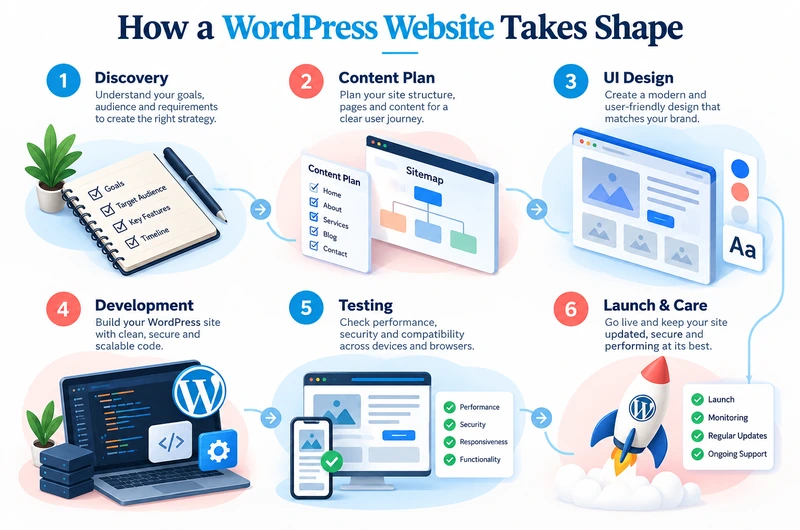
Six steps of WordPress website development from planning and design to testing and launch

Step 1: Understand the Business Requirements

Before choosing a theme or writing code, define what the website needs to accomplish.

A company may want more service inquiries, an educational institution may need to publish information, while an online retailer may want to manage orders.

These goals affect the website structure and required features.

At Webtech Nepal, our planning process begins with understanding the client’s business, audience, content, and technical requirements.

It is also useful to identify who will update the website after launch.

A marketing team may need flexible landing pages. An administrative department may only need controlled fields for updating notices and documents.

Step 2: Plan the Website Structure

The next step is deciding how pages and information will be organized.

For a typical business website, the main pages may include Home, About, Services, Portfolio, Blog, and Contact.

However, the structure should reflect what customers actually need to find.

A company offering several services may benefit from dedicated pages rather than placing everything on one long page.

A sitemap helps the development team plan navigation, page hierarchy, and internal links before building the website.

Step 3: Design the Website Interface

Once the structure is approved, the design stage begins.

Designers prepare layouts for important pages and consider typography, colors, navigation, images, buttons, and content spacing.

Mobile design deserves particular attention because visitors may access the website from smartphones with varying screen sizes and connection speeds.

The design should make important actions easy to find.

For example, a service company may want visitors to request a quotation, while a school may prioritize admissions information and notices.

A successful design helps people complete these tasks without confusion.

Step 4: Set Up WordPress and Develop the Website

Developers create a development environment, install WordPress, and configure the necessary components.

The next tasks include building templates, adding content fields, configuring plugins, and developing custom functionality.

Depending on the requirements, this may involve creating a custom theme, configuring a block theme, or extending a carefully selected existing theme.

The development team should also configure user roles so employees receive only the administrative permissions they need.

Changes should be tested in a staging environment before being published to the live website.

Step 5: Add Content and Prepare the Website for SEO

Content should be treated as part of development, not something added hurriedly before launch.

Service pages need clear descriptions. Important pages should contain accurate contact details, suitable images, useful headings, and relevant calls to action.

The team should also review page titles, meta descriptions, image alt text, URL structures, internal links, and indexing settings.

If the website replaces an older one, existing URLs should be checked carefully.

Where URLs need to change, appropriate redirects help visitors and search engines find the new pages.

Webtech Nepal’s SEO services cover technical improvements and content optimization that can support the website after launch.

Step 6: Improve Website Speed and Security

Before launch, developers should check how the website performs.

Large images, unnecessary scripts, poorly developed themes, and inefficient plugins can increase loading times.

Image compression, caching, properly configured hosting, and selective script loading can improve performance.

Security work should include SSL configuration, strong administrator credentials, access controls, updates, and reliable backups.

The website should also be designed with a practical recovery plan in case a future update causes problems.

Step 7: Test the Website Thoroughly

Testing should cover both appearance and functionality.

A website may look correct on a desktop computer but display poorly on a smaller screen.

The team should test navigation, buttons, forms, images, internal links, administrative workflows, and browser compatibility.

For ecommerce websites, testing should also cover product variations, delivery calculations, payment flows, order notifications, and stock updates.

For content websites, editors should confirm they can publish and update information without accidentally damaging the layout.

Step 8: Launch and Maintain the Website

After testing is complete, the website can be published.

The launch process may include domain and DNS configuration, hosting setup, SSL verification, redirects, analytics, and search engine indexing checks.

Development does not end when the website becomes public.

WordPress core, themes, plugins, hosting systems, and content all require attention over time.

Our website maintenance and support services help businesses manage updates, technical issues, and ongoing website improvements.

How to Make a WordPress Website SEO Friendly

A WordPress website becomes SEO friendly when its technical structure, content, and user experience are planned around how people search and navigate. WordPress provides useful tools, but rankings are not guaranteed by the platform.

For effective WordPress SEO, pay attention to the following areas.

Create a Clear Page Structure

Every important service or product category should have a logical place on the website.

Use descriptive URLs and headings that explain what each page covers.

For example, a separate service page for WordPress development can provide much more useful information than a brief sentence buried inside a general services page.

Avoid creating multiple pages that repeat the same content with only minor keyword changes.

Write Content That Answers Real Questions

Search visitors often want specific information.

Someone searching for WordPress website development may want to know how it works, what it costs, how long it takes, or whether they can manage the website themselves.

Good content answers these questions directly.

A clear question followed by a useful explanation can also make the information easier for search engines and AI based search systems to interpret.

However, there is no special writing formula that guarantees inclusion in AI generated answers.

Accuracy, original information, clear organization, and trustworthy sources remain important.

Connect Related Pages Through Internal Links

Internal links help readers discover related information and help search engines understand how pages on the website are connected.

For example, a blog explaining WordPress development can naturally link to WordPress services, WooCommerce development, hosting, maintenance, and relevant pricing guides.

The anchor text should describe the destination instead of relying on generic phrases such as “click here.”

Optimize Images Properly

Use relevant images that help readers understand the topic.

Compress files before uploading them and choose appropriate image dimensions.

Write descriptive alt text for informative images. Decorative images may not require descriptive alternative text.

Good image handling improves accessibility and can reduce unnecessary page weight.

Monitor Performance and Indexing

Tools such as Google Search Console and Google PageSpeed Insights can help identify issues affecting the website.

Look for indexing errors, broken pages, mobile usability problems, and performance concerns.

Google’s Core Web Vitals also provide useful measurements of loading, responsiveness, and visual stability.

These improvements support the overall visitor experience, even though no single performance score determines search rankings.

Keep Business Information Accurate

For businesses serving customers in Nepal, clearly display the company name, location, services, and contact details.

Where appropriate, use consistent information across the website and business profiles.

Content should identify the author or organization responsible for it, especially when providing advice, prices, or technical recommendations.

Relevant structured data may help search engines understand certain details, but it should accurately reflect information visible on the page.

WordPress Website Speed, Security, and Maintenance

A WordPress website needs regular care to remain reliable.

Performance and security depend on hosting quality, code, configuration, plugins, and maintenance practices.

Choose Suitable Hosting

The hosting environment influences how quickly the server responds and how reliably the website operates.

A small informational website and a busy ecommerce store may have very different hosting requirements.

Choose hosting that supports current WordPress requirements, offers reliable backups, and provides appropriate security controls.

For businesses reviewing their options, Webtech Nepal offers web hosting solutions alongside its development services.

Avoid Unnecessary Plugins

Plugins are useful, but every additional plugin introduces code that needs to be reviewed, updated, and maintained.

Choose plugins based on the features the website genuinely needs.

Check whether they are actively maintained, compatible with the installed WordPress version, and suitable for the hosting environment.

Quality matters more than plugin count alone.

Keep WordPress Updated

Core updates, themes, and plugins may contain security fixes and compatibility improvements.

Test significant updates before applying them to a live business website, especially if the site includes custom functionality.

Maintain Reliable Backups

A backup is valuable only if it can be restored successfully.

Businesses should keep appropriate backup copies of website files and databases, store them securely, and test recovery procedures.

Backup frequency should reflect how often the website changes.

An online store processing daily orders generally needs a different backup policy from a small informational website updated once a month.

For a more detailed explanation, read our article on why WordPress maintenance is essential for website success.

How Much Does WordPress Website Development Cost in Nepal?

The cost of WordPress website development in Nepal depends on the design, number of pages, required features, integrations, and level of customization. There is no single price that applies to every project.

A simple informational website built with an existing theme usually requires less development work than a custom corporate website.

An ecommerce store with product variations, payment integration, delivery rules, and inventory management requires additional development and testing.

As a general website budgeting reference, our Website Design Cost in Nepal: 2026 Price Guide provides the following indicative market estimates:

Website type Estimated development cost
Small business website NPR 30,000 to 80,000
Professional corporate website NPR 60,000 to 150,000
Ecommerce website NPR 70,000 to 500,000+
Custom web application NPR 200,000 to 1,000,000+

These figures represent broad website development categories, not fixed WordPress packages or a quotation from Webtech Nepal.

The final price also depends on content preparation, custom design, licenses, hosting, domain registration, language support, and post launch maintenance.

When comparing development quotations, ask what is included.

A less expensive quotation may exclude content migration, technical SEO, premium plugin licenses, staff training, security configuration, or maintenance.

Understanding these details helps businesses compare the actual value of different proposals.

Common WordPress Development Mistakes to Avoid

Many WordPress problems begin with decisions made during the initial build.

Choosing a Theme Based Only on Appearance

A theme may look impressive in a demonstration but perform poorly with real content.

Review its speed, editing experience, support, and compatibility before using it.

Adding Plugins for Every Small Requirement

Too many overlapping plugins can make maintenance difficult.

Some features may be better implemented through the theme, a custom block, or a small custom plugin.

Ignoring Mobile Users

A desktop design should not simply be squeezed onto a phone screen.

Menus, buttons, images, forms, and content spacing need to work comfortably on smaller devices.

Neglecting Website Security

Weak passwords, excessive administrative access, outdated software, and missing backups can expose a website to avoidable risks.

Security should be planned before launch and maintained afterward.

Forgetting About SEO During Development

Changing URLs without redirects, blocking search engine access accidentally, duplicating content, or leaving important pages without internal links can cause problems.

SEO requirements should be reviewed before the website goes live.

Choosing Hosting Without Considering Future Needs

A hosting package suitable for a basic website may struggle with a large WooCommerce store or a content platform receiving substantial traffic.

Review resource needs, backup policies, support, and upgrade options.

Launching Without Staff Training

A website is harder to maintain when employees do not understand how to use it.

Training should cover the tasks the business performs regularly, such as updating pages, uploading images, publishing notices, and managing user accounts.

How to Choose the Right WordPress Development Company

Choosing a WordPress developer should involve more than comparing design samples and prices.

Start by reviewing the company’s experience with projects similar to yours.

Ask how its developers approach custom themes, content management, performance, security, and plugin selection.

A reliable development partner should be able to explain why a particular approach suits your requirements.

It is also important to discuss what happens after launch.

Find out whether training is included, who handles technical updates, how problems are reported, and whether you will receive access to the website’s administrative accounts and source files.

Look at completed projects and assess how easy they are to navigate, particularly on mobile devices.

You can also read our guide on how to choose a website design company in Nepal for more practical selection criteria.

WordPress Web Development Services at Webtech Nepal

Webtech Nepal is a website design and development company based in Hattigauda, Kathmandu. Since 2017, our team has worked with businesses, educational institutions, organizations, and growing companies in Nepal and abroad.

We develop WordPress websites for clients who need an attractive website without making everyday content management unnecessarily difficult.

Some projects require a straightforward corporate website. Others involve custom themes, WooCommerce stores, multilingual content, integrations, or improvements to an existing website.

Our work can cover website planning, interface design, WordPress development, performance optimization, security configuration, content migration, testing, and support after launch.

We also help businesses evaluate whether an existing WordPress website should be improved or rebuilt.

For an older website with design or usability problems, our website redesign services provide another option.

The aim is to recommend an approach that matches the business requirements rather than introduce features that increase costs without providing meaningful value.

You can explore our WordPress web development services in Nepal to learn more about what we build.

Frequently Asked Questions About WordPress Web Development

1. Is WordPress good for business websites?

Yes. WordPress is suitable for many business websites, including corporate websites, service websites, blogs, portfolios, and online stores. It allows employees to manage content while developers can customize the design and functionality. Its suitability depends on the business requirements and development approach.

2. Do I need coding knowledge to manage a WordPress website?

No. Most routine content tasks can be completed through the WordPress dashboard. You can update text, upload images, and publish articles without programming knowledge. Custom functionality, technical troubleshooting, and complex design changes may still require a developer.

3. How long does it take to develop a WordPress website?

The development timeline depends on the website’s size, design, features, content readiness, and approval process. A small website using a prepared theme can be completed faster than a custom corporate website or WooCommerce store. A realistic timeline should be agreed upon after reviewing the complete project requirements.

4. Is WordPress good for SEO?

Yes. WordPress supports important SEO practices such as editable page titles, clean URLs, heading structures, image alt text, and internal links. However, strong search visibility also depends on useful content, technical quality, website performance, and competition. WordPress alone does not guarantee high rankings.

5. Can I build an ecommerce website using WordPress?

Yes. WooCommerce allows WordPress to support product listings, shopping carts, checkout, payments, and order management. Businesses can also add custom features and connect approved payment providers. More complex stores may require additional development, testing, and hosting resources.

6. Is WordPress secure for business use?

WordPress can be secure when it is properly configured and maintained. Businesses should use trusted themes and plugins, apply updates, manage access permissions, enable HTTPS, maintain backups, and monitor for vulnerabilities. No website platform is completely immune to security risks.

7. What is the difference between a WordPress theme and a plugin?

A WordPress theme controls the website’s presentation, including templates and visual styling. A plugin adds or extends functionality, such as contact forms, SEO settings, booking systems, or ecommerce features. Custom development may involve both.

8. Can an existing website be moved to WordPress without losing SEO rankings?

An existing website can be migrated to WordPress while preserving important SEO elements, but rankings cannot be guaranteed. The migration should account for existing URLs, redirects, page content, metadata, internal links, and search engine indexing. Testing before and after launch is essential.

9. How much does WordPress development cost in Nepal?

WordPress development costs vary according to design complexity, page count, custom functionality, and integrations. A theme based business website generally costs less than a custom corporate website or ecommerce platform. Request a detailed quotation that includes development, hosting, licenses, and maintenance.

10. Does a WordPress website need maintenance after launch?

Yes. WordPress websites need software updates, security monitoring, backups, performance checks, and occasional technical improvements. Regular maintenance helps reduce compatibility problems and keeps the website functioning as business needs change.

Final Thoughts

WordPress is a practical website platform for businesses that want control over their content without sacrificing design flexibility.

It can support a small company website, a large publication, an online store, or a customized business platform. The important decision is not simply choosing WordPress, but deciding how it should be developed for your requirements.

A well planned website should be easy for visitors to use and straightforward for your team to maintain. Its design, content structure, technical setup, and ongoing support all contribute to that result.

If you are planning a new WordPress website or considering improvements to an existing one, Webtech Nepal can help you review the options.

Discuss Your WordPress Website Project with Webtech Nepal

Tell us about your business, the pages or features you need, and any problems with your current website. Our team can review your requirements and recommend a suitable development approach.

Contact Webtech Nepal for a WordPress Development Consultation
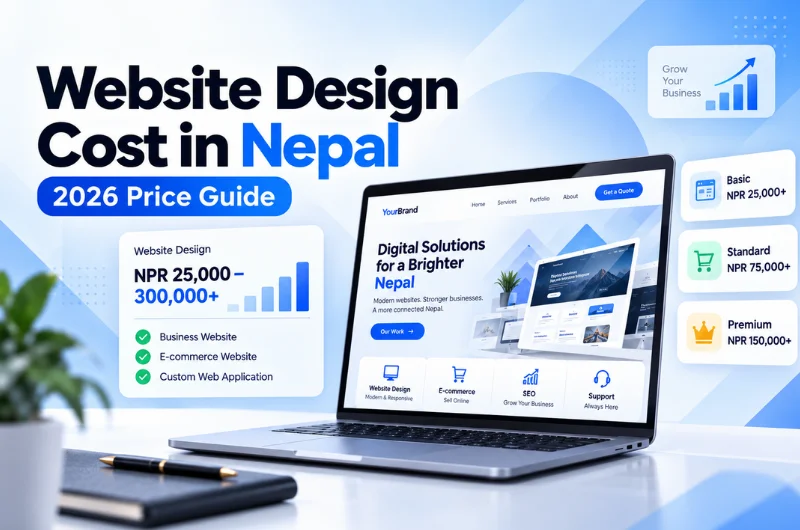
Website Design Cost in Nepal: 2026 Price Guide

How much does it cost to design a website in Nepal in 2026? Whether you’re launching a new business, building an online store, or redesigning an existing website, understanding website development costs is essential for planning your budget.

In today’s digital world, a professional website is more than just an online presence. It helps businesses establish credibility, attract potential customers, showcase products and services, and generate leads.

However, website design prices in Nepal vary significantly depending on the design, functionality, number of pages, and development approach.

In this comprehensive 2026 price guide, we’ll explore the website design cost in Nepal, different website packages, ongoing expenses, and practical tips to help you get the best value for your investment.

How Much Does Website Design Cost in Nepal in 2026?

In 2026, website design and development costs in Nepal can range from NPR 15,000 for a basic website to NPR 500,000 or more for advanced e-commerce websites and custom solutions.

Here’s an estimated pricing breakdown:

Website Type Estimated Price (NPR)
Landing Page Website Rs. 10,000 – 30,000
Basic Static Website Rs. 15,000 – 50,000
Small Business Website Rs. 30,000 – 80,000
Professional Corporate Website Rs. 60,000 – 150,000
E-commerce Website Rs. 70,000 – 500,000+
Custom Web Application Rs. 200,000 – 1,000,000+

Note: These are indicative market estimates, not fixed prices. Actual quotations depend on the scope of work, technologies, design requirements, and development company.

1. Types of Websites and Their Costs in Nepal

Understanding different website categories will help you determine which option best suits your business.

Basic Static Website: Rs. 15,000 – 50,000

A static website is generally the most affordable option for individuals and small businesses that need a simple online presence.

These websites typically contain a few essential pages, such as Home, About Us, Services, and Contact.

They are suitable for personal portfolios, small businesses, informational websites, and startups.

A basic package usually includes mobile-responsive design, a contact form, and fundamental search engine optimization.

However, updating content may require technical assistance if the website does not have a content management system (CMS).

Business Website: Rs. 30,000 – 80,000

A professional business website helps companies establish credibility and attract customers online.

These websites generally offer modern layouts, service pages, image galleries, contact forms, and easy content management.

Businesses such as consultancies, restaurants, construction companies, and local service providers can benefit from this type of website.

For companies looking to build a strong digital presence without investing heavily in custom development, a business website offers a practical solution.

Corporate Website: Rs. 60,000 – 150,000

Corporate websites are designed for established companies and organizations that require a more professional and customized digital presence.

They often include advanced layouts, multiple service sections, company profiles, news or blog sections, career pages, and administrative dashboards.

Additional features may include multilingual support, third-party integrations, and more extensive SEO optimization.

A well-designed corporate website also supports brand consistency and creates a positive impression among potential clients and business partners.

E-commerce Website: Rs. 70,000 – 500,000+

E-commerce websites allow businesses to sell products and services online.

With increasing digital adoption in Nepal, online stores are an important sales channel for retailers and growing businesses.

Common e-commerce features include product catalogs, shopping carts, checkout systems, customer accounts, inventory management, and order tracking.

Nepali businesses may also require payment gateway integrations with services such as eSewa, Khalti, or Fonepay, subject to merchant approval and integration requirements.

A small WooCommerce store can be developed at a relatively affordable price, while larger platforms with custom inventory systems and advanced functionality require a higher budget.

Custom Web Application: Rs. 200,000 – 1,000,000+

Custom web applications are designed around specific business processes rather than standard informational pages.

Examples include hotel reservation systems, online learning platforms, membership portals, customer management systems, and business dashboards.

Their pricing depends on the complexity of the application, database architecture, security requirements, integrations, and development time.

2. Key Factors That Affect Website Design Cost in Nepal

Several factors determine how much you will pay for website design and development.

Website Design and Customization

A website developed using a pre-built template usually costs less than a completely customized design.

Custom UI/UX design involves researching user needs, planning layouts, designing interfaces, and refining the user experience.

Businesses that want a distinctive brand identity may benefit from investing in custom design.

Number of Pages

A five-page website generally requires less work than a corporate website with dozens of unique sections.

However, the number of pages alone does not determine the final cost. A small website with complex interactive features may cost more than a larger informational website.

Website Features and Functionality

Additional functionality can increase development costs.

Examples include online booking, payment processing, customer login systems, multilingual content, live chat, advanced search, and integration with external software.

Each feature may require additional development, testing, and maintenance.

Technology and Development Platform

The technology used to build your website can also affect the budget.

WordPress is often cost-effective for blogs, business websites, and smaller e-commerce stores.

Custom solutions developed using frameworks such as Laravel, React, or Next.js may require a larger investment depending on the project’s technical requirements.

SEO and Performance Optimization

A visually attractive website is not enough if potential customers cannot find it.

Professional website development should consider search engine optimization, loading speed, mobile usability, and website structure.

Advanced SEO services, content marketing, and ongoing optimization are often quoted separately.

3. Additional Website Costs You Should Know

Website development is usually a one-time expense, but keeping a website running involves recurring costs.

Service Estimated Cost
.com Domain Registration Rs. 1,500 – 3,000/year
.com.np Domain Registration Free for eligible applicants
Shared Web Hosting Rs. 2,000 – 15,000/year
SSL Certificate Often free
Website Maintenance Rs. 2,000 – 20,000/month for paid support plans
Premium Themes and Plugins Depends on licensing requirements

In Nepal, eligible individuals and organizations can register a .com.np domain without a registration fee through the official .np registry.

Many hosting companies also provide free SSL certificates, which help secure communication between visitors and websites.

Maintenance packages may include software updates, security monitoring, backups, bug fixes, and content changes.

Before selecting a website development company, make sure you understand which services are included in the initial package and which require additional payment.

4. Freelancer vs. Web Design Agency in Nepal

One important decision is whether to hire a freelance website developer or a professional web development agency.

Hiring a Freelancer

Freelancers can be a budget-friendly option for smaller projects.

They often offer flexible pricing and direct communication, making them suitable for portfolios, landing pages, and simple business websites.

However, service quality, project management, availability, and long-term support can vary from one freelancer to another.

Hiring a Web Design Agency

A professional agency may provide a team of designers, developers, testers, and project managers.

Agencies are often better suited for corporate websites, complex e-commerce platforms, and projects requiring ongoing support.

Although their initial pricing may be higher, they can offer a more structured development process and broader technical expertise.

Which option is better? The right choice depends on your budget, project complexity, timeline, and support requirements. Evaluate previous work and written proposals rather than choosing solely on price.

5. How to Reduce Website Development Costs Without Sacrificing Quality

Building a professional website does not always require a large budget.

Start by identifying the essential features your business needs. You can introduce advanced functionality as your business grows.

Choose an appropriate platform, prepare your website content in advance, and use licensed templates when a completely custom design is unnecessary.

It is also important to request a detailed quotation that clearly explains development costs, hosting fees, revisions, support, and maintenance.

Avoid selecting a website package simply because it is the cheapest. Poor security, difficult content management, slow loading speeds, and unreliable support may result in additional expenses later.

Investing in a well-planned website from the beginning can help reduce unnecessary redesign and maintenance costs.

6. How to Choose the Best Website Design Company in Nepal

Choosing the right development partner is just as important as deciding your budget.

Before hiring a website design company in Nepal, review its portfolio and evaluate the quality of its previous projects.

Look for websites that are mobile-friendly, easy to navigate, fast-loading, and visually consistent.

Discuss your business goals, target audience, required features, and expected timeline before starting the project.

You should also confirm domain ownership, hosting access, CMS credentials, design revisions, post-launch support, and the availability of maintenance services.

A reliable company should provide a transparent proposal with clearly defined deliverables and payment terms.

When comparing quotations, check whether the applicable 13% VAT is included or added separately.

7. Is Investing in a Professional Website Worth It in 2026?

For many businesses in Nepal, a website is a valuable long-term digital asset.

Unlike social media pages, a business website gives you greater control over your branding, content, customer experience, and online marketing strategy.

A professionally developed website can help potential customers discover your business through search engines, understand your services, and contact you directly.

For hotels, trekking agencies, educational institutions, retailers, and professional service providers, a website can also support inquiries, reservations, and sales.

The return on investment depends on your business model, website quality, traffic, and marketing strategy.

A website alone does not guarantee customers, but it provides a foundation for sustained digital growth.

8. Frequently Asked Questions (FAQs)

How much does a basic website cost in Nepal?

A basic static website in Nepal typically costs around Rs. 15,000 to Rs. 50,000 in 2026. The final amount depends on design customization, the number of pages, and included services.

How much does a WordPress website cost in Nepal?

A basic WordPress website development in Nepal may cost approximately Rs. 20,000 to Rs. 50,000, while a professional business website commonly ranges from Rs. 50,000 to Rs. 120,000 or more.

What is the cost of an e-commerce website in Nepal?

An e-commerce website development in Nepal may cost between Rs. 70,000 and Rs. 500,000 or more, depending on product management, payment integrations, design requirements, and advanced functionality.

Can I create a website for free in Nepal?

Yes. Free website builders and free .com.np domains can reduce initial costs. However, professional designs, custom domains, reliable hosting, and advanced functionality may require payment.

How long does it take to build a website?

A basic website may take one to three weeks, while a professional business website may require three to eight weeks. More complex e-commerce platforms and custom applications can take several months.

Does website design pricing include hosting and domain registration?

Not always. Some website development companies include first-year hosting and domain registration, while others charge separately. Always confirm what your package includes.

Conclusion

The website design cost in Nepal in 2026 depends on your business needs, design preferences, technical requirements, and choice of development partner.

A small business can establish a professional online presence with a relatively modest investment, while larger organizations may require custom solutions with advanced functionality.

Rather than focusing only on the initial website price, consider performance, security, scalability, user experience, and long-term support.

Whether you are launching your first business website or upgrading an existing platform, choosing the right website development partner will help you build a stronger digital presence.

Ready to build a professional website for your business? Connect with an experienced website design and development team in Nepal to discuss your requirements and receive a customized quotation.

How to Choose the Right Website Platform for Your Business

Building a website is an important step for any business. But before choosing a design, domain name, or hosting plan, you need to answer one basic question: Which website platform is right for your business?

The right website platform can make your site easier to manage, faster to improve, and ready to grow. The wrong choice can lead to higher costs, limited features, poor performance, or a difficult website migration later.

There is no single platform that is best for every business. A local service company, online store, school, hotel, nonprofit organization, and large company can all have different needs.

In this guide, we will compare popular website platforms and explain what you should consider before choosing one.

Building the Foundation for Online Success

Your website platform is the foundation of your website.

It affects how your website is built, how content is managed, how new features are added, and how the website can grow in the future.

For example:

  • A small business may only need a simple company website.
  • An online store may need product, payment, inventory, and order features.
  • A growing company may need integrations with other software.
  • A large organization may need custom tools and user accounts.
  • A startup may need a custom web application rather than a normal website.

Choosing the platform based only on its popularity is not enough.

Instead, start with your business goals.

What Is a Website Platform?

A website platform is the technology used to build, manage, and run a website.

It usually provides tools for creating pages, managing content, adding features, and publishing information online.

Some platforms are designed for easy website creation. Others provide more control for developers.

Common types include:

  • Content management systems such as WordPress
  • Website builders such as Wix
  • Ecommerce platforms such as Shopify
  • Ecommerce systems such as WooCommerce
  • Visual development platforms such as Webflow
  • Custom-built websites
  • Custom web applications

WordPress, for example, is an open-source content management system that can be extended with themes and plugins. WordPress.org says the platform can be used for everything from simple websites and blogs to complex portals and enterprise websites.

Common Website Platforms Compared

Here is a simple comparison of popular options.

Platform Best For Flexibility Technical Skill
WordPress Business websites, blogs, service websites High Low to Medium
WooCommerce Online stores High Medium
Shopify Ecommerce businesses Medium to High Low to Medium
Wix Simple business websites Medium Low
Webflow Design-focused websites High Low to Medium
Custom Website Unique business requirements Very High High
Custom Web Application Complex online systems Very High High

These platforms solve different problems. Your business requirements should decide which option you use.

WordPress

WordPress is one of the most flexible choices for business websites.

It can be used for:

  • Company websites
  • Blogs
  • Service websites
  • Portfolio websites
  • Hotel websites
  • Education websites
  • NGO websites
  • News websites
  • Membership websites
  • Ecommerce websites

WordPress is open source and has a large plugin ecosystem. This makes it possible to add many features without developing everything from scratch.

WooCommerce

WooCommerce is an open-source ecommerce platform built for WordPress. It can be used to sell physical and digital products and supports product variations, downloads, and other store features.

WooCommerce is a good option when you want a WordPress website and an online store in the same system.

Shopify

Shopify is a hosted ecommerce platform designed specifically for selling online and in person. It provides store management, themes, products, sales channels, and other ecommerce tools in one platform.

It can be useful for businesses that want a managed ecommerce solution without managing the technical side of hosting.

However, businesses should also consider subscription costs, payment options, transaction fees, integrations, and regional requirements before choosing it.

Wix

Wix is a website builder focused on visual website creation. It offers templates, drag-and-drop editing, hosting, ecommerce features, SEO tools, and third-party integrations.

It can work well for individuals and small businesses that want to create and manage a website with limited technical knowledge.

Webflow

Webflow combines visual website design with a CMS and development features.

Its CMS can manage structured content such as blogs, team directories, resource libraries, and other dynamic content.

It can be a good choice for businesses that place a strong focus on visual design and want more design control than some traditional website builders provide.

What Should You Consider Before Choosing a Website Platform?

Do not choose a platform simply because another business is using it.

Look at your own requirements first.

1. Type of Website

Start by asking what you actually need.

Is it:

  • A company website?
  • An online store?
  • A blog?
  • A booking website?
  • A membership website?
  • A marketplace?
  • A customer portal?
  • A web application?

A simple business website and a complex booking system should not be treated as the same project.

2. Budget

Your budget includes more than the initial development cost.

Consider:

  • Website development
  • Domain name
  • Hosting
  • Premium themes
  • Plugins
  • Security
  • Maintenance
  • Website updates
  • Payment gateway costs
  • Developer support
  • Future improvements

A platform that appears cheap at the beginning may become expensive if you need many paid add-ons later.

3. Ease of Management

Think about who will manage the website after launch.

Will your staff need to:

  • Add blog posts?
  • Change images?
  • Update services?
  • Add products?
  • Edit contact information?
  • Create landing pages?

If your team needs to make regular updates, choose a platform that is easy for them to use.

4. Customization

Some websites need only standard features.

Others need something very specific.

For example, a travel company may need a custom booking system. A school may need student login features. A recruitment agency may need job listings and candidate applications.

The more unique your requirements are, the more important customization becomes.

5. SEO

Your platform should allow you to manage basic SEO elements such as:

  • Page titles
  • Meta descriptions
  • URLs
  • Headings
  • Image alt text
  • XML sitemaps
  • Canonical URLs
  • Structured data where appropriate
  • Page speed
  • Mobile performance

Remember that a platform alone does not make a website rank well.

Good content, technical SEO, useful information, links, website performance, and ongoing optimization all matter.

6. Mobile Responsiveness

A large share of website visitors use smartphones.

Your website should work properly on:

  • Mobile phones
  • Tablets
  • Laptops
  • Desktop computers

Do not choose a platform based only on how the desktop version looks.

7. Security

Security should be part of the platform decision.

Consider:

  • Software updates
  • Plugin or extension security
  • SSL
  • User permissions
  • Backups
  • Malware protection
  • Secure hosting
  • Developer access

A website that is not maintained can become a security risk regardless of the platform.

8. Integrations

Your website may need to connect with other services.

For example:

  • Google Analytics
  • Email marketing tools
  • CRM systems
  • Payment gateways
  • Social media
  • Accounting software
  • Booking systems
  • Maps
  • WhatsApp
  • Inventory systems

Check whether the platform supports the integrations you actually need.

9. Scalability

Think about where your business could be in three to five years.

You may start with 10 pages but later need:

  • More services
  • More locations
  • Hundreds of products
  • Multiple languages
  • Customer accounts
  • Online payments
  • Advanced reporting

Choose a platform that can support reasonable future growth.

Our Recommendation: WordPress for Webtech Nepal

For most small and medium-sized businesses in Nepal, we recommend WordPress as a practical website platform. It gives businesses the flexibility to create a professional website, manage content easily, and add new features as they grow. You can learn more about our WordPress technology and how we use it for business websites.

At Webtech Nepal, we build WordPress websites for a wide range of businesses, including service companies, hotels, restaurants, education consultancies, NGOs, travel agencies, and other local businesses. Our WordPress development team in Nepal can handle everything from website design and development to customization, security, performance, and ongoing maintenance.

WordPress also gives business owners more control over their websites. You can update your services, publish blog posts, add new pages, and make changes without rebuilding the entire website. It also provides a strong foundation for SEO when the website is properly developed and maintained.

We also understand that WordPress is not the right choice for every project. If your business needs an online store, complex integrations, or unique business features, we may recommend WooCommerce, custom website development, or a custom web application instead.

Our approach is simple: choose the website platform that fits your business needs, budget, and future plans. For many businesses in Nepal, WordPress provides the right balance of flexibility, ease of management, and room for growth.

When WordPress is the Right Choice

WordPress is often a good fit when you need a professional business website that your team can update.

It can make sense for:

  • Small businesses
  • Corporate websites
  • Service companies
  • Hotels
  • Restaurants
  • Education consultancies
  • NGOs and INGOs
  • Travel and trekking companies
  • Recruitment agencies
  • Professional firms
  • Personal brands
  • Blogs and content websites

For example, a Kathmandu-based consulting company may need pages for its services, team, company information, blog, contact form, Google Maps, and lead generation.

WordPress can handle this type of website without requiring a completely custom system.

When WooCommerce is the Right Choice

WooCommerce makes sense when your website needs ecommerce features.

It can be suitable for:

  • Clothing stores
  • Electronics stores
  • Grocery businesses
  • Furniture stores
  • Bookstores
  • Local product sellers
  • B2B product catalogs
  • Digital products

WooCommerce works inside WordPress, allowing businesses to combine content marketing and ecommerce.

For example, a Nepali clothing brand could have:

Website → Blog → Products → Cart → Checkout → Customer Account

This makes WordPress and WooCommerce a useful combination for businesses that want both content and commerce.

When a Custom Website is the Right Choice

A custom website can make sense when standard themes, plugins, and website builders cannot meet your requirements.

For example, you may need:

  • A unique user interface
  • Special business workflows
  • Custom calculations
  • Complex integrations
  • Special reporting
  • Unique dashboards
  • Large amounts of structured data
  • Specific performance requirements

Custom development gives developers more control over how the website is built.

But more control also means more development work.

A custom website should have a clear reason behind it. Building something custom simply because it sounds more advanced can increase the budget without providing a real business benefit.

When a Custom Web Application Is Better

Sometimes what you need is not really a website.

It is a web application.

A normal website mainly provides information.

A web application allows users to perform tasks.

Examples include:

  • Online booking systems
  • Job portals
  • Customer dashboards
  • Learning management systems
  • Property management systems
  • Inventory systems
  • CRM platforms
  • Appointment systems
  • Online marketplaces
  • Internal business software

For example, a recruitment agency may need a website to explain its services. But if it also needs candidate registration, document uploads, employer accounts, job management, and application tracking, a custom web application may be more appropriate.

WordPress vs Custom Development

The right choice depends on your requirements.

Factor WordPress Custom Development
Initial development Usually lower Usually higher
Flexibility High Very high
Content management Easy Depends on development
Custom features Possible Excellent
Development time Usually faster Usually longer
Maintenance Regular updates needed Developer support usually needed
Plugins/extensions Large ecosystem Custom-built
Best for Most business websites Unique or complex systems

The important point is that custom development is not automatically better.

If WordPress can solve the business problem well, a custom build may not be necessary.

If the project has unique technical requirements, forcing it into WordPress can create problems later.

What Should a Small Business in Nepal Choose?

For many small businesses in Nepal, WordPress is a practical starting point.

A typical small business website may need:

  • Home page
  • About page
  • Services
  • Portfolio or projects
  • Blog
  • Testimonials
  • Contact form
  • Location map
  • Social media links
  • Basic SEO
  • Mobile-friendly design

WordPress can handle these requirements without building a website system from scratch.

The focus should then move to good design, useful content, speed, security, local SEO, and easy management.

For a small business in Kathmandu or another part of Nepal, it is also useful to make sure the website clearly shows contact information, location, services, business hours, and other information local customers may need.

What Should a Growing Business Choose?

A growing business should think beyond the first version of its website.

Ask:

  • Will we add new services?
  • Will we sell products online?
  • Will we need multiple locations?
  • Will we need customer accounts?
  • Will we connect the website to a CRM?
  • Will we need multiple languages?
  • Will our team need different user permissions?
  • Will we need a custom dashboard?

If the answer is yes to several of these questions, platform selection becomes more important.

WordPress may still be enough. WooCommerce may be suitable for ecommerce. A custom system may make more sense when the business has complex workflows.

The goal is not to choose the most powerful technology.

The goal is to choose technology that fits the business.

Common Mistakes When Choosing a Website Platform

Choosing Based Only on Price

The cheapest option is not always the cheapest over time.

Look at the total cost of ownership, including hosting, maintenance, extensions, development, and future changes.

Choosing Based on Popularity

A platform can be popular and still be wrong for your project.

Your business requirements should come first.

Ignoring Future Growth

Do not build a website that only works for today’s needs if you already know your business will expand.

Adding Too Many Plugins

WordPress plugins can add useful features, but installing unnecessary plugins can make maintenance harder.

Use trusted, well-maintained plugins and keep them updated.

Focusing Only on Design

A beautiful website is not enough.

Your website should also be:

  • Fast
  • Mobile-friendly
  • Easy to use
  • Search-friendly
  • Secure
  • Easy to manage

Forgetting About Ownership

Before starting a project, clarify who owns:

  • Domain name
  • Hosting account
  • Website files
  • Website database
  • Content
  • Premium licenses
  • Customer data

This is especially important when working with an external developer or agency.

Not Planning for Maintenance

Every website needs some level of maintenance.

Software updates, security checks, backups, content changes, and technical improvements should be part of your long-term plan.

Questions to Ask Your Web Developer

Before approving a website platform, ask your developer these questions:

  1. Why do you recommend this platform for my business?
  2. Can I update the website myself?
  3. What happens if I need a new feature later?
  4. What will the ongoing maintenance cost?
  5. Who owns the domain and hosting?
  6. Will I receive administrator access?
  7. What happens if I stop working with your company?
  8. How will the website be backed up?
  9. How will security updates be handled?
  10. Is the website optimized for mobile devices?
  11. Can the platform support my SEO requirements?
  12. Can the website connect with the tools I already use?
  13. Can the platform handle my expected growth?
  14. What parts of the website are custom-built?
  15. What are the expected costs beyond the initial development?

A good developer should be able to explain the technical choice in simple business terms.

A Simple Website Platform Decision Guide

You can use this quick guide before starting your project.

Choose WordPress if:

  • You need a flexible business website.
  • You want to manage content yourself.
  • You need strong customization options.
  • You plan to publish regular content.
  • You may add features later.

Choose WooCommerce if:

  • You need an online store.
  • You want ecommerce inside WordPress.
  • You need control over products and store content.
  • You need a flexible product catalog.

Consider Shopify if:

  • Ecommerce is the main purpose of the website.
  • You prefer a managed platform.
  • You want built-in ecommerce tools and a hosted environment.

Consider Wix if:

  • You need a relatively simple website.
  • You prefer visual drag-and-drop editing.
  • Your website does not require highly specialized functionality.

Consider Webflow if:

  • Visual design is a major priority.
  • You need a visual CMS.
  • Your team wants structured content management with strong design control.

Choose custom development if:

  • Your business has unique workflows.
  • You need complex integrations.
  • You are building a system rather than a normal marketing website.

Frequently Asked Questions

What is the best website platform for a small business?

There is no universal best platform. For many small business websites, WordPress offers a useful combination of flexibility, content management, and customization.

Is WordPress good for business websites?

Yes. WordPress can be used for business websites ranging from simple company sites to more complex websites and portals. Its open-source nature and large plugin ecosystem allow it to be extended as business needs change. (WordPress)

Is WordPress better than Shopify?

They are designed for somewhat different needs. WordPress with WooCommerce provides a flexible WordPress-based ecommerce setup, while Shopify provides a hosted ecommerce platform with store management tools. Your choice should depend on your store requirements, budget, integrations, and preferred level of technical control.

Should I choose WordPress or a custom website?

Choose WordPress when it can meet your requirements without unnecessary complexity. Consider custom development when you have unique workflows, integrations, or application features that need more control.

Is a website builder good for a small business?

It can be. Website builders such as Wix can be useful for businesses that need a relatively simple website and want visual editing without much technical work.

Can I change my website platform later?

Yes, but moving platforms can take time and may involve rebuilding pages, migrating content, redirecting URLs, moving data, and testing the new website. Choosing carefully at the beginning can reduce this work.

How much does a website platform cost in Nepal?

The total cost depends on the platform, website size, design, functionality, hosting, integrations, maintenance, and development work. A simple business website and a custom web application can have very different budgets.

Does the website platform affect SEO?

Yes, indirectly and technically. A platform can affect how easily you manage SEO settings, page speed, mobile performance, structured content, URLs, redirects, and other technical elements. But rankings depend on many factors beyond the platform itself.

What website platform does Webtech Nepal recommend?

For many standard business websites, Webtech Nepal recommends WordPress because it offers a practical balance of flexibility, usability, and customization. However, the final platform should be selected after reviewing the project’s actual requirements.

Conclusion

Choosing the right website platform for your business is not about picking the most popular or most advanced technology.

It is about finding the right fit for your goals, budget, content, customers, and future plans.

For many businesses, WordPress provides a strong foundation. WooCommerce can extend WordPress into an online store. Shopify and other hosted platforms can make sense for specific ecommerce needs. And when your requirements become highly specialized, custom website development or a web application may be the better route.

Before starting your next website project, decide what the site needs to do, not just how you want it to look.

If you are planning a new website design in Nepal and are unsure which platform fits your business, Webtech Nepal can help you review your requirements and choose a practical approach for your project.

7 Reasons why WordPress maintenance is essential for your website’s success

WordPress powers over 43% of websites worldwide, making it the go-to platform for businesses, bloggers, and e-commerce stores in Nepal and beyond. Its flexibility, vast plugin ecosystem, and user-friendly interface make it a top choice for creating stunning websites. As the top web design agency in Nepal, Webtech Nepal specializes in building custom WordPress websites tailored to your unique needs.

However, to ensure your WordPress site remains secure, fast, and competitive, regular maintenance is non-negotiable. Below, we explore seven compelling reasons why WordPress maintenance is essential for your online success, crafted to resonate with both search engines and real users seeking practical solutions.

1. Fortify Your Website’s Security

WordPress’s popularity makes it a prime target for cybercriminals. Hackers exploit outdated plugins, themes, or WordPress core versions to launch attacks, including malware injections, brute force logins, and data breaches. Regular maintenance involves updating all components to their latest versions, which include critical security patches.

Tasks like enabling two-factor authentication, monitoring user roles, and scanning for vulnerabilities further strengthen your site’s defenses. A secure website protects your business data and fosters trust with visitors, ensuring they feel safe while browsing or shopping on your platform.

2. Boost Website Speed and Performance

A slow website frustrates users and drives them away. Maintenance tasks, such as optimizing images, cleaning up your database, minifying CSS/JavaScript files, and implementing caching solutions (e.g., WP Rocket or W3 Total Cache), ensure your site loads quickly. Tools like Google PageSpeed Insights or Pingdom can help identify bottlenecks, such as oversized media or outdated code.

A fast website keeps visitors engaged, reduces bounce rates, and improves conversions, whether you’re running a blog, portfolio, or online store in Nepal.

3. Elevate Your SEO Rankings

Search engine optimization (SEO) isn’t just about keywords it’s about technical excellence. Regular WordPress maintenance ensures your site is free of broken links, outdated plugins, or errors that hinder search engine crawlers. Updating your sitemap, optimizing meta tags, and providing mobile responsiveness aligns your site with Google’s latest algorithms.

Additionally, maintaining clean code and fast load times enhances your site’s crawlability, helping it rank higher on search engine result pages (SERPs). By staying proactive, you can adapt to evolving SEO trends and maintain visibility in competitive markets, such as Kathmandu, Chitwan, or Pokhara.

4. Safeguard Your Data with Reliable Backups

Imagine losing your website’s content due to a server crash, plugin conflict, or human error. Regular backups are a lifesaver, allowing you to restore your site to a previous state with minimal disruption. Maintenance plans should include automated, off-site backups (daily or weekly, depending on your site’s activity) stored securely on platforms like Google Drive or Dropbox.

At Webtech Nepal, we emphasize testing backups periodically to ensure they’re functional, giving you peace of mind that your blog posts, product listings, or customer data are always recoverable.

5. Stay Compatible with New Features and Updates

WordPress, its themes, and plugins receive frequent updates to introduce new features, fix bugs, or improve compatibility. Skipping these updates can lead to conflicts that break your site’s functionality, such as forms not submitting or pages failing to load.

Regular maintenance ensures that all components are up-to-date and compatible, allowing you to leverage the latest WordPress features, such as block editor enhancements or new e-commerce tools. This keeps your site modern and aligned with industry standards, enhancing both functionality and user appeal.

6. Save Costs by Preventing Major Issues

Neglecting maintenance can lead to expensive problems, such as site crashes, security breaches, or performance bottlenecks. Emergency fixes often cost more than routine upkeep, not to mention the potential revenue loss from downtime or a damaged reputation.

A proactive maintenance plan—covering updates, monitoring, and optimizations prevents these issues, saving you money in the long run. For businesses in Nepal, where digital presence is critical for growth, investing in maintenance is a cost-effective strategy to protect your online investment.

7. Deliver a Seamless User Experience

Your website is often the first interaction customers have with your brand. A poorly maintained site with broken links, outdated content, or slow load times frustrates visitors and drives them to competitors. Regular maintenance tasks, such as testing contact forms, updating content, and ensuring mobile compatibility, help create a smooth and enjoyable experience.

By incorporating user feedback and adding fresh features, like interactive elements or updated visuals, you keep your site engaging and relevant, encouraging repeat visits and conversions.

Why Partner with Webtech Nepal for WordPress Maintenance?

As the top web design agency in Nepal, Webtech Nepal excels in building custom WordPress websites that reflect your brand’s vision and drive results. Our expertise doesn’t end with development; we’re committed to keeping your site in peak condition with comprehensive maintenance services tailored to your needs.

Our offerings include:

  • Daily Backups: Secure, off-site storage to protect your data.
  • 24/7 Uptime Monitoring: Instant alerts to address issues before they escalate.
  • Security Audits: Regular scans for malware, vulnerabilities, and weak points.
  • Performance Optimization: Speed enhancements using caching, CDN, and image compression.
  • SEO Support: Technical audits and fixes to boost your rankings.
  • Plugin and Theme Updates: Safe, tested updates to ensure compatibility.
  • Custom Support: Dedicated assistance for your unique business needs.

Don’t let an outdated or vulnerable website hold your business back. With Webtech Nepal’s expert WordPress maintenance and custom website development, you can focus on growing your brand while we keep your site secure, fast, and user-friendly.

Contact us today to explore our maintenance packages and discover how our custom WordPress solutions can elevate your online presence.

Best Way to Migrate a WordPress Website Safely

Migrating a WordPress website can be a complicated and time-consuming process. Whether moving to a new web hosting provider, upgrading your existing services, or just wanting to overhaul your website, ensuring everything goes smoothly is essential. Fortunately, there are plenty of effective strategies for making the transition as smooth and secure as possible. This article will explore the best tips for quickly and safely migrating your WordPress site.

Before you begin the migration process, it’s essential to back up your website. This ensures you have a backup to restore if anything goes wrong during the transition. To ensure everything is recovered, consider completely backing up your entire site before starting the migration process. This will include all files and databases related to your WordPress install.

It can also be helpful to use a plugin like Duplicator or All-in-One Migration to handle data transfer between servers. Such plugins can simplify the process by providing an easy interface for transferring files and databases with minimal effort. Please carefully read through all instructions these plugins provide before migrating, as they can save time and ensure everything goes smoothly.

Finally, update any URLs on your new server after completing the migration process. Any links pointing toward old locations must be updated for visitors to land on the correct pages when navigating your site. You can also redirect traffic from old URLs with 301 redirects so visitors are automatically taken where they should go when entering an outdated URL into their browser bar.

What is WordPress Migration?

WordPress migration is moving a WordPress website from one server to another. This can be done for various reasons, such as transferring an existing site to a new host, upgrading the hosting platform, or changing domain names. It’s essential to ensure your website is backed up on the old server and safely transferred to the new server before implementing changes. Preparing ahead is key to successfully migrating a WordPress site with minimal downtime and disruption.

Before migrating, it’s essential to make sure all backups are up-to-date. This includes files and databases, crucial aspects of any WordPress installation. Databases contain user accounts, posts/pages content, settings, comments, etc., while files have themes and plugins installed on your current installation. Additionally, you should review all currently installed plugins, as some may need reconfiguring once migrated over if they utilize database tables to function correctly on the new server environment. It’s also wise to ensure URLs stored within pages/posts reflect their correct path after the migration, so users don’t get 404 errors when navigating through pages within the live environment post-migration.

How to Migrate WordPress Website Safely?

Migrating a WordPress website can be an intimidating process. It is important to approach the process correctly to ensure data is recovered and to maximize the time and effort needed to complete the move. This article will provide step-by-step instructions on how to migrate a WordPress website from one server to another safely. We will cover how to back up your website data and files, transfer them over properly, and ensure everything works correctly afterward.

How to Migrate a WordPress Website Safely

Migrating a WordPress website doesn’t have to be complicated. Whether you’re moving to a new hosting provider, changing your domain, or upgrading your server, following the right process helps prevent data loss, downtime, and broken functionality. Follow these six essential steps for a smooth and secure WordPress migration.

Step 1: Backup Your Website

The first and most important step is creating a complete backup of your WordPress website. Make sure to back up your database, themes, plugins, uploads, and all other website files. Store the backup in a secure location, such as cloud storage or an external drive, so you can quickly restore your website if anything goes wrong during the migration.

Step 2: Choose a Reliable Web Hosting Provider

Select a hosting provider that offers excellent performance, strong security, automatic backups, and reliable customer support. Ensure your new hosting environment meets the latest WordPress requirements, including the recommended PHP version, sufficient storage, SSL support, and adequate server resources.

Step 3: Prepare Your Website for Migration

Before transferring your website, update WordPress core, themes, and plugins to their latest versions. Deactivate unnecessary plugins to reduce the risk of compatibility issues during migration. Cleaning up unused files and optimizing your website before moving can also improve the migration process.

Step 4: Migrate Files and Database

Upload all WordPress files to your new server and import your database using phpMyAdmin or a trusted migration plugin such as Duplicator or All-in-One WP Migration. After importing, verify that your wp-config.php file contains the correct database credentials and that all files have been transferred successfully.

Step 5: Update Website Settings

Once the migration is complete, update your website URL if necessary and review important configuration settings. Check permalink settings, update DNS records if you’re changing domains, configure SSL certificates, and verify that plugins and themes are working correctly on the new server.

Step 6: Test Everything Before Going Live

Before making your migrated website publicly accessible, thoroughly test every important feature. Check page loading speed, menus, forms, images, internal links, contact forms, and plugin functionality. Once everything works correctly, point your domain to the new server and monitor your website for any unexpected issues.

Pro Tip

Never delete your old website immediately after migration. Keep a complete backup and your previous hosting account active until you’ve confirmed that the new website is functioning perfectly and all data has been transferred successfully.

Finally, once everything looks good from an outside perspective, use an automated testing service like Selenium or BrowserStack to check for cross-browser compatibility issues or other technical errors. If everything passes with flying colors, you can push your updates live!

Conclusion: WordPress Migrating Safely

Before beginning any WordPress migration, ensuring a secure backup of your current site is essential. This way, should anything go wrong during the process, you’ll have a version of your website that you can quickly revert to the old one. Furthermore, you will only lose all your content if specific files are recovered or corrupted during the transfer. Additionally, double-check everything once it’s been moved over and ensure all links redirect correctly and any plugins work as expected.

Setting up SSL encryption on your new server or hosting provider before migrating WordPress is also recommended. This will ensure that data delivery from origin to destination is securely encrypted and will help protect against third-party data theft or manipulation. Lastly, depending on the hosting provider used for the new WordPress website, be sure to update any PHP versions necessary for compatibility with current plugins/themes being used to avoid potential compatibility errors after the migration has been completed.

How to Cache ACF Fields?

ACF (Advanced Custom Fields) is a plugin to create user-friendly custom fields and make website fields rapidly without touching the database. Visit their website to learn more.

Cacheable fields save ACF field group and field attributes as JSON files with a file name like group_6335ad67c484f.json within your theme folder. Now that the JSON file exists, ACF will load the relevant field group and field attributes from this file which reduces the number of database calls during your page load. It also improves the loading speed in both the front-end and back-end.

1. Create a folder named as acf-json in your main theme folder

When you create a folder called acf-json now, every time you save a field group and field attributes, it will create a JSON file in that folder automatically. For existing Field Groups, open all one by one and re-save them.

2. Sync Changes

Automation process will be apply for sync changes of the field group and field attributes.

3. Security

If you wish to hide your field group or field attributes from the public, simply add an empty index.php file to your acf-json folder.

theme-folder/acf-json/index.php

<?php

// Silence is golden.

?>

4. Conclusion

You can apply this tips on all your websites that use ACF Plugin.