Top 10 Ecommerce Sites in Nepal – Best Online Shops

Do you want to know the top 10 eCommerce companies or websites for online shopping in Nepal in 2025? Based on traffic and popularity in 2025, we’ve compiled a list of Nepal’s top 10 eCommerce websites.

Surprisingly, the top 10 in the Nepali e-commerce sector includes a large number of Nepali-founded companies. While Daraz is at the top of the list, there aren’t many other American firms in the top ten.

While the Nepal e-commerce sector is still in its early phases of development, it is a market ripe with opportunity; with so many people. As a result, there is plenty of potential for major and minor firms to take a giant chunk out of the Nepalese e-commerce pie.

We’ve assembled the top 10 performing e-commerce sites in Nepal using Alexa data to show what the e-commerce sector looks like in Nepal.

Top Online Shopping Sites of Nepal

1. daraz.com.np

In 2012 Daraz was Launched, South Asia’s premier online shopping marketplace with an active presence in Pakistan, Bangladesh, Sri Lanka, Myanmar, and Nepal. Supported by a wide range of tailored marketing, data, and service solutions, Daraz has 30,000 sellers and 500 brands and serves 5 million consumers across the region. Daraz has more than 2.5 million products to offer, growing at a very fast pace. Daraz offers a diverse assortment in categories ranging from consumer electronics to household goods, beauty, fashion, sports equipment, and groceries.

Daraz provides an excellent customer experience, ease-of-purchase, comprehensive customer care, and hassle-free shopping and returns experience. Alibaba Group acquired Daraz in May 2018.

Alexa Rank in Nepal: 79
Alexa Rank Global: 30,020


2. thulo.com

On thulo.com, you can shop online for your basic daily necessities to other necessities you might need. Browse through thousands of products from our array of online categories such as Personal Care, Electronics, Apparel, Sports and Outdoors, Office Supplies, Fashion, Books, Groceries, and many more. They have served thousands of satisfied customers who have remained loyal to our cause. Through our online shopping platform, we are grateful to have served customers from all over the world.

Alexa Rank in Nepal: 179
Alexa Rank Global: 120,103


3. okdam.com

Ok Dam is one of Nepal’s finest online shopping portal. With online customers on the skyscraper, Nepal is moving towards a digital revolution. Ok Dam is Nepal’s Leading e-commerce marketplace launched in November 2017 OkDam is an emerging online Shopping solution in Nepal. 

Okdam.com is a definitive online shopping goal for Nepal, offering a bother-free shopping background through secure and trusted portals. Okdam provides a popular and unique shopping experience with all your most loved brands, which is just the beginning. Customers never again need to hold up in traffic, expect rebates and invest hours searching for the products and services that they need. All it takes is a couple of snaps and a couple of moments to find the product and to put order(s) at OkDam. Ok Dam exhibits items from all classes, for example, Fashion, clothing, footwear, ornaments, gadgets, Kitchen Appliances, Home Appliances, Furniture, Accessories, Health Care, Machinery, Sports & Fitness, beauty products, Send Gifts To Nepal and as yet tallying! Our collection consolidates the most trending in the fashion list as well as the all-time high demands. 

Alexa Rank in Nepal: 238
Alexa Rank Global: 172,230


4. sastodeal.com

Sastodeal’s story began in Dec 2011, when internet penetration in Nepal was just about 9%. Yet, we were encouraged to start not just a company but an eCommerce industry that would have a significant impact in Nepal’s economy for generations to come. Bootstrapped with just Rs.50,000, we rented a small garage, worked on broken furniture and chairs, and worked hard to build a strong company and significantly contributing to building an eCommerce industry.

Today, Sastodeal is one of the leading eCommerce companies in Nepal, with millions of customers and thousands of vendors/partners all over Nepal. We have a logistic network that ensures deliveries in most parts of the nation, except for some locations (work in progress). Our goal is to ensure that our users and customers can buy products at affordable prices, get their products delivered as assured and on time regardless of their location. On the other hand, we provide a platform for our vendors to cater to millions of customers without additional cost to their business.

Alexa Rank in Nepal: 268
Alexa Rank Global: 157,034


5. gyapu.com

GYAPU is the most rewarding online shopping platform led by Nepali Entrepreneurs to expand and flourish e-commerce industries in Nepal and across South East Asia. The primary objective of GYAPU is to build the Nepali Global Brand and promote domestic Nepali products in Nepal and throughout the globe.

GYAPU pledges to disintermediate the monopoly of mediators and existing e-commerce industrial trends. GYAPU envisions uplifting the local business enthusiasts and overall Economy of Nepal while simultaneously creating job opportunities nationwide.

Alexa Rank in Nepal: 408
Alexa Rank Global: 350,113


6. dealayo.com

 Deal Ayo is a trusted and easy-to-use shopping site that offers a surprising and exciting range of top-quality products at affordable prices.

Deal Ayo is easy to use, and we provide a level of customer service that we believe is second to none. They aim to make Deal Ayo people’s first choice to look for top quality and affordable online shopping in Nepal.

Alexa Rank in Nepal: 673
Alexa Rank Global: 364,616


7. socheko.com

Socheko.com has aimed to provide you a one-stop solution for all your need. Nowadays, the internet has been the most common and part of our life. We are searching for products of our need, but we can not manage time to go and get it. “Socheko” is the solution for all this you will get the right product on the right way precisely at your doorstep.

Socheko doesn’t commit we’ll sell our product at a cheaper price than others because we don’t believe in a price war; we are more committed to quality. In other words, they tag the right price for the right product.

Nepal’s renowned business group promotes Socheko.Com in Nepal’s business arena for the last 20 years. They understood the value of a customer and always believe that the customer comes first. Enjoy Shopping.

Alexa Rank in Nepal: 1,585
Alexa Rank Global: 393,557


8. meroshopping.com

Meroshopping.com is the solution for any online shopping in Kathmandu, Bhaktapur, Lalitpur, and any other major city in Nepal. Meroshopping is becoming more and more popular as you can enjoy shopping from the comfort of your home.

Shopping has never been easy and fun; with our user-friendly online shopping platform, customers can browse and directly purchase their desired products using a secure and safe online payment system. In other words, Meroshopping is Reliable, affordable, and offering Free home delivery inside Nepal. The major cities in Kathmandu provide online shopping in Pokhara, Butwal, Chitwan, Dharan, Surkhet, Birgunj, Biratnagar, Jhapa, and Nepalgunj, Mero Shopping has reached many shoppers in Nepal. With a fast and free delivery within 24 hours, Mero Shopping proves to be reliable and affordable.

Alexa Rank in Nepal: 1,763
Alexa Rank Global: 1,154,110


9. smartdoko.com

SmartDoko is an online shopping destination in Nepal, offering a wide range of products at competitive prices! They focus on quality products and fast delivery to give customers the best shopping experience. Their reward point system is the first and only one of its kind in the Nepali e-commerce industry in Nepal.

A subsidiary of IMS Group, one of Nepal’s most prominent business houses, SmartDoko is a reliable platform. SmartDoko has created a simple and safe platform for both customers and vendors. They can shop or sell from the comfort of their homes. It is your One-Click Solution to all things shopping!

Alexa Rank in Nepal: 2,322
Alexa Rank Global: 1,548,877


10. muncha.com

Muncha.com is the most prominent name in gifting among Nepalese all over the world. We started as Muncha House in the 1920s, the first department store in Nepal, and ventured into online shopping in 2000 to offer a gifts gallery to non-resident Nepalese looking to surprise family and friends back home.

Muncha started with the vision of forging lifelong relationships with our customers, taking pride in being reliable, and undertaking special deliveries every day.

Their customers remember Muncha to send gifts for birthdays, anniversaries, Nepalese festivals, occasions, rituals, internationally celebrated festivals, weddings, celebrations for achievements, missing family and friends, and numerous other reasons.

Muncha seeks to serve and delight each customer where in the world they may be and stick to our roots even as we are technologically innovative.

Alexa Rank in Nepal: 3,275
Alexa Rank Global: 651,676


Conclusion

The list above comprises the top 10 best eCommerce online shopping websites of Nepal in 2025. Most importantly, our findings are based on the latest results from Alexa and the traffic rankings from Google Search.

Do you use other popular online shopping websites in Nepal? Let us know if we are missing something!


Why Webtech Nepal is the Best Website Development Company in Nepal

In today’s digital era, having a robust online presence is essential for businesses of all sizes. Webtech Nepal has emerged as the go-to solution for companies in Nepal that need exceptional website development services. With a strong reputation for quality, innovation, and client satisfaction, Webtech Nepal stands tall as the best website development company in Nepal.

What Sets Webtech Nepal Apart?

Webtech Nepal’s success stems from its dedication to delivering cutting-edge web solutions tailored to meet the unique needs of its clients. Here are some of the key factors that make Webtech Nepal a leader in website development:

Expert Team of Professionals

Webtech Nepal boasts a talented team of developers, designers, and strategists who bring years of experience and creativity to every project. Their expertise ensures that each website is visually appealing but also functional and user-friendly.

Comprehensive Services

From small business websites to large-scale e-commerce platforms, Webtech Nepal offers a wide range of services, including:

  • Website Design and Development
  • E-commerce Development
  • Custom Web Applications
  • SEO and Digital Marketing
  • Website Maintenance and Support

This comprehensive approach allows clients to find all their digital needs under one roof.

  1. Client-Centric Approach
    Webtech Nepal prioritizes understanding its clients’ goals and visions. The company’s team works closely with businesses to create customized solutions that align with their objectives, ensuring 100% client satisfaction.
  2. Innovative Design Philosophy
    Staying ahead of design trends, Webtech Nepal excels in creating modern, responsive, and aesthetically pleasing websites. Their designs attract visitors and keep them engaged, ultimately driving conversions.
  3. Proven Track Record
    With a portfolio that includes projects for leading businesses across various industries, Webtech Nepal’s track record speaks volumes. The company’s consistently delivering high-quality websites has earned it a loyal client base.

Why Businesses Choose Webtech Nepal

When it comes to website development, businesses in Nepal and beyond trust Webtech Nepal for its:

  • Affordability: High-quality services at competitive prices.
  • Reliability: Timely delivery and dependable support.
  • Technical Excellence: Use of the latest tools and technologies.
  • Local and Global Reach: Expertise in catering to local businesses and international clients.

Success Stories

Webtech Nepal has helped transform numerous businesses by creating impactful websites that drive growth. A few examples include:

Raithaane Spot: Local online store to buy Nepal’s Organic Food Products like Beans, Flour, Herbs, Pulses, Rice, Seeds, Fruits and Vegetables.

Mountain Trekking  Nepal : Trekking company in Nepal that gained global visibility through a responsive, SEO-optimized website.

These stories highlight Webtech Nepal’s ability to understand diverse industry requirements and deliver exceptional results.

Discover the Exciting Future of Web Development with Webtech Nepal!

As technology continues to evolve, Webtech Nepal is committed to staying at the forefront of innovation. By embracing emerging technologies and maintaining a client-first approach, the company is balanced to lead the future of web development in Nepal.

Whether you’re a small business looking to establish an online presence or a large enterprise needing advanced web solutions, Webtech Nepal is your trusted partner.

Are you ready to take your business to the next level? Contact Webtech Nepal today and experience the difference that exceptional website development can make!

Things to consider by company before starting a brand new website

When a company is planning to start a brand new website, there are several key considerations to ensure the project aligns with business goals and achieves long-term success. Here are the primary factors to consider:

1. Purpose and Goals

  • Define Objectives: Understand the primary purpose of the website. Is it for brand awareness, lead generation, e-commerce, information sharing, or community building?
  • Target Audience: Identify the demographics, needs, and behavior of your target audience to tailor the website to their preferences.

2. Budget and Resources

  • Financial Planning: Determine the budget for design, development, hosting, maintenance, and future updates.
  • Human Resources: Assess whether you have in-house expertise or need to hire external developers, designers, or content creators.

3. Technology and Platform

  • Platform Choice: Decide whether to use a CMS (like WordPress), an e-commerce platform (like WooCommerce or Shopify), or custom development.
  • Scalability: Choose technology that can grow with your business and handle increased traffic, content, or sales over time.

4. Content Strategy

  • Content Plan: Develop a strategy for content creation, including text, images, videos, and any interactive elements.
  • SEO Considerations: Implement SEO best practices from the start to ensure your website is discoverable by search engines.

5. User Experience (UX) and Design

  • User-Centric Design: Focus on creating an intuitive, user-friendly interface with clear navigation and a responsive design that works on all devices.
  • Brand Consistency: Ensure the design aligns with your brand identity, including logo, color schemes, fonts, and overall tone.

6. Functionality and Features

  • Core Features: Identify essential features such as contact forms, blogs, e-commerce capabilities, social media integration, and analytics tracking.
  • Custom Functionality: Consider whether any custom features or integrations with existing systems are needed.

7. Security and Compliance

  • Data Protection: Implement security measures to protect user data, including SSL certificates and secure hosting.
  • Regulatory Compliance: Ensure the website complies with relevant regulations, such as GDPR for data protection or accessibility standards for users with disabilities.

8. Hosting and Domain

  • Domain Name: Choose a domain name that is memorable, relevant to your business, and easy to spell.
  • Reliable Hosting: Select a hosting provider that offers reliable performance, uptime, and customer support.

9. Timeline and Development Process

  • Project Timeline: Set realistic timelines for each phase of development, including design, content creation, testing, and launch.
  • Agile Development: Consider an iterative approach where the website is launched in phases, allowing for feedback and adjustments.

10. Marketing and Launch Plan

  • Pre-Launch Strategy: Build anticipation for your website launch through social media, email marketing, or other channels.
  • Post-Launch Strategy: Plan for ongoing marketing efforts such as SEO, PPC, and content marketing to drive traffic and achieve your website goals.

11. Maintenance and Updates

  • Ongoing Maintenance: Plan for regular updates, backups, and security patches to keep the website running smoothly.
  • Content Updates: Ensure there is a system in place for regularly updating content to keep the website fresh and relevant.

12. Performance Monitoring

  • Analytics Setup: Use tools like Google Analytics to monitor traffic, user behavior, and conversions.
  • KPIs and Metrics: Define key performance indicators (KPIs) to measure the success of the website against your business goals.

By carefully considering these factors, a company can ensure that the new website not only meets immediate needs but also serves as a valuable long-term asset for the business.

15 Best Web Hosting Companies in Nepal

Nepal is a land of mountains, culture, and a growing digital entrepreneurship and business hub. This rapid growth creates a vibrant ecosystem that demands reliable and efficient web hosting services. Finding the right web hosting provider is not just crucial but also exciting for the success of your online presence. In this blog post, we will explore Nepal’s 15 best web hosting providers that cater to various needs, from small personal blogs to large e-commerce websites.

What is Web Hosting?

Web hosting is a service that enables individuals and organizations to make their websites accessible on the Internet. It involves storing website files, databases, and other content on a server connected to the web. When someone enters your website’s domain name, their computer connects to the server, displaying the website’s content on their browser.

There are several types of web hosting services, each designed to cater to different needs:

1.⁠ ⁠Shared Hosting: Multiple websites share resources on a single server, making it cost-effective and suitable for small to medium-sized websites.

2.⁠ ⁠VPS (Virtual Private Server) Hosting: A physical server is divided into multiple virtual servers, offering more resources and control than shared hosting. This type of hosting is ideal for medium to large websites.

3.⁠ ⁠Dedicated Hosting: A single server is dedicated to one website, providing maximum control, performance, and security, perfect for large websites with high traffic.

4.⁠ ⁠Cloud Hosting: This type of hosting utilizes a network of interconnected servers to host websites, offering scalability, flexibility, and high uptime. It is suitable for websites with fluctuating traffic.

5.⁠ ⁠Managed WordPress Hosting: Explicitly optimized for WordPress websites, including features like automatic updates, backups, and enhanced security for a hassle-free experience.

When selecting a web hosting provider, key features include uptime guarantees, customer support, security measures, scalability, and user-friendly control panels. Reliable web hosting ensures your website’s accessibility, performance, and security and can even enhance search engine rankings.

Why Choose Local Web Hosting in Nepal?

Opting for a local web hosting provider in Nepal offers several advantages that can make your online journey smoother and more successful:

1. Faster Load Times: With servers in the country, your website will load faster for local visitors.

2. Local Support: Access to customer support in your native language and time zone can be a huge advantage.

3. SEO Benefits: Local hosting can improve your website’s SEO rankings within Nepal.

4. Cost-Effective: Local hosting providers often offer competitive pricing tailored to the Nepali market.

Criteria for Selecting the Best Web Hosting

The following criteria for selecting the best web hosting service are listed based on the results of a Google Search. When choosing a web hosting provider, consider the following requirements:

1. Performance: Speed and uptime are crucial for a seamless user experience.

2. Customer Support: Reliable and responsive support can save you a lot of headaches.

3. Pricing: Ensure the pricing plans fit your budget and needs.

4. Features: Look for essential features like SSL certificates, backups, and easy-to-use control panels.

5. Scalability: Choose a provider that can quickly scale your resources as your website grows.

15 Best Web Hosting Providers in Nepal

1. Webtech Nepal

Webtech Nepal is a Nepal-based web development and web hosting company that believes in exceptional customer service and great value. Webtech Nepal Web Hosting offers sensational pricing alongside high-performance web hosting.

No matter what type of website you have, whether powered by WordPress, Laravel, or another website builder, Webtech Nepal will provide the technology and hardware to keep it online. Choose Webtech Nepal Hosting service to give your website the best performance.

2. Nest Nepal

Nest Nepal is the #1 web hosting provider in Nepal, offering unlimited NVMe-SSD disk space and bandwidth. Established in 2020, Nest Nepal’s goal is to provide top-quality web hosting services. They prioritize delivering exceptional speed, top-notch security, and around-the-clock support. Nest Nepal is recognized as Nepal’s #1 Cloud Service Provider.

3. Babal Host

Babal Host was established by a team of experienced web hosting professionals who wanted more hosting options. They aimed to create a customer-focused and efficient company where your needs and satisfaction are our top priority.

Babal Host believes customer service should never be compromised for the sole purpose of adding more servers. Their objective is to offer the best hosting experience possible without using complex jargon or attempting to sell unnecessary add-ons. They are dedicated to supporting you and ensuring your web hosting experience is exceptional. We are committed to providing reliable servers, user-friendly systems, and outstanding customer service.

4. Prabhu Host

Prabhu Host is one of Nepal’s best web hosting companies and the fastest-growing company in the country. They aim to focus on what makes hosting great: reliable servers, easy-to-use systems, and fantastic customer support. They do not use complex jargon to explain simple things, and we won’t try to sell you unnecessary “website add-ons.” We are dedicated to providing better hosting services and won’t fob you off when you need help with your hosting package.

5. WebHost Nepal

WebHostNepal is Nepal’s leading web hosting provider, offering world-class Shared Hosting, Cloud Hosting, Reseller Hosting, Cloud VPS, and Dedicated servers. Web Host Nepal provides affordable and reliable hosting plans for small to medium-sized businesses. Their plans include free SSL certificates, daily backups, and 24/7 support.

6. Himalayan Host

Himalayan Host was founded in 2007 with a clear objective: to provide affordable and top-quality web hosting services from Kathmandu, Nepal. Their commitment is to offer unmatched speed, top-tier security, and round-the-clock support. Today, they proudly stand as Nepal’s leading Cloud Service Provider.

Himalayan Host offers a variety of hosting solutions, including shared, VPS, and dedicated hosting. It is known for its high uptime and excellent customer support.

7. Gurkha Host

Gurkha Host is the premier web hosting provider in Nepal. Their Web hosting services include shared hosting, cPanel hosting, and domain registration, all powered by Google Cloud and optimized for speed and reliability. They offer affordable web hosting solutions for individuals, businesses, and domain reselling businesses, with options for free Linux hosting and top-of-the-line SSD hosting.

Their cloud hosting services are perfect for scaling up as your business grows, while our VPS hosting and WordPress hosting provider options offer flexibility and customization. With their 24/7 support and Litespeed hosting, you can trust us to keep your website running smoothly and efficiently. Gurkha Host Laravel and SEO hosting options provide specialized hosting environments for specific needs. Gurkha Host is committed to providing the best web hosting in Nepal, with fast and reliable web servers, top website hosting features, and a user-friendly domain reseller platform.

8. eHostingServer

Established in 2010, eHostingServer is one of Nepal’s most reputable and experienced web hosting providers. eHostingServer confidently offers top-notch web hosting services managed from Nepal, backed by 24/7 support. Their web hosting solutions cater to every website, be it a blog, news website, or eCommerce business.

9. Yoho.Cloud

Yoho.Cloud is proud to offer award-winning web hosting services in Nepal, supported by a team of knowledgeable web hosting experts. Their infrastructure is managed on a premium cloud platform, utilizing robust technology to ensure top-notch performance. As Nepal’s leading independent web hosting company, they take pride in powering over 1000 websites and continue to grow.

10. Mercantile Communication

One of the oldest ISPs in Nepal, Mercantile Communication also offers reliable web hosting services. Their plans include high bandwidth, dedicated IP addresses, and robust security measures.

11. AGM Web Hosting

AGM Web Hosting is known for its comprehensive hosting solutions, including shared, VPS, and dedicated hosting. They offer excellent customer support and a user-friendly control panel.

12. Alpha Beta

Alpha Beta offers a range of hosting services focused on performance and security. It provides free domain registration, SSL certificates, and 24/7 customer support.

13. Web Hosting Nepal

Webhosting-Nepal.com offers various hosting solutions with features like free domain registration, SSL certificates, and 24/7 customer support. It is known for its affordable pricing and reliable performance.

14. Nepal Link

Nepal Link offers various hosting options, including shared, VPS, and dedicated hosting. It also provides high uptime, free SSL certificates, and excellent customer support.

15. Webpage Nepal

Webpage Nepal offers affordable hosting plans with features like free domain registration, SSL certificates, and daily backups. It is known for its reliable performance and excellent customer support.

Conclusion

Choosing the right web hosting provider is crucial for the success of your online presence. The 15 best web hosting providers listed above offer a variety of hosting solutions, from shared to VPS and dedicated hosting, to meet different needs and budgets. Whether you are a small business owner, a blogger, or an e-commerce entrepreneur, you can find a reliable web hosting provider in Nepal that suits your requirements. Consider the abovementioned criteria when deciding, and you’ll be well on your way to a successful online presence.

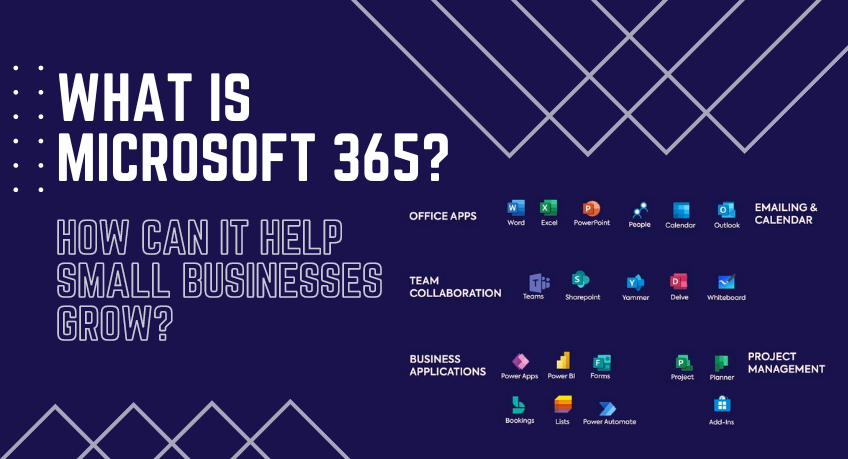
What is Microsoft 365, and how can it help small businesses grow?

Microsoft 365, formerly known as Office 365, is a robust suite of productivity and collaboration tools designed to enhance business operations. From its inception as a simple set of office applications, Microsoft 365 has evolved into a comprehensive business solution. It offers a vast range of features that can help businesses of all sizes to grow. Its powerful tools, coupled with its versatility and scalability, can make a significant difference in how a business operates, especially in today’s digital and interconnected world.

Features and services of Microsoft 365?

Microsoft 365 offers various services designed to increase productivity and collaboration within businesses. The Office Suite includes familiar applications like Word, Excel, and PowerPoint. Once confined to desktop installations, these applications are now enhanced with cloud capabilities, allowing seamless collaboration and access from any internet-enabled device.

In addition to the Office Suite, Microsoft 365 streamlines email and calendaring with Outlook and Exchange. These tools go beyond simple messaging and scheduling, providing businesses with powerful organization and communication capabilities crucial in today’s fast-paced business environment.

For collaboration, Microsoft 365 offers tools like Teams and SharePoint. Teams is a hub for teamwork where you can chat, hold meetings, and share files and apps. On the other hand, SharePoint is a secure place to store, organize, share, and access information from any device.

Furthermore, Microsoft 365 includes business management tools like Bookings, simplifying scheduling and managing appointments, and Invoicing, which makes creating professional invoices easy. These are just the tip of the iceberg, as Microsoft 365 includes many other tools to help businesses manage their operations effectively.

How Microsoft 365 Helps Small Businesses Grow

Microsoft 365 can be a game-changer for small businesses. It enhances collaboration and communication through Teams and SharePoint, allowing seamless remote interaction. This can be particularly beneficial in the current climate, where remote work is becoming more prevalent.

Another significant benefit of Microsoft 365 for small businesses is its potential to improve productivity. The Office Suite’s cloud capabilities allow for real-time editing and sharing of documents, reducing time spent on back-and-forths and streamlining teamwork.

Microsoft 365 also ensures data security and compliance, a crucial aspect for businesses dealing with sensitive information. It provides built-in security measures and compliance tools, giving businesses peace of mind knowing their data is protected.

Lastly, the scalability and flexibility of Microsoft 365 make it a perfect fit for growing businesses. As a business expands, its software requirements can change. Microsoft 365’s scalable nature allows businesses to adjust their software usage based on their current needs.

The Benefits of Microsoft 365 for Small Businesses

Microsoft 365, formerly Office 365, is a comprehensive suite of productivity tools designed to boost business efficiency and collaboration. It offers many features that can aid businesses of all sizes, but small businesses, in particular, can reap significant benefits. From enhancing collaboration to improving productivity, ensuring data security, and providing scalability, Microsoft 365 is a game-changer for small business operations.

Enhancing Collaboration and Communication

One of the main advantages of Microsoft 365 for small businesses is its ability to enhance collaboration and communication. Tools such as Teams and SharePoint facilitate seamless interaction, even from remote locations. Teams serve as a hub for teamwork, allowing businesses to chat, hold meetings, and share files and apps. At the same time, SharePoint provides a secure platform for storing, organizing, sharing, and accessing information. This level of connectivity can help small businesses to operate more efficiently, regardless of their team’s geographical locations.

Improving Productivity

Microsoft 365 can significantly improve productivity within small businesses. Its Office Suite, which includes applications like Word, Excel, and PowerPoint, now comes with cloud capabilities, allowing for real-time editing and sharing of documents. This functionality reduces time spent on back-and-forths and streamlines teamwork. Furthermore, tools like Outlook and Exchange provide powerful organization and communication capabilities, beyond simple messaging and scheduling, that are crucial in today’s fast-paced business environment.

Ensuring Data Security and Compliance

Data security is vital for all businesses, and Microsoft 365 provides robust security measures and compliance tools. Small businesses dealing with sensitive information can have peace of mind knowing that their data is protected. Microsoft 365 includes built-in security features that safeguard business data and help maintain compliance with industry regulations, a critical aspect for small businesses aiming to establish trust with their clients and partners.

Differences plans of Microsoft 365 for Small Business

Microsoft 365 is a comprehensive suite of productivity tools designed to enhance business operations. It offers a variety of plans tailored to meet the needs of businesses of all sizes, including small businesses. Choosing the right strategy is crucial as it can significantly impact your business’s efficiency and growth. This post will explore the differences between the different Microsoft 365 small business plans.

Microsoft 365 Business Basic

The Microsoft 365 Business Basic plan is designed for businesses that require basic office applications and some cloud services. It includes web and mobile versions of Word, Excel, and PowerPoint, along with services like Microsoft Teams, cloud storage, and sharing through OneDrive. It also includes email and calendaring through Outlook and Exchange. This plan is ideal for businesses that need basic productivity tools and are just beginning to explore cloud-based services.

Microsoft 365 Business Standard

The Microsoft 365 Business Standard plan offers a more extensive range of features. It includes everything in the Business Basic plan, desktop versions of Office applications, and additional services like Publisher and Access. It also has more advanced tools for business management, like Bookings and Invoicing. This plan is well suited for businesses that need a broader range of productivity and management tools and prefer having the flexibility to use desktop applications and cloud services.

Microsoft 365 Business Premium

The Microsoft 365 Business Premium plan is the most comprehensive for small businesses. It includes everything in the Business Standard plan, plus advanced cybersecurity features like Advanced Threat Protection and Device Management. It also provides compliance solutions like Information Protection and Governance and Identity and Access Management. This plan is perfect for businesses that handle sensitive information and require top-tier security and compliance solutions and a full range of productivity tools.

Difference Between Microsoft 365 and Office 2021

Microsoft offers a range of productivity tools to cater to different user needs and preferences. Two of the most popular ones are Microsoft 365 and Office 2021. While they might seem similar because they provide access to well-known applications like Word, Excel, and PowerPoint, they differ in many ways. This blog post will delve into the differences between Microsoft 365 and Office 2021, providing insights to help users make an informed choice.

The choice between Microsoft 365 and Office 2021 depends on individual or business needs. If you need the latest features, regular updates, and access to cloud-based services for collaboration, Microsoft 365 is likely the better choice. However, if you need the core Office applications and prefer a one-time purchase without a recurring fee, Office 2021 may be more suitable. Understanding these differences can help you make the right choice for your productivity needs.

Microsoft 365: A Subscription-Based Service

Microsoft 365, formerly Office 365, is a subscription-based service that provides access to the latest versions of Microsoft Office applications, including Word, Excel, and PowerPoint. It also includes other productivity services enabled over the internet (cloud services).

Microsoft 365 offers several advantages:

  1. The subscription model ensures users can access the latest features, updates, and security improvements without upgrading their software suite.
  2. It includes cloud-based services like OneDrive, Microsoft Teams, and Exchange, which are unavailable with Office 2021. These tools facilitate collaboration, file sharing, and remote work.
  3. Microsoft 365 subscriptions come with different packages, so users can choose a plan that best fits their needs.

Office 2021: A One-Time Purchase

Office 2021, on the other hand, is a standalone product that users can purchase with a one-time fee. It provides access to the same core Office applications as Microsoft 365 but does not include all the bells and whistles of the subscription-based model.

Office 2021 is a good choice for users who want to avoid paying a recurring fee and don’t require the additional features offered by Microsoft 365. Once purchased, it’s yours to use indefinitely. However, it’s important to note that Office 2021 receives different frequent feature updates than Microsoft 365. Users will have access to security updates, but they won’t get new features that are added after the release of Office 2021.

Conclusion

In conclusion, Microsoft 365 is more than just a set of office applications. It’s a comprehensive business solution that can help small businesses grow by enhancing collaboration, improving productivity, ensuring data security and compliance, and providing scalability. The success stories of small businesses that have integrated Microsoft 365 into their operations are a testament to its value. By choosing Microsoft 365, businesses invest in tools and a foundation for growth, efficiency, and success.

Microsoft Windows Server 2022 Buyer’s Guide

Are you planning to upgrade your organization’s server infrastructure? Look no further than Microsoft Windows Server 2022, the latest edition of Microsoft’s renowned server operating system. With powerful features, enhanced security, and improved performance, Windows Server 2022 is a game-changer for businesses of all sizes.

In this Microsoft Windows Server 2022 Buyer’s Guide, we will walk you through the key aspects and benefits of Windows Server 2022, helping you make an informed decision for your organization’s server needs.

1. Enhanced Security:
Keeping your data and systems secure is paramount, with cyber threats constantly evolving. Windows Server 2022 brings advanced security features like a secured-core server, secure DNS, and improved encryption capabilities. These additions provide a robust defense against malware, unauthorized access, and data breaches, ensuring the protection of your critical business information.

2. Improved Performance:
Windows Server 2022 is designed to optimize performance and ensure seamless operations. The operating system leverages innovations such as Storage Migration Service, delivering enhanced speed and efficiency in storage management. Additionally, in-memory database caching and Azure Arc integration improve performance and scalability, making it an ideal choice for businesses with growing workloads.

3. Hybrid Cloud Capabilities:
Windows Server 2022 seamlessly integrates with Azure, Microsoft’s cloud computing platform. This integration enables businesses to leverage the power of the hybrid cloud, allowing for the migration of workloads between on-premises servers and the cloud. Empower your organization with the flexibility to scale resources as needed and take advantage of innovative cloud services while retaining control over your infrastructure.

4. Simplified Management:
Efficient server management is crucial for maintaining productivity and minimizing downtime. Windows Server 2022 introduces new management tools and features such as Windows Admin Center and Windows Server Core edition. These tools offer a simplified and intuitive server management interface, enabling administrators to perform tasks quickly and effectively.

5. Application Compatibility:
Windows Server 2022 ensures seamless application compatibility, enabling businesses to run their existing applications without hiccups. This allows for a smooth transition and minimizes disruptions during the upgrading process. Additionally, the operating system supports containerization, facilitating the modernization of applications and leveraging the scalability and agility of containerized deployments.

Microsoft Windows Server 2022 is a robust and secure solution for organizations seeking to enhance their server infrastructure. With its advanced security features, improved performance, seamless cloud integration, simplified management tools, and application compatibility, Windows Server 2022 offers a comprehensive package for businesses of all sizes.

When considering an upgrade, trust in the capabilities of Windows Server 2022 to streamline operations, boost productivity, and safeguard your data. Make the smart choice for your organization’s future growth by choosing Microsoft Windows Server 2022 as your preferred server operating system.

Microsoft Windows Server 2022: Must Know

Microsoft Windows Server 2022 is the latest version of the Windows Server operating system, released by Microsoft in October 2021. It is designed specifically for a server operating system and offers various features and improvements compared to its predecessors.

Some key highlights of Windows Server 2022 include:

1. Hybrid capabilities: Windows Server 2022 helps facilitate hybrid cloud deployments by offering seamless integration with Microsoft Azure services. It enables organizations to extend their on-premises infrastructure to the cloud and leverage Azure services for scalability, security, and management.

2. Security enhancements: There are several security enhancements in Windows Server 2022 to strengthen the overall security posture. These include secure default settings, support for Secure Core servers, Windows Defender Antivirus and Windows Defender Firewall improvements, strengthened authentication mechanisms, and enhanced threat detection and response capabilities.

3. Storage improvements: Windows Server 2022 introduces Storage Migration Service (SMS), which simplifies the process of migrating servers and their data to newer hardware or the cloud. It also includes improvements to Storage Spaces Direct (S2D) and File Server Resource Manager (FSRM), providing better scalability and performance.

4. Hyper-V enhancements: Hyper-V, the virtualization platform in Windows Server, sees various improvements in the 2022 version. It introduces features like GPU pass-through for virtual machines, resizable BAR support, support for VM quick creation, and VM fleet management, allowing organizations to manage their virtualized infrastructure efficiently.

5. Application compatibility: Windows Server 2022 focuses on improving application compatibility and ease of migration. It offers compatibility for legacy applications and provides tools like Azure Migrate and App Compatibility FOD (Feature on Demand) to streamline the application migration process.

6. Windows Admin Center: Windows Server 2022 works seamlessly with Windows Admin Center, a web-based management tool with a centralized interface for managing servers, clusters, and hyper-converged infrastructure. It offers a comprehensive set of GUI-based server management, monitoring, and troubleshooting tools.

Windows Server 2022 is available in different editions, including Standard, Datacenter, and Essentials, each with specific features and licensing options to cater to various business needs.

Windows Server 2022 delivers an updated and feature-rich server operating system that aims to address the evolving needs of modern data centers, hybrid cloud environments, and virtualization technologies.

What is Windows Server 2022?

Windows Server 2022 is the latest version of Microsoft’s server operating system. It is designed to provide a reliable, secure, and scalable platform for various server applications and services. It includes many new features and improvements over its predecessor, Windows Server 2019.

Some key features of Windows Server 2022 include enhanced security, improved performance, increased scalability, and new management capabilities. It introduces advanced multilayer security measures to protect against evolving threats and provides features like a secured core server and secured virtualization to safeguard critical workloads.

Windows Server 2022 also brings improvements in terms of performance and scalability. It includes optimizations for modern hardware architectures to deliver faster and more efficient performance. It supports higher VM density, enhanced storage performance, and improved networking capabilities.

Windows Server 2022 introduces new management tools and features to simplify server administration. It includes an improved Windows Admin Center, which offers a modern web-based interface for managing servers, clusters, and hybrid environments. It also provides enhanced hybrid capabilities to integrate with Azure services and enables seamless management and migration of workloads between on-premises and cloud environments.

Overall, Windows Server 2022 is a robust server operating system that offers enhanced security, performance, scalability, and management capabilities for organizations of all sizes.

Different Versions of the Microsoft Server 2022

Microsoft has yet to officially release or announce any specific versions of Windows Server 2022. However, it is worth noting that Microsoft typically offers various editions of their server operating systems, each tailored to different usage scenarios and customer needs.

1. Standard Edition:

Designed for small to medium-sized businesses, it includes general-purpose server functionality with features like Active Directory, file and print services, and remote access.

Windows Server 2022 Standard is designed to provide a robust and reliable platform for running enterprise-level applications and services. It offers a range of features and improvements, including enhanced security, increased performance, and improved scalability.

2. Datacenter Edition:

Geared towards large organizations and enterprises, it provides advanced virtualization capabilities, including unlimited Hyper-V and Windows Server containers.

Windows Server 2022 Data Center is the latest version of Microsoft’s server operating system. It is designed to provide a scalable and reliable platform for running enterprise-level applications and services. Windows Server 2022 Data Center offers various features and capabilities to support various data center needs, including virtualization, storage management, network services, security, and administration.

3. Essentials Edition:

Targeted at small businesses with up to 25 users, it offers simplified management tools, integration with cloud services, and Windows Server roles and features.

4. Web Edition:

Focused on hosting websites and web applications, it provides a more cost-effective option for web hosting providers.

Please note that this information is based on previous versions of Windows Server, and Microsoft may release official details on specific editions for Windows Server 2022 in the future. Keep an eye on Microsoft’s official website and announcements for the most up-to-date information.

Windows Server 2022 Licensing Overview

Pricing and licensing overview
Windows Server 2022 Edition Ideal for Licensing model CAL requirements Suggested Retail Price (MSRP)
Datacenter Highly virtualized datacenters and cloud environments Core-based Windows Server CAL $6,155
Standard Physical or minimally virtualized environments Core-based Windows Server CAL $1069
Essentials Small businesses with up to 25 users and 50 devices Specialty servers (server license) No CAL required $501

[1] CALs are required for every user or device accessing a server. See the Product Use Rights for details.

[2] Datacenter and Standard edition pricing is for 16 core licenses.

[3] Up to 10 cores and 1 VM on single-socket servers. Windows Server Essentials is available through our OEM Server Hardware partners.

[4] Pricing is shown in USD and may vary from country to country.


Windows Server 2022 Licensing: In Details

Windows Server 202 is a server operating system designed and developed by Microsoft. It is the successor to Windows Server 2019 and is part of the Windows NT family of operating systems.

Licensing for Windows Server 202 is done through the Windows Server 202 Licensing model, which includes several editions, each with its own features and licensing requirements. Here are the details of the Windows Server 202 licensing:

1. Editions: Windows Server 202 comes in several editions, including:
– Datacenter Edition: This edition is designed for highly virtualized data centers and offers unlimited virtualization rights along with advanced features such as software-defined networking and storage.
– Standard Edition: This is suitable for non-virtualized or lightly virtualized environments. It provides limited virtualization rights and fewer advanced features than Datacenter Edition.
– Essentials Edition: This edition is tailored for small businesses with up to 25 users and 50 devices. It offers a simplified server management experience and supports basic server functions.

2. Licensing Model: Windows Server 202 uses a Core-based licensing model, which means the licenses are based on the number of processor cores in the server. You need to buy the appropriate number of Core licenses to cover all the physical cores in the server.

3. Core Licenses: Each physical processor in the server requires a minimum of 8 Core licenses, and there is a minimum purchase requirement of 16 Core licenses per server. Additional Core licenses can be purchased in increments of 2 cores. For example, if you have a server with two physical processors, each with 8 cores, you would need a minimum of 16 Core licenses (8 cores per processor) to license the server.

4. CAL (Client Access License) Requirements: Besides the Core licenses, you may need to purchase CALs to access Windows Server 202 based on your edition. CALs are required for each user or device that directly or indirectly accesses the server’s features or data. Datacenter Edition does not need CALs, while Standard and Essentials Editions have CAL requirements.

5. Licensing Scenarios: Windows Server 202 offers various licensing scenarios and options, such as:

– Physical Servers: You can license each physical server according to the number of cores as mentioned earlier.
– Virtual Servers: If you have a highly virtualized environment, you can license all the physical cores in the server (minimum of 16 Core licenses) and get unlimited virtualization rights for both Datacenter and Standard Editions.
– Containers and Hyper-V: Windows Server 202 allows you to use the same licensing model for containers and Hyper-V instances, i.e., you need to license all the cores of the host server running the containers or virtual machines.

It’s important to note that the details provided here are a general overview of Windows Server 202 licensing. It’s recommended to consult Microsoft’s official licensing documentation or contact a licensing specialist to get accurate and up-to-date information based on your specific needs and requirements.

Upgrading to New Windows Server 2022

Upgrading to Windows Server 2022 from an older version involves a few steps to ensure a smooth transition. Here’s a general guide to help you with the process:

1. Compatibility Check: Start by checking the compatibility of your existing hardware and software with Windows Server 2022. Review the system requirements and verify that your server meets them. Additionally, check the compatibility of any third-party applications or services critical to your environment.

2. Backup: Before proceeding with any major upgrade, creating a complete backup of your existing server is crucial. This will be a safety net if anything goes wrong during the upgrade process.

3. Evaluate Licensing: Ensure that your licensing is valid and covers the upgrade to Windows Server 2022. If necessary, acquire any additional licenses required for the new version.

4. Prepare the Migration Plan: Develop a detailed migration plan that includes the order in which you will migrate your servers, how you’ll handle data migration, and any potential downtime or disruptions. Identify any dependencies between servers to ensure a smooth transition.

5. Perform a Test Migration: It is advisable to perform a test migration in a non-production environment to simulate the process and uncover any potential issues. This will help you refine your migration plan and mitigate any risks.

6. Install Windows Server 2022: Once you’re confident in your migration plan, install Windows Server 2022. This can be done by performing an in-place upgrade on the existing server or setting up a new server and migrating your data and services.

7. Migrate Data and Services: If you’re performing a fresh installation, transfer your data and services from the older server to the new one using your created migration plan. Ensure that all necessary configurations, permissions, and settings are properly migrated.

8. Test and Validate: After the migration, thoroughly test the functionality of your systems, applications, and services running on Windows Server 2022. Validate that everything works as expected and that any dependencies have been correctly addressed.

9. Decommission the Old Server: Once you’re confident that the migration was successful and all systems are running smoothly on Windows Server 2022, decommission the old server and remove it from your infrastructure.

10. Post-Migration Tasks: Perform any necessary post-migration tasks, such as updating documentation, verifying backups, adjusting security settings, and monitoring the performance of your new server environment.

Remember, each organization’s setup and requirements may differ, so it’s essential to tailor the migration process to your needs. It is also recommended to consult official documentation and seek assistance from Microsoft support or qualified professionals to ensure a successful upgrade. Contact Webtech Nepal, authorized Microsoft Reseller Partner to buy Windows Server,


Benefits of Buying Microsoft Products in Nepal

Benefits of Buying Microsoft Products in Nepal with Microsoft Partner Nepal

is not just a matter of convenience but also of guaranteeing safety and quality. Opting for a reputable reseller lowers the risks of purchasing counterfeit or unauthorized products, preventing potential legal, security, and compatibility issues. Webtech Nepal will explore the advantages of buying from a trusted Microsoft reseller partner, highlighting product warranties, reliable technical support, professional advice, and the assurance of adhering to licensing compliance.

Purchasing Microsoft products from Webtech Nepal ensures genuine products, competitive pricing, technical expertise, license management, value-added services, and the convenience of a local presence. It provides peace of mind and a reliable source for all your Microsoft software needs.

Buying from a trusted Microsoft reseller partner in Nepal comes with several benefits. Here are some of them:

1. Authenticity and Genuine Products: Webtech Nepal, a trusted Microsoft reseller partner, ensures you receive genuine and authorized Microsoft products. They source their products directly from Microsoft, guaranteeing authenticity and eliminating concerns about counterfeit or pirated software.

2. Product Selection: Webtech Nepal, a Microsoft reseller partner, offers a wide range of products from Microsoft, including operating systems, office productivity suites, server software, cloud-based solutions, and more. Webtech can help you choose the right products based on your specific requirements and provide customized solutions.

3. Competitive Pricing: Webtech Nepal often offers competitive pricing for Microsoft products, as we have established partnerships with Microsoft. We can provide cost-effective solutions tailored to your budget, saving you money compared to purchasing directly from Microsoft.

4. Technical Expertise and Support: We are trained and knowledgeable about Microsoft products. Webtech Nepal can offer technical assistance, answer your queries, and guide you through purchasing. Additionally, we can provide after-sales support, troubleshooting, and any necessary product updates or upgrades.

5. License Management: Webtech Nepal can help manage your software licenses effectively. We can advise on the appropriate licensing programs for your organization or business. We can assist with license renewals, migrations, and compliance, ensuring you stay within the legal framework and avoid potential licensing issues.

6. Value-Added Services: Webtech Nepal offers value-added services, such as implementation support, training, and consulting. We can help you with the installation and configuration of Microsoft software, ensuring smooth deployment and optimal utilization of the products.

7. Local Presence: Choosing a trusted Microsoft reseller partner in Nepal ensures you have a local point of contact. This can be advantageous regarding communication, service delivery, and addressing regional requirements or challenges.

8. Enhanced Security: Trusted Microsoft resellers understand the importance of security, especially in today’s digital landscape. Webtech Nepal can guide the implementation of security measures and ensure your Microsoft software is up-to-date with the latest security patches and updates. This helps protect your systems and data from potential cyber threats.

9. Tailored Solutions: Webtech Nepal has in-depth knowledge of Microsoft’s product portfolio and can recommend solutions tailored to your needs. Whether you are an individual, small business, or enterprise, We can identify the most suitable Microsoft products and licensing options that align with your requirements and objectives.

10. Simplified Procurement: Partnering with a reseller simplifies the procurement process. We have established relationships with Microsoft and can streamline the ordering, delivery, and invoicing processes, making purchasing Microsoft products more efficient and hassle-free.

11. Access to Promotions and Special Offers: Reseller partners often have access to promotions, discounts, and special offers provided by Microsoft. They can inform you about these opportunities and help you take advantage of cost-saving initiatives, allowing you to maximize the value of your investment.

12. Knowledge Transfer and Training: Webtech Nepal can provide training and knowledge transfer sessions to assist you and your team effectively use Microsoft products. We can offer workshops, seminars, or online resources to enhance your understanding and utilization of the software, improving productivity and efficiency.

13. Strategic Partner for Business Growth: Webtech Nepal can be a valuable strategic partner for your business growth. We can advise you on leveraging Microsoft technology to optimize operations, enhance collaboration, and drive innovation. Our insights and expertise can contribute to your long-term success and digital transformation journey.

14. Strong Relationship with Microsoft: Established reseller partners developing solid relationships with Microsoft. This lets them stay updated on the latest product advancements, roadmap, and developments. By aligning with a trusted reseller partner, you can gain insights into upcoming releases, feature updates, and new solutions, keeping you ahead of the curve in technology adoption.

In conclusion, buying from a trusted Microsoft reseller partner in Nepal provides various benefits, including enhanced security, tailored solutions, simplified procurement, promotion access, knowledge transfer, and guidance for business growth. It’s a reliable and convenient way to acquire Microsoft products and leverage their full potential.

Buy Microsoft 365 Plans from the Trusted Microsoft Reseller Partner in Nepal

Microsoft 365 is a powerful solution that empowers organizations to enhance productivity, promote collaboration, and embrace the benefits of the cloud. While purchasing Microsoft 365 plans in Nepal, partnering with a trusted Microsoft Reseller is essential. Webtech Nepal is a Trusted Microsoft Reseller Partner in Nepal that brings expertise, competitive pricing, and dedicated customer support and ensures the authenticity of your licenses. Choose Webtech Nepal, a trustworthy , to provide a smooth purchasing experience and ongoing support for your Microsoft 365 journey.

In today’s technology-driven world, businesses of all sizes rely heavily on efficient communication, collaboration, and productivity tools. Microsoft 365 has emerged as a leading solution that combines the power of familiar Microsoft Office applications with cloud-based services, enabling users to work effectively from anywhere in the world. Suppose you are based in Nepal and looking to purchase Microsoft 365 plans. In that case, seeking a trusted Microsoft Reseller Partner is essential to ensure a seamless purchasing experience and reliable customer support.

Why Choose Microsoft 365 Business?

Microsoft 365 offers a comprehensive suite of cloud-based applications and services that cater to the diverse needs of both individuals and businesses. With Microsoft 365 Business Plan, users can access familiar tools like Word, Excel, PowerPoint, and Outlook, along with a host of other collaboration and communication tools such as Teams and OneDrive.

Here are some key reasons why Microsoft 365 is a preferred choice for organizations:

1. Productivity and Collaboration: Microsoft 365 provides tools that enhance productivity and enable seamless collaboration among team members. It offers real-time co-authoring, file sharing, and integration across various services, enabling teams to work together efficiently.

2. Cloud-Based Accessibility: With Microsoft 365’s cloud-based approach, users can access their files and applications from any device with an internet connection. This flexibility allows users to work remotely, whether traveling or working from home.

3. Enhanced Security: Microsoft takes security seriously and integrates advanced security features into the Microsoft 365 suite. These measures include data encryption, multi-factor authentication, and built-in compliance capabilities, which help protect sensitive information and ensure regulatory compliance.

Choosing a Trusted Microsoft Reseller Partner in Nepal:

When it comes to purchasing Microsoft 365, it is crucial to choose a reliable Microsoft Reseller Partner in Nepal. Here’s why:

1. Expert Knowledge: Trusted Microsoft Reseller Partners possess in-depth knowledge and expertise about Microsoft products and licensing. They can guide you in selecting the most suitable Microsoft 365 plan based on your requirements.

2. Competitive Pricing: Authorized Microsoft Resellers offer competitive pricing, ensuring you get the best value for your investment. They can provide subscription-based pricing options, allowing you to choose the most cost-effective plan for your organization.

3. Dedicated Customer Support: Working with a reputable Microsoft Reseller Partner ensures access to dedicated customer support. They understand the complexities of Microsoft licensing and can assist with any licensing or technical issues, providing prompt resolutions.

4. Genuine Licensing: Purchasing through trusted Microsoft Reseller Partners ensures you receive genuine Microsoft licenses. This helps protect your organization from the risks of counterfeit or unauthorized software.

Boost Employee Performance with a Learning Management System

A well-designed Learning Management System (LMS) is essential for any organization that wants to improve employee productivity and streamline onboarding. By providing a structured and organized approach to learning, the LMS can help employees quickly acquire the knowledge and skills they need to perform their job responsibilities effectively. The LMS can also help managers track employee progress and identify areas where additional training may be required.

One aspect that highlights the importance of employee performance is its direct link to organizational profitability. Research has consistently shown that companies with high-performing employees have higher profit margins than those with low-performing ones. This is because high-performing employees are often more efficient, produce better quality work, and possess more vital problem-solving skills – all factors that directly impact financial gains for an organization.

Moreover, strong employee performance can also lead to increased employee satisfaction and retention rates. When individuals feel valued and recognized for their contributions, they are more likely to remain committed to their work and stay motivated to perform at a high level. This also has a positive ripple effect on team dynamics; when one employee performs well, it inspires others to step up their game too. Ultimately, this leads to a more productive workforce as a whole.

In conclusion, understanding the importance of employee performance is crucial for any organization’s success. By prioritizing and investing in strategies that support high-performance levels among employees – such as utilizing learning management systems – businesses can expect significant improvements in productivity, profitability, and employee satisfaction levels.

What is a Learning Management System?

A Learning Management System (LMS) is a powerful tool that enhances employee learning and development within an organization. It is a centralized platform for delivering, tracking, and managing training programs. Gone are the days of manual tracking spreadsheets or inconvenient in-person training. With an LMS, companies can easily create and deliver engaging online courses that cater to the needs of their employees.

One key advantage of the Learning Management System (LMS ) is its ability to track and monitor learner progress. This feature allows organizations to ensure that their employees complete required training while providing valuable insights into individual performance. By analyzing data on completion rates, assessment scores, and learner feedback, managers can identify areas for improvement and implement targeted strategies to boost employee performance.

A Learning Management System (LMS) promotes continuous learning by offering a variety of content formats, such as videos, documents, quizzes, and interactive simulations. This enables employees to engage with information in ways that best suit their learning styles. Additionally, some advanced LMS platforms provide personalized recommendations based on previous learning activities or job requirements – allowing employees to focus on areas that need attention while making the most efficient use of their time.

A Learning Management System (LMS) is another technology solution and a catalyst for driving employee development and enhancing overall organizational performance. By leveraging the capabilities of an LMS to deliver engaging training content tailored to individual needs, companies can foster continuous learning among their workforce at scale.

Benefits of Implementing a Learning Management System

Implementing a learning management system (LMS) can benefit companies looking to boost employee performance. One key advantage is the ability to provide consistent and standardized training across the organization. With an LMS, companies can ensure that employees receive uniform information and knowledge on various subjects, eliminating discrepancies or gaps in their learning experience. LMS enhances their skills and creates a sense of equality among employees.

Another benefit of using an LMS is its flexibility regarding learning styles. Traditional training methods often cater to a specific type of learner, leaving others behind. However, with an LMS, companies can incorporate different types of content, such as videos, audio files, quizzes, and interactive modules, which accommodate diverse learning preferences.

Organizations can engage learners more effectively and increase knowledge retention by tailoring the training materials to fit various styles.
Furthermore, implementing an LMS lets companies easily track and measure employees’ progress. Using analytics and reporting tools offered by most modern LMS platforms, we can gather data on employee performance during training sessions, such as completion rates and scores on assessments or evaluations. Managers can then use this data to identify further support or improvement areas and make informed decisions regarding employee development initiatives.

Implementing Learning Management systems brings numerous advantages over traditional training methods that will undoubtedly foster improved employee performance within organizations.

How to Choose the Right Learning Management System

When choosing the right Learning Management System (LMS) for your organization, one of the most critical factors is the ease of use. Employees should be able to navigate through the platform effortlessly and access the information they need with minimal effort. Look for an LMS with a user-friendly interface and intuitive features that can be easily understood by tech-savvy employees and those less comfortable with technology.

Additionally, it’s essential to choose an LMS that aligns with your organization’s specific training needs. Consider what content you will deliver and how you want it presented. Some LMS platforms offer various formats, such as videos, interactive quizzes, or e-books, which can make learning more engaging and effective. Furthermore, look for an LMS that allows customization so that you can tailor the system to fit your organization’s unique requirements.

Finally, remember compatibility and integration capabilities when selecting an LMS. Ensure that your chosen system can integrate smoothly with other software applications used in your organization, such as HRIS or CRM systems. This seamless integration will allow for efficient data transfer between platforms and streamline administrative tasks, saving time and effort for both employees and administrators.

By prioritizing ease of use, aligning with specific training needs, and ensuring compatibility and integration capabilities when choosing an LMS, organizations can boost employee performance effectively while setting themselves up for long-term success in their learning initiatives.

Best Practices for Using a Learning Management System

One of the best practices for using a learning management system (LMS) is to create engaging and interactive content. Gone are the days of simply uploading static PDFs and calling it an online course. Organizations should leverage the technology in an LMS to boost employee performance and create dynamic and immersive learning experiences. Incorporating videos, quizzes, simulations, and gamification can make learning fun and engaging for employees, increasing knowledge retention and application in the workplace.

Another important best practice is to assess and evaluate the effectiveness of your LMS regularly. Tracking completion rates, assessment scores, and learner feedback can provide valuable insights into how well your training programs work. This data can help identify areas for improvement or gaps in knowledge that must be addressed. You can make data-driven decisions to enhance your training initiatives by continuously evaluating your LMS’s impact on employee performance.

Furthermore, providing ongoing support and resources for learners is key to maximizing the benefits of an LMS. Employees should have access to a helpdesk or support forum to ask questions or troubleshoot issues they may encounter while using the system. Additionally, creating a repository of additional resources such as job aids, reference materials, or further reading materials can help reinforce learning even after completing a course. By offering ongoing support and resources within your LMS framework, you empower employees to take control of their development journey – leading to improved performance outcomes.

Conclusion: Maximizing Employee Performance through Continuous Learning

In conclusion, continuous learning plays a crucial role in maximizing employee performance. By investing in a learning management system (LMS), organizations can provide employees with access to training materials and resources anytime, anywhere. This flexibility allows individuals to learn at their own pace and engage with the content in a way that suits their learning styles.

Not only does continuous learning improve employee knowledge and skills, but it also fosters a culture of growth and development within the organization. When employees feel supported and encouraged to expand their capabilities continually, they become more engaged and motivated. This leads to higher productivity levels and ultimately drives business success.

Furthermore, utilizing an LMS enables organizations to track employee progress and identify areas where additional support may be needed. Employers can tailor future learning experiences to address specific knowledge gaps or skill deficiencies by regularly assessing employee performance through quizzes or assessments embedded within the platform.

Overall, implementing a comprehensive learning management system is essential for organizations seeking to maximize employee performance. Employees are empowered to enhance their skills and stay up-to-date with industry trends through continuous learning opportunities.

Additionally, this investment demonstrates a commitment from leadership toward fostering an environment of professional growth – leading to improved employee engagement levels. By embracing lifelong learning as an organizational priority, companies set themselves up for continued success in today’s ever-evolving business landscape.

10 Essentials Features of Learning Management System

A Learning Management System (LMS) is a software application that facilitates the management, delivery, and tracking of educational courses and training programs. LMS platforms are widely used in schools, universities, corporations, and other organizations to deliver and manage online learning experiences.

However, not all Learning Management System platforms are created equal. A good LMS encompasses many features designed to simplify administration, engage learners, and deliver effective educational content. In this article, we will explore some of the essential features of a Learning Management System and discuss how a Learning Management System (LMS) contribute to effective teaching and learning in the modern era.

1. User-Friendly Interface:

An intuitive and user-friendly interface is crucial for both educators and learners. A good Learning Management System should have a well-organized and visually appealing interface that enables easy navigation, seamless content access, and a consistent user experience.

2. Course Creation and Management:

The capability to create, customize, and manage courses effortlessly is a fundamental feature of any Learning Management System. Look for features such as drag-and-drop editors, multimedia integration, assessment tools, and the ability to organize course materials in a structured manner.

3. Comprehensive Reporting and Analytics:

An Learning Management System should provide robust reporting and analytics functionalities to assess the learning process’s effectiveness. Detailed insights into learner performance, course completion rates, and participation data enable educators to make data-driven decisions and continuously improve their teaching methods.

4. Collaboration and Communication Tools:

Effective collaboration and communication tools are vital for fostering engagement and interaction within a virtual learning environment. Look for features like discussion forums, real-time chat, messaging, and group collaboration functionalities that encourage learner collaboration and support effective communication between learners and instructors.

5. Mobile Compatibility:

With the increasing popularity of mobile devices, having a Learning Management System compatible with various platforms and devices is essential. A good LMS should offer a responsive design that adapts to different screen sizes and ensures a seamless user experience on desktops, laptops, tablets, and smartphones.

6. Gamification and Interactive Features:

Gamification elements, such as badges, leader-boards, and rewards, can significantly enhance learner engagement and motivation. Additionally, interactive features like simulations, quizzes, and multimedia content transform traditional learning into an interactive and enjoyable experience.

7. Integration Capabilities:

A good Learning Management System should have integration capabilities with other educational tools and systems. The ability to seamlessly integrate with Student Information Systems (SIS), third-party content providers, video hosting platforms, and e-commerce systems can significantly enhance the overall functionality of the LMS and streamline administrative tasks.

8. Customization and Branding:

The ability to customize the Learning Management System to match an institution’s branding and specific requirements is a valuable feature. Look for a platform that allows you to customize the look and feel, add institution logos, customize learner dashboards, and tailor notifications to enhance the overall user experience.

9. Strong Security Measures:

Protecting learner data is a paramount concern, so a good LMS must prioritize security. Look for features such as data encryption, secure login protocols, role-based access controls, and regular security updates to ensure the highest level of protection for learners and instructors.

10. Ongoing Support and Updates:

Last but not least, a good Learning Management System should have a dedicated support team that provides timely assistance and addresses any technical issues that may arise. Regular updates and improvements to the platform also demonstrate the vendor’s commitment to continuous improvement and meeting user needs effectively.

Conclusion:

When selecting a Learning Management System(LMS), it’s important to consider a wide range of features that align with your institution’s needs and goals. A good LMS should provide a user-friendly interface, robust course creation and management tools, comprehensive reporting and analytics functionalities, collaboration and communication features, mobile compatibility, gamification options, seamless integration capabilities, customization options, strong security measures, and ongoing support and updates. Choosing the right Learning Management System(LMS ) with these features will pave the way for a practical online learning experience for educators and learners alike.