Beginners guide to Git and Github

As a beginner, Git and GitHub might seem daunting, but they are essential tools for any developer or anyone who wants to collaborate on a project. Git is a version control system, while GitHub is a web-based hosting service for Git repositories. In this blog post, we’ll discuss the basics of Git and GitHub and how to use them.

What is Git?

Git is a distributed version control system that helps track changes to files and directories. With Git, you can keep track of changes to your code, collaborate with others on a project, and revert to previous versions of your code if necessary.
Git is a command-line tool that works on Windows, Mac, and Linux. You can also use Git with a graphical user interface (GUI).

What is GitHub?

GitHub is a web-based hosting service for Git repositories. It provides tools for collaboration, code review, and project management. GitHub lets you store your Git repositories online and collaborate with others on a project.

GitHub offers free and paid plans. The free plan includes unlimited public repositories, while the paid plans provide additional features such as private repositories and advanced collaboration tools.

How to use Git and GitHub?

To get started with Git and GitHub, you need to follow these basic steps:

Step 1: Install Git

First, you need to install Git on your computer. You can download Git from the official website and follow the installation instructions for your operating system.

Step 2: Create a GitHub account

Next, you need to create a GitHub account. Go to the GitHub website and sign up for an account.

Step 3: Create a Git repository

After installing Git and creating a GitHub account, you need to create a Git repository. A Git repository is a folder that contains your code and version history.

To create a Git repository, follow these steps:

  1. Create a new folder on your computer.
  2. Open the command prompt or terminal and navigate to the folder.
  3. Run the command git init to initialize the repository.

Step 4: Add files to the repository

After creating a Git repository, you need to add files to the repository. To add files to the repository, follow these steps:

  1. Copy the files you want to add to the repository into the repository folder.
  2. Run the command git add . to stage the files for the next commit.

Step 5: Commit changes

After adding files to the repository, you need to commit the changes. A commit is a snapshot of the repository at a specific point in time.

To commit changes, follow these steps:

  1. Run the command git commit -m "commit message" to create a new commit.
  2. Write a descriptive commit message that explains the changes you made.

Step 6: Push changes to GitHub

After committing changes, you need to push the changes to GitHub. To push changes to GitHub, follow these steps:

  1. Create a new repository on GitHub.
  2. Run the command git remote add origin [GitHub repository URL] to add the GitHub repository as the remote origin.
  3. Run the command git push -u origin main to push the changes to GitHub.

Conclusion

Git and GitHub are essential tools for any developer or anyone who wants to collaborate on a project. In this blog post, we discussed the basics of Git and GitHub and how to use them. With Git and GitHub, you can keep track of changes to your code, collaborate with others on a project, and revert to previous versions of your code if necessary.

Best Way to Migrate a WordPress Website Safely

Migrating a WordPress website can be a complicated and time-consuming process. Whether moving to a new web hosting provider, upgrading your existing services, or just wanting to overhaul your website, ensuring everything goes smoothly is essential. Fortunately, there are plenty of effective strategies for making the transition as smooth and secure as possible. This article will explore the best tips for quickly and safely migrating your WordPress site.

Before you begin the migration process, it’s essential to back up your website. This ensures you have a backup to restore if anything goes wrong during the transition. To ensure everything is recovered, consider completely backing up your entire site before starting the migration process. This will include all files and databases related to your WordPress install.

It can also be helpful to use a plugin like Duplicator or All-in-One Migration to handle data transfer between servers. Such plugins can simplify the process by providing an easy interface for transferring files and databases with minimal effort. Please carefully read through all instructions these plugins provide before migrating, as they can save time and ensure everything goes smoothly.

Finally, update any URLs on your new server after completing the migration process. Any links pointing toward old locations must be updated for visitors to land on the correct pages when navigating your site. You can also redirect traffic from old URLs with 301 redirects so visitors are automatically taken where they should go when entering an outdated URL into their browser bar.

What is WordPress Migration?

WordPress migration is moving a WordPress website from one server to another. This can be done for various reasons, such as transferring an existing site to a new host, upgrading the hosting platform, or changing domain names. It’s essential to ensure your website is backed up on the old server and safely transferred to the new server before implementing changes. Preparing ahead is key to successfully migrating a WordPress site with minimal downtime and disruption.

Before migrating, it’s essential to make sure all backups are up-to-date. This includes files and databases, crucial aspects of any WordPress installation. Databases contain user accounts, posts/pages content, settings, comments, etc., while files have themes and plugins installed on your current installation. Additionally, you should review all currently installed plugins, as some may need reconfiguring once migrated over if they utilize database tables to function correctly on the new server environment. It’s also wise to ensure URLs stored within pages/posts reflect their correct path after the migration, so users don’t get 404 errors when navigating through pages within the live environment post-migration.

How to Migrate WordPress Website Safely?

Migrating a WordPress website can be an intimidating process. It is important to approach the process correctly to ensure data is recovered and to maximize the time and effort needed to complete the move. This article will provide step-by-step instructions on how to migrate a WordPress website from one server to another safely. We will cover how to back up your website data and files, transfer them over properly, and ensure everything works correctly afterward.

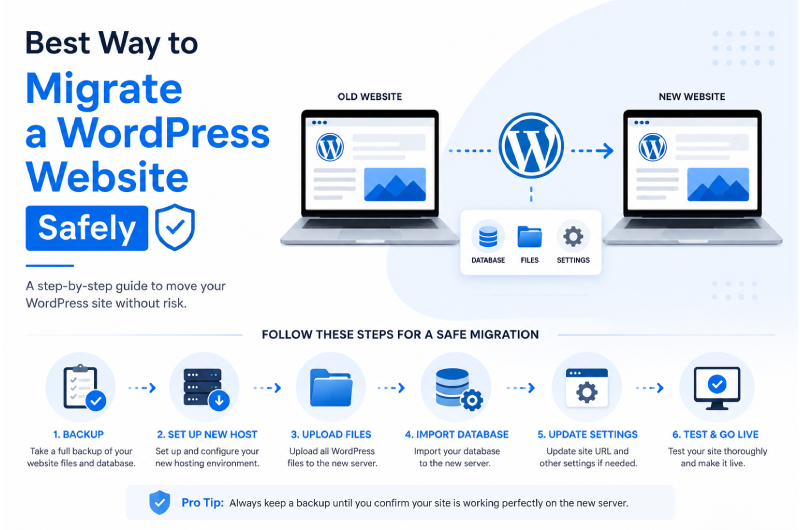
How to Migrate a WordPress Website Safely

Migrating a WordPress website doesn’t have to be complicated. Whether you’re moving to a new hosting provider, changing your domain, or upgrading your server, following the right process helps prevent data loss, downtime, and broken functionality. Follow these six essential steps for a smooth and secure WordPress migration.

Step 1: Backup Your Website

The first and most important step is creating a complete backup of your WordPress website. Make sure to back up your database, themes, plugins, uploads, and all other website files. Store the backup in a secure location, such as cloud storage or an external drive, so you can quickly restore your website if anything goes wrong during the migration.

Step 2: Choose a Reliable Web Hosting Provider

Select a hosting provider that offers excellent performance, strong security, automatic backups, and reliable customer support. Ensure your new hosting environment meets the latest WordPress requirements, including the recommended PHP version, sufficient storage, SSL support, and adequate server resources.

Step 3: Prepare Your Website for Migration

Before transferring your website, update WordPress core, themes, and plugins to their latest versions. Deactivate unnecessary plugins to reduce the risk of compatibility issues during migration. Cleaning up unused files and optimizing your website before moving can also improve the migration process.

Step 4: Migrate Files and Database

Upload all WordPress files to your new server and import your database using phpMyAdmin or a trusted migration plugin such as Duplicator or All-in-One WP Migration. After importing, verify that your wp-config.php file contains the correct database credentials and that all files have been transferred successfully.

Step 5: Update Website Settings

Once the migration is complete, update your website URL if necessary and review important configuration settings. Check permalink settings, update DNS records if you’re changing domains, configure SSL certificates, and verify that plugins and themes are working correctly on the new server.

Step 6: Test Everything Before Going Live

Before making your migrated website publicly accessible, thoroughly test every important feature. Check page loading speed, menus, forms, images, internal links, contact forms, and plugin functionality. Once everything works correctly, point your domain to the new server and monitor your website for any unexpected issues.

Pro Tip

Never delete your old website immediately after migration. Keep a complete backup and your previous hosting account active until you’ve confirmed that the new website is functioning perfectly and all data has been transferred successfully.

Finally, once everything looks good from an outside perspective, use an automated testing service like Selenium or BrowserStack to check for cross-browser compatibility issues or other technical errors. If everything passes with flying colors, you can push your updates live!

Conclusion: WordPress Migrating Safely

Before beginning any WordPress migration, ensuring a secure backup of your current site is essential. This way, should anything go wrong during the process, you’ll have a version of your website that you can quickly revert to the old one. Furthermore, you will only lose all your content if specific files are recovered or corrupted during the transfer. Additionally, double-check everything once it’s been moved over and ensure all links redirect correctly and any plugins work as expected.

Setting up SSL encryption on your new server or hosting provider before migrating WordPress is also recommended. This will ensure that data delivery from origin to destination is securely encrypted and will help protect against third-party data theft or manipulation. Lastly, depending on the hosting provider used for the new WordPress website, be sure to update any PHP versions necessary for compatibility with current plugins/themes being used to avoid potential compatibility errors after the migration has been completed.

How much does website development cost in Nepal?

Website development cost in Nepal is an essential factor to consider when planning the launch of a new website. It is important to understand the factors that affect the cost of website development to make a well-informed decision. The primary factors affecting website development costs in Nepal are the type and complexity of the project, labor costs, and quality assurance procedures.

The type of website being developed plays a vital role in determining its overall cost. If a simple static one-page website is sufficient for your needs, it can be done at a much lower price than if you are building a complex eCommerce store with multiple pages, functionality, and features. Additionally, labor costs also need to be considered when budgeting for your project – if you choose to hire professionals from outside Nepal, their fees will add additional overhead costs to your total budget.

Overview: What is Website Development?

Website development is a term used to describe creating and maintaining a website. It involves web design, programming, content creation, search engine optimization (SEO), and other aspects of website management. Website development can be expensive for businesses, but it is also essential to reach potential customers and increase brand awareness.

To understand how much it will cost to develop a website in Nepal, one must consider the project’s complexity. A simple static website with basic features such as a contact us page or blog may require fewer resources than a complex e-commerce site that needs payment gateways integrated into it. Once all aspects have been considered and the budget established, web developers can then estimate how much time and money will be required for the project.

Factors Affecting Cost

When it comes to website development costs in Nepal, many factors need to be taken into consideration. Understanding these factors can help you determine what kind of budget you should allocate for your project and how much you should expect the total costs to be. These factors include the project’s complexity, the website’s size and scope, additional tasks or customizations needed, and more.

The complexity of a website is one major factor that affects its overall development cost. A basic site with minimal functionality will be less expensive than an advanced e-commerce store or web application with integrated features like user registration and login forms, payment processing capabilities, search functions, etc. Additionally, any customization requests may also increase costs if they require additional coding or programming work.

What is the price of a one-page website?

Price range: between NPR 15,000 and NPR 30,000

This website has one page, sometimes known as a “landing page,” where users are directed after clicking an advertisement or email link.

These “one-page” websites can have extensive and intricate pages, although they typically have little substance.

This kind of website has a straightforward objective: to persuade the user to make a purchase, sign up for an offer, complete a form, dial a number, or download a file. Every content on the website is meant to encourage the user to finish this job.

These sites typically require the slightest effort to construct because they provide a clear and distinct purpose.

This kind of website is also appropriate if you want to establish a professional internet presence to reassure your clients. Then, a business card, flyer, document header, or any offline source is used by your consumers to reach your website.

How much does a dynamic website cost?

Price range: between NPR 45,000 and NPR 80,000+

The most typical website for small enterprises is of this type.
Usually, there are no page limits. You’ll find the following page kinds on these websites:

  • Homepage
  • About
  • Team
  • Mission/Vision
  • Services/Products
  • Appointment
  • Publications
  • Testimonials
  • Blog
  • Photo Gallery
  • Video Gallery
  • Contact

The website focuses on building the company’s identity, marketing its services and goods, and providing details like directions or business hours.

Similar to the one-page website mentioned above, the goal is always to persuade the user to follow an income-generating lead.

How much does an E-commerce site cost?

Price range: between NPR 1,00,000 and NPR 5,00,000+

The cost of setting up an online store can be a significant barrier for entrepreneurs who are considering launching their own e-commerce business. With the range of services and software available, it can be challenging to know exactly how much you need to budget to get your store off the ground.

It could be a straightforward marketing website with an e-commerce feature to offer a few direct goods or services, as in Click and Collect. Using a program like WordPress WooCommerce to build an online store is more superficial.

These solutions work well when you have standard e-commerce requirements without a need for specialized features.

Average Costs in Nepal

When businesses in Nepal consider website development, they often want to know the cost. Building a successful website requires a combination of services and technology that can vary widely, making it difficult to provide an exact answer. However, understanding the average costs associated with website development in Nepal can help organizations make more informed decisions while building their online presence.

Most websites require web hosting services, a content management system (CMS), and design work to create the site’s overall structure. The cost for these services can range from about NPR 45,000 for basic entry-level projects up to NPR 500000+ for more custom or complex initiatives. Additionally, ongoing maintenance and support fees typically add 10-15% of the total project costs each year after launch. Understanding these average costs is essential for any business planning to develop a website in Nepal.

Factors to Consider Before Developing a Website

Creating a website is essential for businesses looking to expand their reach and grow. However, before getting started, some factors need to be taken into account to ensure the website’s success. In Nepal, several cost considerations must be weighed when developing a website. This article will discuss how much it costs to create a website in Nepal and what key factors should be considered before taking this significant step.

Cost is essential when considering any web development project, which is no different in Nepal. Depending on the complexity of the site, web development can range from as little as NPR 15,000 up to thousands of bucks for more complex websites with extra features. Businesses need to determine their budget constraints before starting any project so they can plan accordingly and work within their financial parameters.

Popular Platforms for Website Development

When it comes to website development, there are a variety of popular platforms to choose from. Knowing which is best suited for your project can take time and effort, especially if you’re new to web development. The most popular platforms include WordPress, Joomla!, and Drupal – each with its strengths and weaknesses.

WordPress is the most popular platform of the three and has an easy-to-use interface that makes it ideal for those just starting out. It also has a massive library of plugins and themes, making customization relatively easy. However, while WordPress is user-friendly on the surface, it can be challenging to customize more complex features.

Joomla! is also popular among web developers due to its advanced content management system (CMS).

Conclusion

The bottom line is that website development costs in Nepal can vary greatly depending on the size and scope of the project. The complexity of the website, the number of pages, and the features required. Any additional services, such as SEO or digital marketing, will contribute to the overall cost. Even with a simple website, prices can range from a few hundred bucks to several thousand for full custom-built sites.

By understanding your needs and requirements before you start looking for quotes from a web development company, you’ll be in a better position to find an experienced company that can help you build an effective website at an affordable price. Researching what’s available in Nepal is also essential so that you know exactly what kind of services are available at each price point.

Free Web Hosting Migration with Webtech Nepal

The performance of your website and its availability to users are directly influenced by the web hosting business you use. Your search rankings will suffer, and your website’s traffic will decrease if you have to host that is either slow or unreliable. This is where Webtech Nepal comes in; we are pleased to provide hosting services that are both quick and dependable for a wide variety of websites, including those belonging to businesses, personal blogs, and online stores. You will never need to be concerned about downtime or slow load times when you use Webtech Nepal web hosting.

The procedure can be challenging and complex if you have never migrated a website before; even a single mistake or missing file might render the website inoperable. The website migration service provided by Webtech Nepal removes the possibility of such a happening. Your data will always be protected, thanks to our highly trained specialists’ usage of a secure data transfer technique, a full backup, and comprehensive testing procedures.

We at Webtech Nepal know the impact that downtime can have on the traffic and money generated by your website. During the migration, we will ensure that your website continues to function normally and is accessible to visitors. Because your customers can still use the site, you will be aware of all potential leads, sales, and earnings.

How to Migrate Your Website to Webtech Nepal for Free?

Changing your current website to the best web hosting providers may be complicated. Our staff knows this fact and As a result, we take significant measures to simplify this transition for you by following a four-step process.

Step 1: Sign up for a Webtech hosting package

Pick the web hosting plan that fits your needs well. Don’t hesitate to ask our customer service staff for guidance; we’ll be happy to assist you in finding the plan that best suits your website and your financial constraints.

Step 2: Provide access to your website

Contact our migration team and grant us access to your website so that we can complete the migration. This makes it possible for us to copy the site’s files. At this point, your work is done; we will take a backup from here.

Step 3: Wait for Migration to Complete

The process of migration can typically finish within a few days. You won’t experience any hiccups in service because your website will remain online and operational throughout the entire process.

Step 4: Complete the Setup of Your Email Account

After our team has mapped your current email settings to your new Webtech Nepal hosting service and walked you through the speedy setup procedure, you can return to work immediately.

What kind of websites do we migrate?

The Webtech Nepal migration service is available for the following types of websites:

  • WordPress
  • Joomla
  • Drupal
  • Custom HTML
  • Web applications
  • Laravel

The Benefits of Facebook Advertising

You own a business and are looking for advertising avenues to get it noticed by potential, and you might have heard of Facebook Advertising. Maybe you’re still on the fence about it, but knowing how Facebook can help you boost your website traffic might make you leap.

“Facebook advertising has a lot of benefits, and it’s not just for big companies. If you’re looking to boost your business or brand awareness, Facebook ads can help you get more eyes on your products,” says business and marketing expert Shane Perry from Max Funding.

When used correctly, Facebook advertising can be a powerful tool for growing your business. If you’re still skeptical, here are some of the benefits of using Facebook ads for your business:

1. High Conversion

A solid social media marketing strategy is crucial for businesses in this digital age. One of the most significant benefits of advertising on Facebook is that it is one of the most effective ways to get your message across to the platform users.

And with a high average conversion rate of 9.21% across multiple industries, business owners that utilize Facebook ads will surely see increased website traffic.

2. Greater Reach

Facebook is one of the most prominent social media, with 1.98 billion users worldwide. You can also target specific groups based on their interests and demographics.

This means that not only will your ad reach more people and be more likely to respond because they’re interested in what you have to offer!

3. Track and Measure with Ease

Facebook has many tools to know how your ad is doing. You can use Facebook’s built-in analytics to see how much traffic your ad generated, how many people clicked on it, and where they came from.

They also let you track the success of each ad by letting you know when someone has engaged with it. Facebook allows you to remarket to people who previously interacted with your ad.

4. Customizable Ads and Target Audiences

Facebook advertising is a great way to reach your audience, especially if you want to market your business to a specific demographic. This means that you can target your ad at the people most likely to be interested in what you’re selling.

Another customization option that can increase your click-through rate is adding a custom call-to-action to give direction and encourage your potential customers.

5. More Control Over Your Budget

When buying ad space on Facebook, you can decide how much money you want to invest in each campaign.

This is especially important for small businesses that don’t have the same capital resources as more prominent corporations. You can set daily budgets for each ad or how much money you’re willing to spend on your ad set.

budgets

Grow Your Business with Facebook Ads

Facebook ads can be a great way to reach more people, drive more traffic, and grow your business. It doesn’t matter what business you’re in or what kind of audience you want to reach—Facebook ads are a great way to get in front of people who are interested in what you have to say.

Webtech Nepal offers software and website development services that help businesses have a solid online presence with high-quality assurance.

Contact us today to learn more about our services!

Design Thinking in Application Development

What do you think makes or breaks an app? Is it the features or the services provided by the app, or is it something else entirely? It’s the app design that holds the key to the success of your app amongst users. While the service for which your app is created will essentially draw the users to download and use it, the mobile app design will make the users keep using it.

Simply put, mobile app design focuses on the way your users will interact with your app. Everything they see, hear, and touch within your app contributes to its design. No wonder companies and clients often spend the longest time and effort perfecting the app design and hiring the most competent mobile app developers to turn their vision into reality.

So how does one perfect mobile app design?

The answer is simple- Design Thinking. Design thinking in application development involves using the mainframe of design thinking and using those principles to create the most interactive and supportive app design for your users.

Top mobile app developers focus on designing and developing user-centric apps, and the principles of design thinking allow them to follow a process that is completely inclusive of the needs and motivations of the app users. Imagine using a fast-loading app that displays a simple welcome logo and a fundamental homepage that requires you to navigate quite a bit to get to the features that are important to your interest. You will be turned off by the monotonous look and feel of the app very quickly.

Imagine a fast-loading app with colorful and welcoming graphics and an easy-to-follow user guide. Which app will hold your interest for longer? The answer is quite clear. Hence, mobile app designers turn to the following principles of design thinking that help them make their apps more appealing and give them insights into the user experience.

The Process of Design Thinking

Design thinking is all about putting the needs of the consumer above all. It heavily focuses on user-centric features and outcomes. It relies on empathizing with your users to define their needs, generate insights about their problems, and create innovative solutions for the same.

There are 5 main stages in the design thinking process that app designers can follow to create the most surprising and popular mobile app designs for their users.

1. Empathize

As mentioned earlier, successful mobile app design will emerge from a proper understanding of the psyche of the people using it. Empathizing with the needs and motivations of your users is a tactic that will lead app designers to understand better what the users will be looking for in their app when they download it. Design thinking requires critical thinking to a certain extent, where you must compromise between your vision and what the users will actually need and react positively to.

Due to this, the process of design thinking is not linear but iterative. It requires constant updates and modifications as new information comes in.

2. Define

Once you are in the shoes of your users, it will be relatively easy to define their problems and create respective solutions. You need to organize the information you have gathered from your observations during the empathizing stage and then discuss them with your team to figure out the core problems.

Your problem statement should focus on your perception of the user’s problem so that you can pitch solution-oriented ideas to incorporate into your app design. The more questions are asked, the better you will be able to define the problems.

3. Ideate

At this stage, you let your imagination run free. You can take ideas and feedback from cross-functional teams to improve your design ideas for the app or other features. How to create a solution through your app for the problem that your target audience already struggles with.

In this ideation stage, you can use many brainstorming techniques to help you expand your problem-solving space, like Worst Possible Idea, or SCAMPER, to help you stimulate thinking outside the box. Doing this will help you come up with a variety of ideas, some of which could actually be doable, and from some, you can borrow certain elements that will make the design of your app more appealing to users.

4. Prototype

Prototyping is the fourth stage of design thinking, where app designers can try out their different design ideas for the app and identify the ones that best fit the outcome desired by the clients or the needs and convenience of the users.

Remember, since design thinking is an iterative process, designers always have space to modify certain elements or eliminate them if they don’t do justice to the user experience when brought to life. The design team can prepare watered-down versions of the ideas they came up with a system to experiment with the team to identify the ones that best fit the features and requirements of the app and give an engaging user experience.

By the end of the prototyping stage, designers will have a much clearer understanding of what works for the app and the users and what doesn’t.

5. Test

Once you have ruled out other design alternatives, you can go ahead and produce a full-fledged final prototype that will be released to the beta testers or shown to the client. The iterative nature of the design thinking process will resurface here as the feedback from beta testers or the client will have to be adjusted in the final design before releasing it to the public.

Throughout this entire process, you will develop a deep understanding of what the clients and users expect from the app and deliver on it. The additional feedback will only help improve your app and make it so that it really hits off with the target market.

Concluding Thoughts

The process of design thinking is not limited to designers only. The concept addresses biases and views that hamper innovative solutions to help people solve core problems. Design thinking gives any problem a human-centric approach so that it becomes easier for designers in any field to grasp a closer and deeper understanding of users’ needs, motivations, and preferences. Overall, design thinking in app development allows developers and designers to create a compelling design for end-users that dramatically impacts any app’s success.

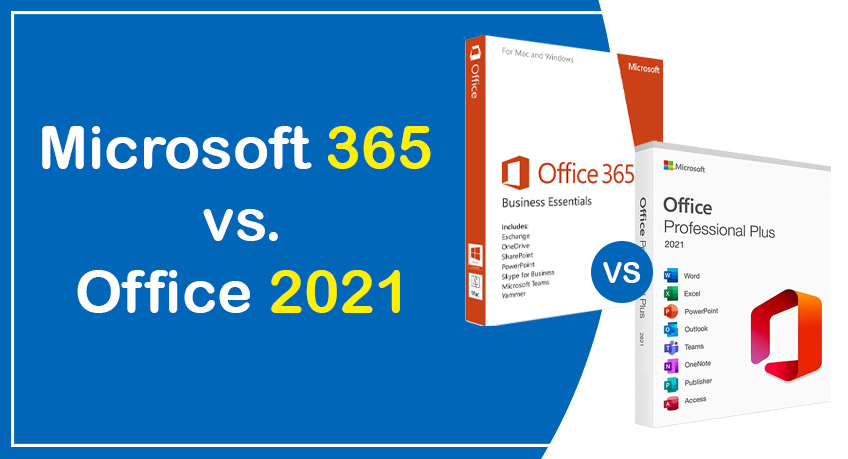
Microsoft 365 vs. Office 2021: Which One is Right for You?

Microsoft products are used for work and education by billions of people all around the world. These people may be working or learning from their homes, offices, classrooms, or a combination of all three settings.

This productivity suite is available in personal, small business, corporate, and educational editions and is utilized by people working in 106 languages throughout nearly every country.

It was in October of 2021 when Microsoft released Windows 11 and Office 2021. After 30 years, Microsoft has released the newest version of its office suite. However, Microsoft 365 is also available if you go to their website.

Some may wonder, “Why does Microsoft have two versions of the same product?” As such, we will explain the differences between Microsoft 365 and Office 2021 to clear up any confusion.

Differentiating between a One-Time Purchase and a Subscription

Microsoft 365 is a subscription service that provides access to the most recent versions of Microsoft’s modern productivity software. Individuals, families, students, teachers, and non-profits can all find a Microsoft 365 plan that suits their needs.

Word, PowerPoint, and Excel, among others, are all included in the full version of Microsoft Office, which is part of the Microsoft 365 subscriptions for personal and commercial use. More space is available on the cloud; you may share and edit files in real time with your colleagues. With a subscription, you’ll have access to perpetual tech support and the most recent upgrades, fixes, and security patches at no additional cost. Monthly or annual payments are accepted for subscriptions. You can include up to five family members or friends in your Microsoft 365 Family plan and give them access to the same subscription features you do.

In addition to the online versions of Office, file storage, and email, Microsoft offers more basic options with fully installed desktop software for businesses, schools, and non-profits. What’s most practical for you to do is up to you. In the context of a business, an enterprise, an academic institution, or a charitable organization.

Office 2021 is a one-time buy, meaning you pay once to install it on as many computers as you need. Both PCs and Macs can make one-time purchases. Unfortunately, no upgrade paths are available; therefore, if you want to move up to the next major release, you will have to pay full price.

Comparing Office 2021 Vs. Microsoft 365 Subscription

1. Cost

Microsoft 365: With Microsoft 365, you can pay a lower monthly fee or save money by paying for the entire year’s subscription.

Office 2021: One-time payment must be made in advance for the entirety of the lifecycle, according to Office 2021.

2. Applications

Microsoft 365: Install the most recent versions of Excel, Word, PowerPoint, and Outlook on your Windows or Mac computer with Microsoft 365. It also includes OneNote.

You will always get access to the latest features, tools, security upgrades, and bug patches as soon as they become available.

Office 2021: Get programs from the Office suite, such as Excel, Word, and PowerPoint, with Office 2021.

3. Feature updates

Microsoft 365: Microsoft 365 ensures that your applications will improve continuously.

Office 2021: You will obtain all of the most recent improvements and features and any necessary bug fixes and safety enhancements.

There are security patches available for Office 2021, but there are no new features to be had. Upgrades to major versions of the release are not included.

4. Install Office on multiple computers (Mac or PC).

Microsoft 365: You can use Office applications no matter where you are or what device you’re working on if you have Microsoft 365 Business Basic, Microsoft 365 Business Standard, Microsoft 365 Business Premium, or Microsoft 365 Apps for Business installed on all of your devices and are signed in to at least five of them simultaneously.

There is no additional cost for computers, Apple iPads, or mobile phones.

Office 2021: Office 2021 software can be installed on either a personal computer or a Macintosh computer.

5. Tablets and mobile phones with enhanced capabilities.

Microsoft 365: Install the free mobile applications that come with Microsoft 365, and when you sign in to Office apps on your device, you’ll get access to additional features.

Office 2021: Install the free mobile applications for Office 2021 to receive access to fundamental editing capabilities on tablets or phones with displays that are less than 10.1 inches.

6. Additional storage space available online

Microsoft 365: Microsoft 365 allows you to safely store your files in the cloud and access them from any device, regardless of location.

Get one terabyte of online storage with OneDrive and one terabyte of storage with Microsoft 365 Family for up to six people, including yourself.

Office 2021: Office 2021 does not include cloud storage or other available features.

7. There is the provision of technical help.

Microsoft 365: You can contact them at any point during their membership for help with technical issues and billing and subscription questions.

Office 2021: The initial phase of technical support is restricted entirely to the installation process.

Additional Advantages of Using Microsoft 365

You will also get access to various features and the previously mentioned applications and services. You can seamlessly insert royalty-free creative content into your Microsoft 365 documents, such as stock pictures, icons, fonts, templates, and more.

You also gain access to products driven by artificial intelligence, such as the PowerPoint Presenter Coach, Resume Assistant, Designer, and Ideas. The use of AI to assist you in automatically completing tasks is one of the ways that these value-added services simplify your life.

For instance, Microsoft Word is smart enough to recognize when you’re putting together a resume, so it can provide you with appropriate templates to use. When developing a presentation, ideas could include different layouts or pictures. And Designer will assist you in selecting the proper formatting for your Word document and ensuring that it is maintained consistently throughout all of the pages.

Is Microsoft 365 the Best Available Alternative?

After reading through all of the advantages that come with using Microsoft 365 in comparison to Office 2021, you could be forgiven for thinking that selecting the former is the obvious path to take. However, it is more complex than it sounds.

If you keep a computer for two years or longer, you do not need cloud storage, and you use the basic functions of Word, Excel, and PowerPoint, then it is in your best interest to go with Office 2021. This version is appropriate for young students or retirees who do not frequently utilize these applications and are not typically linked to the internet.

Professionals who use smartphones provided by their employers may choose the single-purchase option, mainly if they don’t use these apps outside the scope of their jobs.

On the other hand, if you have at least two users in your organization willing to share a Microsoft 365 plan for at least three years, it is more cost-effective to go with the subscription plan.

Conclusion

Office 2021 is designed to meet the requirements of customers who have volume licenses but have yet to be ready to transition to cloud applications such as Microsoft 365 and have specific requirements to use the products on-premise.

On the other hand, customers who need more preparation to commit to a subscription-based service can purchase Office 2021. Ultimately, the decision will be made based on the programs and services necessary to do the job.

Microsoft 365 is your organization’s finest option to consider if you want to continue using Office for many years. With the assistance of Webtech Nepal, you can have Microsoft 365 up and running in no time, which is the most excellent choice if you want your company to grow while fostering smooth collaboration among your employees.

The benefits of using an Inventory Management System

Streamlining business processes and improving overall efficiency are essential for business. Implementing an inventory management system can help achieve these goals by providing accurate, real-time tracking of inventory levels and enhancing forecasting and planning capabilities.

“Proper inventory management is crucial for businesses, as it helps ensure that the right level of goods is available to meet customer demand while avoiding overstocking or stock shortages. In addition, an efficient inventory management system can improve relationships with vendors and enhance loss prevention efforts. Overall, proper inventory management can lead to increased productivity and financial success for a business,” says business analyst and loan provider Mason Burt of Ask Funding.

What is an inventory management system?

An inventory management system is a software program that tracks and manages a business’s inventory, including the receipt, storage, and distribution of goods. It allows companies to track their inventory levels efficiently, analyze purchasing patterns, and accurately fulfill customer orders. This can lead to cost savings and improved overall efficiency within the business.

What are the benefits of using an inventory management system?

A good inventory control integrates physical inventory with online ordering systems, ensuring that when customers add an item to their cart, it is available in the warehouse. This decreases wait times and eliminate the company’s need to reject orders due to a lack of inventory.

1. Improved Organization And Accuracy Of Inventory Records

By using an inventory management system, businesses can easily track and update their inventory records in real time, leading to improved organization and accuracy.

2. Enhanced Ability To Forecast And Plan For Future Inventory Needs

With accurate and up-to-date inventory records, businesses can more effectively forecast and plan for future inventory needs. This can lead to cost savings by reducing overstocking or stock shortages.

3. Improved Customer Satisfaction

An efficient system for tracking and managing inventory allows businesses to fulfill customer orders quickly and accurately, resulting in improved customer satisfaction.

4. Reduced Human Error

Inventory management systems reduce the chance of human error in record keeping and order fulfillment, leading to improved efficiency and cost savings. The automation provided by an inventory management system reduces the chance of mistakes in record keeping and order fulfillment, leading to improved efficiency and cost savings.

5. Improved Supplier Relationships

An efficient inventory management system allows for improved communication and collaboration, leading to better supplier relationships.

6. Reduced Inventory Costs

By better understanding current inventory levels and future needs, businesses can more effectively manage their inventory and reduce excess costs.

7. Enhanced Ability To Track And Monitor Inventory Levels

Inventory management systems allow businesses to easily track and monitor their current inventory levels, leading to improved decision-making and cost control.

8. Improved Ability To Adapt To Changes In Demand Or Supply

Accurate and up-to-date records allow businesses to effectively forecast and plan for their future inventory needs, leading to cost savings by reducing the risk of stock-outs or overstocking. This will enable companies to adapt to demand or supply changes quickly.

9. Enhanced Loss Prevention Efforts

Inventory management systems allow businesses to quickly identify discrepancies in inventory records, leading to improved loss prevention efforts.

10. Improved Overall Efficiency And Productivity

Overall, an inventory management system improves organization, accuracy, and efficiency in managing a business’s inventory, resulting in increased productivity.

Reach The Peak Of Your Success

An inventory management system can benefit your business and lead to financial success.

Webtech Nepal is a company dedicated to helping businesses achieve business success in the virtual sphere. We provide numerous services for your business, from inventory management to customizing CMS websites, Facebook advertising, domain registration, SEO optimization, and many more.

Contact us to reach the peak of your business’ success!

How Businesses can Leverage using Laravel CMS?

The main reason developers choose Laravel is that it simplifies adding MVC templates and creating websites. As a result of its open-source nature, this framework is packed with a wide range of features, including verification, routing processes, handling sessions, caching, and much more.

Why Businesses Prefer Laravel Framework?

Wide varieties of frameworks are available to create mobile or web applications. Laravel is preferred over other frameworks because it includes a dedicated dependency manager, routing services, code separation, unit testing, modular packaging, and other valuable features. Laravel is considered one of the best CMS solutions since it only requires a text editor and PHP installation.

Thousands of experts around the world are building client-centric solutions using this framework. Many businesses have now started opting for potential development companies that assist them in building custom web apps that cater to vivid business requirements.

Companies like Pfizer, Crowdcube, TourRadar, and BBC use Laravel. Another noteworthy example is the BBC, the oldest broadcaster in the world and the largest by employee numbers.

Here are some of the stats that show how popular Laravel is:

  • There are over 761,321 websites that are currently live and using Laravel.
  • Laravel has approximately 100,173 unique domains that are used globally. Some top countries using Laravel are the United States, Brazil, Russia, China, Japan, and India.
  • Many industry verticals choose Laravel for building their websites. The top industries where Laravel is used include computers, Electronics & Technology at approximately 5.91%, science and education at approximately 2.92%, and arts & entertainment at approx. 2.60% and others.
  • In the USA alone, more than 10 lacs of Laravel-based websites exist. Of these 4,86, 424 websites are live, and 601,221 sites have previously used this technology.

With Laravel, you can create stunning web apps that make your business stand out.

How Can Companies Use Laravel Development Optimally?

Laravel development is significant for business growth for the following reasons:

1. Powerful Security That Minimizes Cyber Threat

By using Laravel, companies can run their websites smoothly with minimal or negligible risk of cyber-attacks.

eCommerce portal users place great importance on privacy and their client’s data resources. The Laravel framework offers the best level of security for both of these business aspects.

Laravel offers the best security practices for developers that help them to build robust solutions, which ultimately helps businesses achieve secure Software Solutions in which they can safely manage their confidential data without getting prey to any online threats.

Your digital assets are protected by Laravel from a variety of internet threats. In addition, the Laravel framework protects your code base from threats such as cross-site forgery requests, SQL injection, etc.

2. Streamlined Authentication

Laravel business solutions framework permits developers to create web applications that grant resource access to authorized users.

3. High-Level Performance

Online businesses, especially start-ups, rely heavily on website speed and performance. Low conversion rates may be caused by the slow loading speed of the page.

Laravel is here to help with website page speed. This architecture controls how quickly a website loads and enhances how quickly it responds.

With the Laravel framework at your side, you can put an end to the stress caused by a slow website’s loading time. The framework’s numerous extraordinary capabilities and out-of-the-box functionalities enable businesses to grow to new heights despite its small size.

The Laravel framework’s tools, Redis and Memcached, will increase the efficiency and performance of your website.

3. High Level Capabilities

The Laravel organization currently provides comprehensive solutions to its international audience. The versatility of Laravel web development is just one of its many benefits. Building engaging multilingual applications is doable and attainable for Laravel app developers.

Businesses will be able to expand their reach and enter uncharted territory thanks to this.

In addition to increasing their online presence, businesses can improve sales and revenue.

4. Multi-Level Capabilities

The Laravel organization currently provides comprehensive solutions to its international audience. The versatility of Laravel web development is just one of its many benefits. Building engaging multilingual applications is doable and attainable for Laravel app developers.

Businesses will be able to expand their reach and enter uncharted territory thanks to this.

In addition to increasing their online presence, businesses can improve sales and revenue.

5. Tool Integration Capability

Laravel web development framework facilitates the integration of different tools that proves helpful in enhancing web apps’ performance.

6. Strong Software Architecture

Laravel implements a templating engine called Blade, which is used for website development. Developers can use plain PHP code with the Blade engine, its most appealing feature. Additionally, template boilerplates are automated.

Any large project requires excellent scalability and simpler code management, and Laravel delivers both advantages by adhering to the MVC architecture conventions.

The Laravel framework comes with several utilities. These tools guarantee that your system consistently follows the intended architecture. Artisan CLI is one of the most well-known instruments.

The MVC architectural feature of Laravel enables developers to resolve all technical problems with the application efficiently.

7. Appealing and Customized Themes

Laravel offers enticing themes that are simple to customize for an exquisite look of the app according to individual requirements. You can now create high-performance web applications for your business with an appealing interface.

8. Amazing Traffic Handling

There will come a time when your web application receives more traffic. A web application must deal with more requests per second as soon as it gets more traffic. It also illustrates how users face problems like website server malfunctions and data loss due to higher web traffic.

However, with Laravel, such situations wouldn’t arise.

Every project developed with Laravel includes a message queue system that helps balance the load. It will strengthen, ensure reliability, and keep the web server healthy by improving speed and data integrity.

Ending Note

You can see that many well-known companies throughout the world have adopted and used the Laravel framework. Over the past few years, Laravel has become increasingly popular for creating unique web apps in this quickly developing technology sector. The framework has assisted organizations in expanding financially while also enhancing consumer engagement and satisfaction.

You can be confident that the outcome will always be fantastic whether you hire a Laravel development service provider or a freelance Laravel developer.

11 Reasons Why Outsourcing Web Development Services to Nepal

You can outsource your web development project to Nepal whether you want a basic website to serve as a company blog or a complex website with integrated widgets and chat boxes.

It’s not easy to outsource any part of your business, as your company’s website is the backbone of your business. You might be hesitant to outsource something as important as web development if your needs are complicated and require a lot of micromanagement.

You can relax because Nepal is arguably the best market in the world to send your web design or web development job for outsourcing. It’s not just the bottom line that will benefit from outsourcing your web and mobile development needs to Nepal. We have compiled a list of the most compelling arguments for outsourcing web application development work to Nepal.

1. Price

Businesses can save money on resources and other expenses like salary, utilities, and infrastructure when they outsource a specific task. The necessary development environments and tools are taken care of for you. For affordable service, outsource to a Nepal web development firm.

2. Quality

When creating cutting-edge software, competition is fierce among Nepal’s many software development firms. Companies are under intense pressure to consistently outperform the competition in today’s market because they can’t survive unless they continue to meet consumer demand. Checking a company’s ratings and customer feedback before hiring them can ensure top quality.

3. Modern Technologies

Again, competition is a significant factor. When you outsource your software development to Nepal, you can rest assured that your project will handle by the latest technological experts in the most cutting-edge tools and methods.

4. Custom Solutions

With the level of expertise found among Nepalese developers, you can rest assured that you will find most of the answers you seek, regardless of the obstacles. Whether it’s a product, service, or piece of market content, there are faultless options available to meet the requirements of any business.

5. Saves Rime

You can avoid finding and hiring new employees when you outsource development services. It can take several weeks or months to complete the cycle of hiring, training, and managing a development team. To free up time for running the core operations of your business, you can hire an outsourcing company in Nepal to handle the administrative tasks.

6. Communication and Quality Content

One significant benefit of outsourcing web design services to Nepal is the high English proficiency among the workforce. Expect fluent communication and content that is up-to-date, user-friendly, and written to international standards. Because of the way it looks and sounds, visitors will want to return to your site.

7. Conveniently located

Suppose you’re looking for tailor-made web solutions based on your business needs. In that case, most offshore web design and development service providers in Nepal have teams with the right blend of qualified and skilled web developers, Quality analysts, e-commerce developers, designers, project managers, and digital marketing experts.

8. Risk Management

Your in-house team may need more experience to successfully execute new projects or plans for your business. You can expect financial losses as a result. To avoid this, it’s best to bring specialists from other countries. There are many arguments in favor of taking this course of action. You can reduce the likelihood of mistakes in web development by using an outside company. Your in-house team must be aware of many cutting-edge web development tools. Web development outsourcing involves contacting people who are well-versed in the relevant technologies.

9. Exceptional Adaptability

So, you have some urgent website maintenance, but all your staff is away celebrating the holidays. You can’t cancel the Christmas holidays. Developers in Nepal are easily accessible and can continue working for you even during the holiday season. Nepal is the only country that provides such adaptability. They will work on your project even if it’s a holiday.

10. Unparalleled Assistance Anytime, Any day

If you’re wondering, you can get round-the-clock service from Nepal if you outsource your web development project there. Timestamps play a massive role in the success of online enterprises. If your website experiences even a 15-minute outage, you risk losing customers. In times of crisis, you’ll want a reliable team on the scene. The best option is to hire a web development company in Nepal. They offer round-the-clock assistance so you can fix any problems on your website whenever they arise.

11. Improved Efficiency

Turning your web development over to a company in Nepal will free you up to concentrate on other areas of expertise. Hire a web development company and let them deal with your hassle. You can stop worrying about your website and instead focus on growing your business thanks to their efforts. If you outsource your website’s maintenance to professionals in Nepal, you can devote time and energy to studying the competition and developing strategies to eliminate them.

Conclusion

With these gains in mind, working with the best web designers in Nepal can yield significant results monetarily and in terms of the value added to your company by the website.